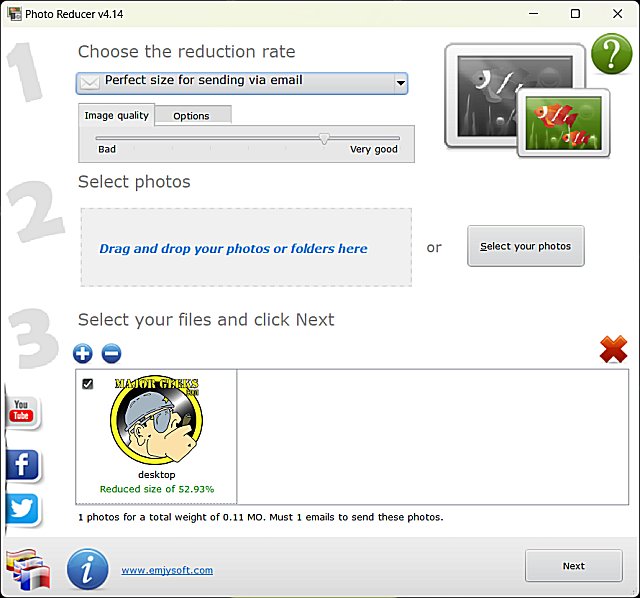
Photo Reducer 6.1 has been released as a user-friendly freeware application designed specifically for reducing the size of photos with minimal effort. The app boasts a clean and straightforward interface that allows users to easily add multiple photos or entire folders through simple drag-and-drop functionality.
Once photos are added, users can select from various options located conveniently at the top of the interface. The application offers several presets tailored for different needs, including sizes suitable for email, digital frames, HD TVs, 4K TVs, web usage, and a custom size option. Additionally, users can control the image quality via a slider that ranges from "Bad" to "Very Good," allowing for flexibility based on their requirements.
After making selections, users can proceed by clicking "Next," where they have options to email the resized file, save it as a compressed (zip) file, or copy it to a local folder. Importantly, Photo Reducer ensures that the original image is preserved while it resizes the selected photos.
In summary, Photo Reducer has a singular focus: to effectively resize images, and it excels in this task. Its ease of use and thoughtful design make it an excellent tool for anyone looking to manage photo sizes efficiently.
As an extension of this summary, it could be noted that Photo Reducer may benefit from future updates that include features such as batch processing capabilities, enhanced editing options, or integration with cloud storage services, which could further streamline the photo management process for users. Additionally, tutorials or support resources could be made available to help users maximize the app's potential
Once photos are added, users can select from various options located conveniently at the top of the interface. The application offers several presets tailored for different needs, including sizes suitable for email, digital frames, HD TVs, 4K TVs, web usage, and a custom size option. Additionally, users can control the image quality via a slider that ranges from "Bad" to "Very Good," allowing for flexibility based on their requirements.
After making selections, users can proceed by clicking "Next," where they have options to email the resized file, save it as a compressed (zip) file, or copy it to a local folder. Importantly, Photo Reducer ensures that the original image is preserved while it resizes the selected photos.
In summary, Photo Reducer has a singular focus: to effectively resize images, and it excels in this task. Its ease of use and thoughtful design make it an excellent tool for anyone looking to manage photo sizes efficiently.
As an extension of this summary, it could be noted that Photo Reducer may benefit from future updates that include features such as batch processing capabilities, enhanced editing options, or integration with cloud storage services, which could further streamline the photo management process for users. Additionally, tutorials or support resources could be made available to help users maximize the app's potential
Photo Reducer 6.1 released
Photo Reducer is a freeware, easy-to-use app designed to reduce the size of your photos as simply as possible.