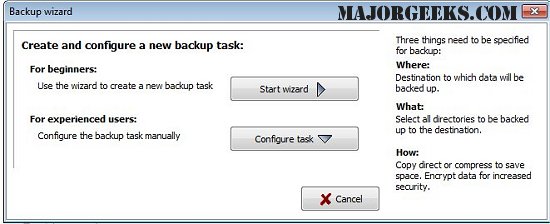
Personal Backup is a versatile software application designed to facilitate the secure storage of personal data. It allows users to save their files to any desired destination, which can include local fixed or removable drives, Windows network servers, or FTP servers. The latest version, 6.4.5.0, offers a range of features that enhance its usability and efficiency in data backup.
Key Features:
1. Flexible Backup Tasks: Users can configure an unlimited number of backup tasks tailored to their specific needs. Each task allows for the selection of files on a by-folder basis, with all subfolders included by default. Users have the option to include or exclude specific subdirectories using filters.
2. File Selection Criteria: Users can refine their backup selection based on various criteria, including file type, age, and name filters. This flexibility ensures that only the most relevant data is backed up.
3. Preservation of Directory Structure: Personal Backup maintains the original directory structure, allowing users to easily navigate their files. Original drives are represented as subdirectories (e.g., LwC, LwD) within the backup.
4. Data Compression and Encryption: The software supports gzip compression, either for the entire backup or by individual subfolders as zip files. Additionally, users can opt to encrypt their data using the AES algorithm for enhanced security.
5. User-Friendly Wizard: A user-friendly wizard simplifies the process of creating new backup tasks, making it accessible even for less experienced users.
6. Automation and On-Demand Backup: Users have the flexibility to initiate backups manually or set them to run automatically, ensuring that data is consistently backed up without user intervention.
7. FTP Backup Options: The application supports FTP backups, including options for proxy settings and FTPS (FTP over SSL), enhancing data transfer security.
8. Diverse Backup Formats: Users can choose from several backup formats, including:
- Copying files with or without compression while preserving the directory structure.
- Creating zip files that support files larger than 4GB, with options for single zip files per directory or subdirectory.
Additional Resources:
For users seeking further assistance with Windows management, Personal Backup also provides links to helpful guides on topics such as resetting or reinstalling Windows 10, managing system restore points, and adjusting system protection storage sizes.
In conclusion, Personal Backup 6.4.5.0 is an invaluable tool for anyone looking to efficiently manage their personal data backups with a focus on flexibility, security, and ease of use. The software's extensive features cater to a wide range of backup needs, making it a reliable choice for individuals and businesses alike
Key Features:
1. Flexible Backup Tasks: Users can configure an unlimited number of backup tasks tailored to their specific needs. Each task allows for the selection of files on a by-folder basis, with all subfolders included by default. Users have the option to include or exclude specific subdirectories using filters.
2. File Selection Criteria: Users can refine their backup selection based on various criteria, including file type, age, and name filters. This flexibility ensures that only the most relevant data is backed up.
3. Preservation of Directory Structure: Personal Backup maintains the original directory structure, allowing users to easily navigate their files. Original drives are represented as subdirectories (e.g., LwC, LwD) within the backup.
4. Data Compression and Encryption: The software supports gzip compression, either for the entire backup or by individual subfolders as zip files. Additionally, users can opt to encrypt their data using the AES algorithm for enhanced security.
5. User-Friendly Wizard: A user-friendly wizard simplifies the process of creating new backup tasks, making it accessible even for less experienced users.
6. Automation and On-Demand Backup: Users have the flexibility to initiate backups manually or set them to run automatically, ensuring that data is consistently backed up without user intervention.
7. FTP Backup Options: The application supports FTP backups, including options for proxy settings and FTPS (FTP over SSL), enhancing data transfer security.
8. Diverse Backup Formats: Users can choose from several backup formats, including:
- Copying files with or without compression while preserving the directory structure.
- Creating zip files that support files larger than 4GB, with options for single zip files per directory or subdirectory.
Additional Resources:
For users seeking further assistance with Windows management, Personal Backup also provides links to helpful guides on topics such as resetting or reinstalling Windows 10, managing system restore points, and adjusting system protection storage sizes.
In conclusion, Personal Backup 6.4.5.0 is an invaluable tool for anyone looking to efficiently manage their personal data backups with a focus on flexibility, security, and ease of use. The software's extensive features cater to a wide range of backup needs, making it a reliable choice for individuals and businesses alike
Personal Backup 6.4.5.0 released
Personal Backup saves personal data to any destination folder located on a local fixed or removable drive, Windows network server, or an FTP server.