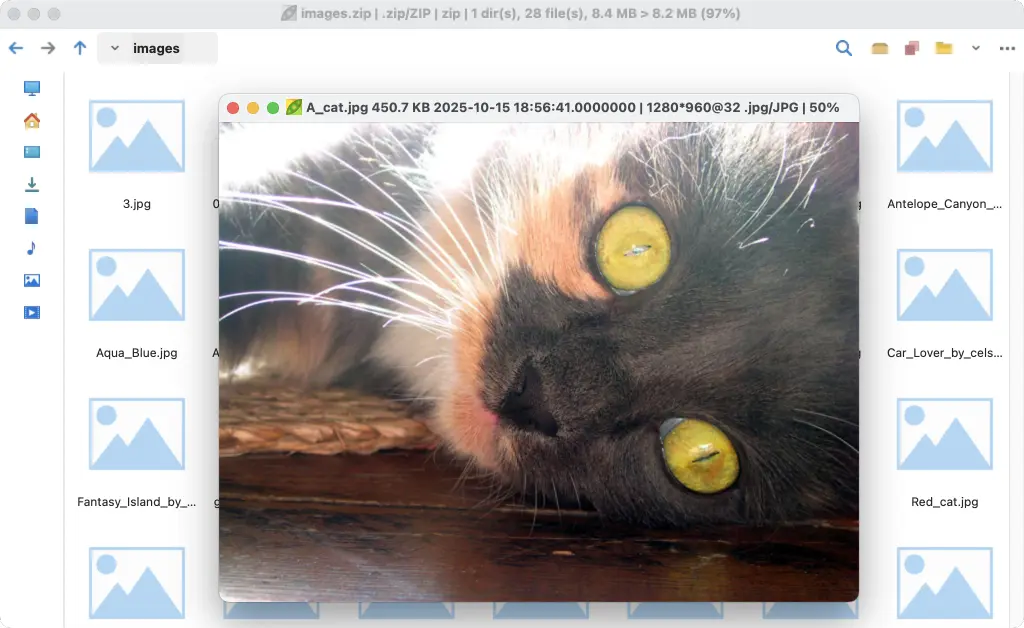
PeaZip has announced the release of version 10.8.0, introducing a range of features designed to enhance user experience when interacting with archive contents. A standout feature is the ability to preview files directly within various archive formats, including ZIP, RAR, and TAR, eliminating the need for external software to view file contents. This allows users to quickly access files like photos and logs without extraction.
In addition to file previews, PeaZip 10.8.0 introduces practical "File tools" that enhance functionality. Users can now verify file authenticity through checksums, view embedded metadata, and inspect hex data, all from within the application. These tools streamline the workflow by reducing the need to switch between different programs.
The update also focuses on performance improvements and bug fixes to ensure smoother operation across various systems. Notably, handling RAR and TAR files is now more efficient, which is particularly beneficial for frequent users of these formats. Furthermore, the underlying libraries have been upgraded, with the core Pea library updated to version 1.28, ensuring better compatibility across different operating systems.
The integrated image viewer allows users to view images directly within PeaZip, providing a seamless experience when dealing with archives containing pictures. Users can customize the viewer's appearance through various styles, enhancing the overall aesthetic.
Overall, PeaZip 10.8.0 represents a significant advancement in usability and functionality, making it easier for users to manage and access their archived files. It encourages users to explore the new features that improve interaction with archives, making the process more efficient and user-friendly.
Extension:
As PeaZip continues to evolve, future updates may further enhance its capabilities by incorporating features such as cloud integration, improved encryption options, and expanded support for additional file formats. The focus on user experience could lead to the inclusion of advanced search functionalities, allowing users to quickly locate files within large archives. Additionally, community feedback may drive the development of customizable tools that cater to specific user needs, solidifying PeaZip's position as a versatile and essential tool for file management
In addition to file previews, PeaZip 10.8.0 introduces practical "File tools" that enhance functionality. Users can now verify file authenticity through checksums, view embedded metadata, and inspect hex data, all from within the application. These tools streamline the workflow by reducing the need to switch between different programs.
The update also focuses on performance improvements and bug fixes to ensure smoother operation across various systems. Notably, handling RAR and TAR files is now more efficient, which is particularly beneficial for frequent users of these formats. Furthermore, the underlying libraries have been upgraded, with the core Pea library updated to version 1.28, ensuring better compatibility across different operating systems.
The integrated image viewer allows users to view images directly within PeaZip, providing a seamless experience when dealing with archives containing pictures. Users can customize the viewer's appearance through various styles, enhancing the overall aesthetic.
Overall, PeaZip 10.8.0 represents a significant advancement in usability and functionality, making it easier for users to manage and access their archived files. It encourages users to explore the new features that improve interaction with archives, making the process more efficient and user-friendly.
Extension:
As PeaZip continues to evolve, future updates may further enhance its capabilities by incorporating features such as cloud integration, improved encryption options, and expanded support for additional file formats. The focus on user experience could lead to the inclusion of advanced search functionalities, allowing users to quickly locate files within large archives. Additionally, community feedback may drive the development of customizable tools that cater to specific user needs, solidifying PeaZip's position as a versatile and essential tool for file management
PeaZip 10.8.0 released
The latest version of PeaZip, 10.8.0, has been released with several useful features that make interacting with archive contents easier and faster. One of the main additions is previewing files within archives without needing special software each time, available for various formats including ZIP, RAR, and TAR. The update also includes practical "File tools" functions such as checking file authenticity, viewing metadata, and inspecting hex data, all within PeaZip itself. Additionally, other improvements and bug fixes have been made to ensure PeaZip runs smoothly and reliably on different setups.