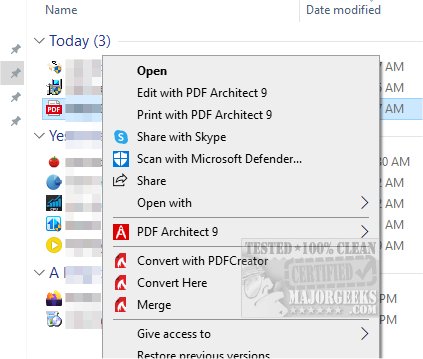
PDFCreator version 6.2.2 has been released, offering users the ability to create PDF files from virtually any application on Windows. This software is designed to be user-friendly and secure, allowing for the encryption of PDF documents to prevent unauthorized access. In addition to encryption, PDFCreator also provides the option to digitally sign PDFs, validating the author's identity and ensuring the document remains unaltered.
Users can take advantage of features such as merging multiple PDF files, automating the saving of files in specified folders and formats, and customizing the installation options to suit their needs. Notably, PDFCreator is not limited to PDF creation; it also supports the conversion of documents into various graphic formats including PNG, JPG, BMP, and more.
For those looking to enhance their PDF handling experience, PDFCreator presents a versatile tool that extends beyond basic document creation. The software's ability to integrate with multiple applications makes it a valuable addition for professionals and casual users alike, enhancing productivity and document management capabilities.
Overall, PDFCreator 6.2.2 stands out as a comprehensive solution for anyone needing to generate, modify, and secure digital documents efficiently.
For further reading, you may find resources on how to create PDFs in Windows, enable two-page view in Google Chrome for PDF documents, or prevent Microsoft Edge from opening PDFs and HTML files helpful
Users can take advantage of features such as merging multiple PDF files, automating the saving of files in specified folders and formats, and customizing the installation options to suit their needs. Notably, PDFCreator is not limited to PDF creation; it also supports the conversion of documents into various graphic formats including PNG, JPG, BMP, and more.
For those looking to enhance their PDF handling experience, PDFCreator presents a versatile tool that extends beyond basic document creation. The software's ability to integrate with multiple applications makes it a valuable addition for professionals and casual users alike, enhancing productivity and document management capabilities.
Overall, PDFCreator 6.2.2 stands out as a comprehensive solution for anyone needing to generate, modify, and secure digital documents efficiently.
For further reading, you may find resources on how to create PDFs in Windows, enable two-page view in Google Chrome for PDF documents, or prevent Microsoft Edge from opening PDFs and HTML files helpful
PDFCreator 6.2.2 released
Create PDF files from almost any Windows application and more with PDFCreator.