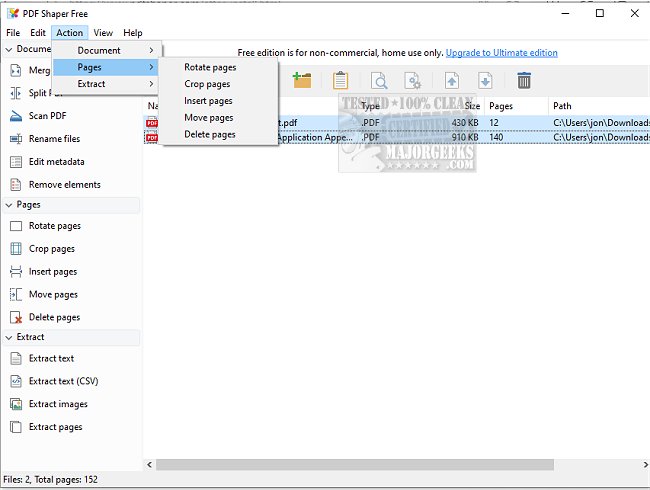
PDF Shaper 15.4 has been released, offering an intuitive and user-friendly interface that makes it easy to convert and extract PDF files. This powerful tool is known for its fast and stable processing algorithms, enabling users to handle multiple PDF documents simultaneously. With a wide range of features, PDF Shaper allows users to split large PDF files, merge several documents into one, and add watermarks for intellectual property protection. Additionally, it supports electronic signatures, which is especially beneficial for legal paperwork.
The software also includes functionalities for optimizing PDF files for quicker loading, converting PDFs to different formats like Word, Excel, and HTML, as well as encrypting and decrypting documents with password protection for enhanced security. Users can manipulate pages by inserting, moving, or deleting them, and extract text and images from PDFs.
One significant advantage of PDF Shaper is its low resource usage, ensuring that it operates efficiently without burdening system performance. The batch mode feature allows for simultaneous processing of multiple documents, saving users time and effort.
Key features of PDF Shaper include:
- Splitting and merging PDF documents and pages
- Extracting text, graphics, and pages from PDFs
- Converting images to PDF and vice versa
- Rotating, cropping, or deleting pages
- Encrypting/decrypting PDFs, signing, and setting user permissions
- Converting PDFs to RTF and TXT formats
Overall, PDF Shaper 15.4 is a comprehensive and reliable tool for effective PDF management, catering to a variety of user needs.
As an extension, users may wish to explore additional tools that complement PDF Shaper’s functionality, such as OCR (Optical Character Recognition) software for converting scanned documents into editable text, or cloud storage solutions for easy access and sharing of PDF files. Furthermore, integrating PDF Shaper with automation tools can streamline workflows, making document management even more efficient
The software also includes functionalities for optimizing PDF files for quicker loading, converting PDFs to different formats like Word, Excel, and HTML, as well as encrypting and decrypting documents with password protection for enhanced security. Users can manipulate pages by inserting, moving, or deleting them, and extract text and images from PDFs.
One significant advantage of PDF Shaper is its low resource usage, ensuring that it operates efficiently without burdening system performance. The batch mode feature allows for simultaneous processing of multiple documents, saving users time and effort.
Key features of PDF Shaper include:
- Splitting and merging PDF documents and pages
- Extracting text, graphics, and pages from PDFs
- Converting images to PDF and vice versa
- Rotating, cropping, or deleting pages
- Encrypting/decrypting PDFs, signing, and setting user permissions
- Converting PDFs to RTF and TXT formats
Overall, PDF Shaper 15.4 is a comprehensive and reliable tool for effective PDF management, catering to a variety of user needs.
As an extension, users may wish to explore additional tools that complement PDF Shaper’s functionality, such as OCR (Optical Character Recognition) software for converting scanned documents into editable text, or cloud storage solutions for easy access and sharing of PDF files. Furthermore, integrating PDF Shaper with automation tools can streamline workflows, making document management even more efficient
PDF Shaper 15.4 released
PDF Shaper is an easy-to-use PDF converter and extractor with a user-friendly interface and many useful features.