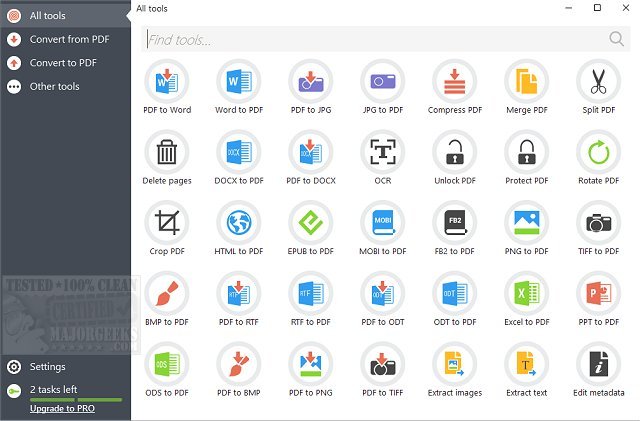
Icecream PDF Candy has released version 3.17, enhancing its reputation as a comprehensive PDF utility that caters to various needs in handling PDF files. This online toolkit offers a seamless experience for users who require quick conversions, edits, and manipulations of PDFs without the hassle of downloading large applications or creating accounts. For those who prefer offline functionality, a dedicated Windows version is available, which includes batch processing and advanced controls.
Key Features and Functionalities
1. PDF to Word Conversion: PDF Candy excels in converting PDF documents to Word format (DOCX) efficiently. Users simply upload their PDF, and within moments, they receive a well-formatted Word file. While it may struggle with intricate layouts, it significantly outperforms basic copy-pasting and less reliable free converters, making it ideal for contracts, notes, and reports.
2. PDF to Excel Conversion: The tool effectively extracts tables from PDFs and translates them into clean Excel sheets, maintaining the structural integrity of rows and columns. This feature is particularly beneficial for users needing to extract data from invoices and financial reports without tedious retyping.
3. PDF Editor: While the built-in editor allows for quick annotations, text additions, and markups, it does not enable direct editing of original text. This limitation suits users looking to make simple modifications or fill out forms without the necessity for advanced editing capabilities.
4. Additional Tools: PDF Candy includes a variety of useful functionalities such as merging PDFs, splitting documents, compressing file sizes, unlocking password-protected files, and converting images to and from PDF format. The interface is user-friendly, with clear labels and minimal distractions from ads.
Platform Support and Considerations
PDF Candy operates on any modern web browser, making it compatible with Windows, macOS, Linux, and mobile devices without requiring installation. However, users seeking unlimited conversions and offline tools can opt for the paid upgrade of the Windows desktop version, though a portable version is not available.
Pros and Cons
- Pros:
- Intuitive, clean interface
- Effective Word and Excel conversions
- No sign-up required
- Accessible via browser and free to use
- Cons:
- Limited usage on the free version
- The editor does not modify original text
- Batch processing is exclusive to the desktop version
Conclusion
In summary, PDF Candy stands out as a reliable solution for everyday PDF tasks. It combines speed, ease of use, and a comprehensive set of tools to facilitate conversions, edits, and file management. The dual availability of desktop and web options enhances its appeal, though users should be mindful of the limitations inherent in the free version. Overall, PDF Candy is a commendable choice for those seeking an effective PDF handling solution.
Future Enhancements
Looking forward, potential improvements for PDF Candy could include enhancing the editing capabilities to allow for direct text modifications, expanding the features available in the free version, and possibly introducing a portable version for users who need on-the-go access. Further, additional integrations with cloud storage services could streamline workflows for users who manage documents across multiple platforms
Key Features and Functionalities
1. PDF to Word Conversion: PDF Candy excels in converting PDF documents to Word format (DOCX) efficiently. Users simply upload their PDF, and within moments, they receive a well-formatted Word file. While it may struggle with intricate layouts, it significantly outperforms basic copy-pasting and less reliable free converters, making it ideal for contracts, notes, and reports.
2. PDF to Excel Conversion: The tool effectively extracts tables from PDFs and translates them into clean Excel sheets, maintaining the structural integrity of rows and columns. This feature is particularly beneficial for users needing to extract data from invoices and financial reports without tedious retyping.
3. PDF Editor: While the built-in editor allows for quick annotations, text additions, and markups, it does not enable direct editing of original text. This limitation suits users looking to make simple modifications or fill out forms without the necessity for advanced editing capabilities.
4. Additional Tools: PDF Candy includes a variety of useful functionalities such as merging PDFs, splitting documents, compressing file sizes, unlocking password-protected files, and converting images to and from PDF format. The interface is user-friendly, with clear labels and minimal distractions from ads.
Platform Support and Considerations
PDF Candy operates on any modern web browser, making it compatible with Windows, macOS, Linux, and mobile devices without requiring installation. However, users seeking unlimited conversions and offline tools can opt for the paid upgrade of the Windows desktop version, though a portable version is not available.
Pros and Cons
- Pros:
- Intuitive, clean interface
- Effective Word and Excel conversions
- No sign-up required
- Accessible via browser and free to use
- Cons:
- Limited usage on the free version
- The editor does not modify original text
- Batch processing is exclusive to the desktop version
Conclusion
In summary, PDF Candy stands out as a reliable solution for everyday PDF tasks. It combines speed, ease of use, and a comprehensive set of tools to facilitate conversions, edits, and file management. The dual availability of desktop and web options enhances its appeal, though users should be mindful of the limitations inherent in the free version. Overall, PDF Candy is a commendable choice for those seeking an effective PDF handling solution.
Future Enhancements
Looking forward, potential improvements for PDF Candy could include enhancing the editing capabilities to allow for direct text modifications, expanding the features available in the free version, and possibly introducing a portable version for users who need on-the-go access. Further, additional integrations with cloud storage services could streamline workflows for users who manage documents across multiple platforms
PDF Candy 3.17 released
Icecream PDF Candy is an all-in-one PDF utility containing virtually everything you need for working with PDF files.