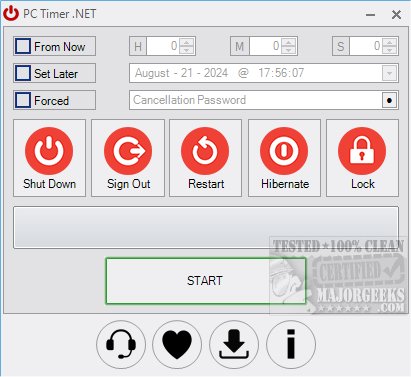
PC Timer .NET Edition 19.4 has been released, introducing a user-friendly portable tool for scheduling various PC shutdown operations. This software allows users to effortlessly set their computers to shut down, sign out, restart, or lock at specific times without needing to navigate through the command line. A noteworthy feature is the inclusion of a password option for cancellation, which helps ensure that scheduled tasks proceed as intended without interruptions.
Using PC Timer .NET Edition is straightforward. Users only need to select the desired action, specify the time, set a password if necessary, and press start to initiate the process. Its intuitive interface makes it an excellent choice for anyone looking to manage their PC's power states efficiently.
In addition to its core functionalities, PC Timer .NET Edition can be particularly useful for users who may want to automate their computer's power management for energy-saving purposes or to ensure their system is not left running unattended.
As a complementary resource, users can also explore various related articles, such as tips on restarting or shutting down Windows 10 and 11, understanding boot options like Fast Startup, and deciding between sleep, hibernate, or shutdown modes for their PCs.
Overall, PC Timer .NET Edition 19.4 enhances user control over their computer's operations, making it a valuable tool for managing scheduled tasks effectively
Using PC Timer .NET Edition is straightforward. Users only need to select the desired action, specify the time, set a password if necessary, and press start to initiate the process. Its intuitive interface makes it an excellent choice for anyone looking to manage their PC's power states efficiently.
In addition to its core functionalities, PC Timer .NET Edition can be particularly useful for users who may want to automate their computer's power management for energy-saving purposes or to ensure their system is not left running unattended.
As a complementary resource, users can also explore various related articles, such as tips on restarting or shutting down Windows 10 and 11, understanding boot options like Fast Startup, and deciding between sleep, hibernate, or shutdown modes for their PCs.
Overall, PC Timer .NET Edition 19.4 enhances user control over their computer's operations, making it a valuable tool for managing scheduled tasks effectively
PC Timer .NET Edition 19.4 released
PC Timer .NET Edition is a portable tool that allows scheduled PC shutdown operations from an efficient interface.