Paul's Auto Clicker and Macro version 1.3.0 has been released, offering a free and open-source solution for users looking to automate mouse clicks and keyboard inputs on Windows. This tool allows users to execute rapid series of clicks, reaching speeds of up to 25,000 clicks per second, making it highly suitable for engaging with old-school browser games that require extensive clicking for progression.
Beyond simple clicking, Paul's Auto Clicker & Macro includes advanced macro recording capabilities that can simulate mouse movements, significantly enhancing productivity when navigating user interfaces. For instance, users can record the steps needed to toggle features like the Night Light in Windows, which lacks a direct hotkey, and replay these actions with a simple keystroke. The program's macros can be edited in text format for fine-tuning and can be set to play back in designated windows to prevent interference with system functions.
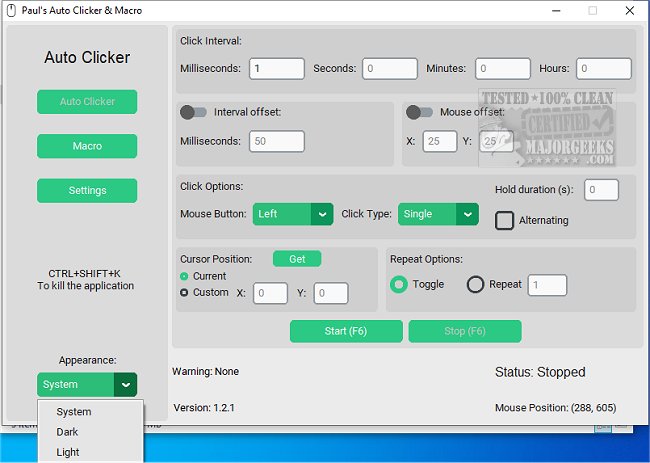
The user-friendly graphical interface (GUI) features include a kill switch, customizable click intervals, and randomized mouse position offsets, supporting left, right, and middle mouse buttons. Users can repeat actions a specific number of times or until manually stopped, record macros, and save them for later use. The program also allows for the creation of custom hotkeys and scripts, enabling tailored automation solutions for individual needs.
In summary, Paul's Auto Clicker & Macro not only enhances the automation of repetitive tasks but also empowers users to streamline their workflows effectively through its array of customizable features and user-centric design. As automation becomes increasingly integral to productivity, tools like this provide essential support in managing tasks more efficiently
Beyond simple clicking, Paul's Auto Clicker & Macro includes advanced macro recording capabilities that can simulate mouse movements, significantly enhancing productivity when navigating user interfaces. For instance, users can record the steps needed to toggle features like the Night Light in Windows, which lacks a direct hotkey, and replay these actions with a simple keystroke. The program's macros can be edited in text format for fine-tuning and can be set to play back in designated windows to prevent interference with system functions.
The user-friendly graphical interface (GUI) features include a kill switch, customizable click intervals, and randomized mouse position offsets, supporting left, right, and middle mouse buttons. Users can repeat actions a specific number of times or until manually stopped, record macros, and save them for later use. The program also allows for the creation of custom hotkeys and scripts, enabling tailored automation solutions for individual needs.
In summary, Paul's Auto Clicker & Macro not only enhances the automation of repetitive tasks but also empowers users to streamline their workflows effectively through its array of customizable features and user-centric design. As automation becomes increasingly integral to productivity, tools like this provide essential support in managing tasks more efficiently
Paul's Auto Clicker and Macro 1.3.0 released
Paul's Auto Clicker & Macro is a free and Open Source tool that offers easy-to-use auto clicker and macro capabilities for Windows.