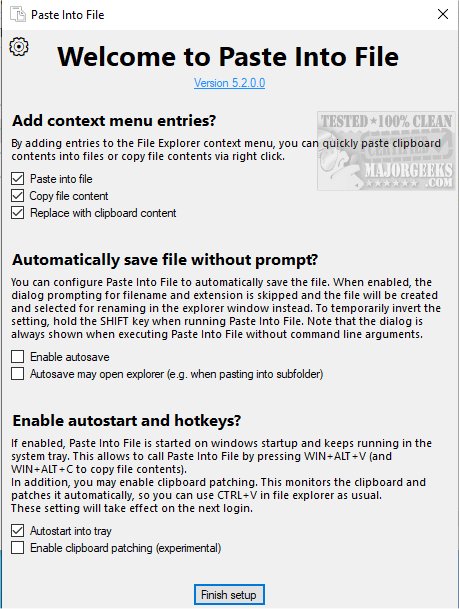
PasteIntoFile is an innovative tool designed to streamline the process of copying and pasting clipboard contents directly into files, saving users time and effort. With this software, users can easily transfer text or images from their clipboard into a file without the hassle of opening it manually. The application also allows users to quickly copy file contents to their clipboard through a convenient context menu, making it easier to transfer information across various applications.
The interface, while not ultra-modern, is user-friendly, featuring a clear display of the filename at the top, an output directory, and a large preview box to review the copied content. A standout feature is the ability to customize filenames and choose from various date and time formats, enhancing organization.
One of the key functionalities of PasteIntoFile is its Batch Mode for Monitoring Clipboard Changes. This feature automatically tracks everything copied to the clipboard—whether text or images—and saves it into files whenever a new item is added, ensuring no important data is lost. Additionally, the Clipboard Patching feature allows users to paste items into files using familiar methods such as CTRL+V or right-clicking to select Paste, streamlining the user experience.
The tool is versatile, supporting a wide range of content types and allowing users to save files in numerous formats, including Markdown, HTML, Java, PS1, JSON, CSS, PHP, and Python, among others.
Key Features of PasteIntoFile:
- Explorer context menu options for pasting into files, replacing content with clipboard data, and copying file contents.
- Hotkeys for quick actions: Win+Alt+V to paste and Win+Alt+C to copy file contents.
- Autosave mode enables users to rename files in the file explorer without requiring additional dialog prompts.
- Batch mode monitors clipboard changes and saves new entries automatically.
- Clipboard patching facilitates traditional paste options like CTRL+V (experimental).
- Support for various formats, including PNG, JPG, GIF, SVG, TXT, HTML, CSV, PDF, RTF, and more.
Conclusion and Future Enhancements
As PasteIntoFile continues to evolve, future updates could focus on improving the user interface for a more modern look, as well as enhancing the Clipboard Patching feature to make it more robust. Additionally, integrating more advanced file management options, like tagging or categorizing saved files, could further increase productivity for users handling large volumes of data. Overall, PasteIntoFile remains an essential tool for anyone looking to streamline their clipboard management and file handling processes efficiently
The interface, while not ultra-modern, is user-friendly, featuring a clear display of the filename at the top, an output directory, and a large preview box to review the copied content. A standout feature is the ability to customize filenames and choose from various date and time formats, enhancing organization.
One of the key functionalities of PasteIntoFile is its Batch Mode for Monitoring Clipboard Changes. This feature automatically tracks everything copied to the clipboard—whether text or images—and saves it into files whenever a new item is added, ensuring no important data is lost. Additionally, the Clipboard Patching feature allows users to paste items into files using familiar methods such as CTRL+V or right-clicking to select Paste, streamlining the user experience.
The tool is versatile, supporting a wide range of content types and allowing users to save files in numerous formats, including Markdown, HTML, Java, PS1, JSON, CSS, PHP, and Python, among others.
Key Features of PasteIntoFile:
- Explorer context menu options for pasting into files, replacing content with clipboard data, and copying file contents.
- Hotkeys for quick actions: Win+Alt+V to paste and Win+Alt+C to copy file contents.
- Autosave mode enables users to rename files in the file explorer without requiring additional dialog prompts.
- Batch mode monitors clipboard changes and saves new entries automatically.
- Clipboard patching facilitates traditional paste options like CTRL+V (experimental).
- Support for various formats, including PNG, JPG, GIF, SVG, TXT, HTML, CSV, PDF, RTF, and more.
Conclusion and Future Enhancements
As PasteIntoFile continues to evolve, future updates could focus on improving the user interface for a more modern look, as well as enhancing the Clipboard Patching feature to make it more robust. Additionally, integrating more advanced file management options, like tagging or categorizing saved files, could further increase productivity for users handling large volumes of data. Overall, PasteIntoFile remains an essential tool for anyone looking to streamline their clipboard management and file handling processes efficiently
PasteIntoFile 5.6 released
PasteIntoFile is a useful tool that provides you with the ability to copy and paste clipboard contents into files.