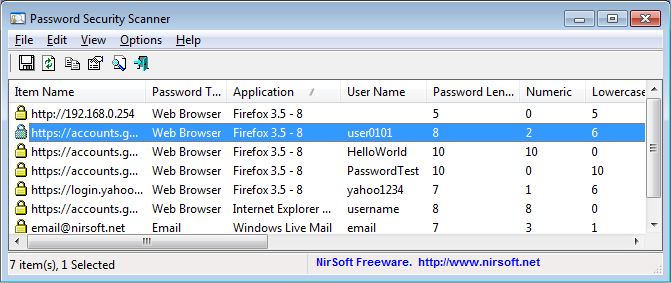
The latest version of Password Security Scanner, a freeware application, has been released. This tool is designed to analyze passwords saved by widely-used Windows applications, including Microsoft Outlook, Internet Explorer, and Mozilla Firefox. Upon scanning, it provides detailed security information about each password, such as total character count, the number of numeric characters, breakdown of lowercase and uppercase letters, instances of repeating characters, and an overall assessment of password strength.
This application empowers users to evaluate the security of passwords utilized by others without revealing the actual passwords themselves, making it an invaluable resource for those concerned about password security.
Additionally, users can explore other related topics such as securing Facebook accounts, troubleshooting incorrect username or password issues, revealing hidden passwords behind asterisks, retrieving Wi-Fi passwords, and managing passwords in Google Chrome.
Extension: Enhancing Password Security Awareness
In today's digital landscape, password security is paramount. With the rise of data breaches and cyber threats, tools like Password Security Scanner provide essential insights into password vulnerabilities. Users are encouraged to regularly assess their password strength and consider implementing multi-factor authentication for added protection.
Moreover, organizations should invest in training employees about the importance of password hygiene, including the use of unique passwords for different accounts and regular updates to existing ones. As technology evolves, so do the methods employed by cybercriminals, making it crucial for individuals and businesses to stay informed about best practices in password security.
In summary, Password Security Scanner 1.65 is a significant release that not only facilitates password analysis but also serves as a reminder of the ongoing need for robust security measures in our increasingly interconnected world
This application empowers users to evaluate the security of passwords utilized by others without revealing the actual passwords themselves, making it an invaluable resource for those concerned about password security.
Additionally, users can explore other related topics such as securing Facebook accounts, troubleshooting incorrect username or password issues, revealing hidden passwords behind asterisks, retrieving Wi-Fi passwords, and managing passwords in Google Chrome.
Extension: Enhancing Password Security Awareness
In today's digital landscape, password security is paramount. With the rise of data breaches and cyber threats, tools like Password Security Scanner provide essential insights into password vulnerabilities. Users are encouraged to regularly assess their password strength and consider implementing multi-factor authentication for added protection.
Moreover, organizations should invest in training employees about the importance of password hygiene, including the use of unique passwords for different accounts and regular updates to existing ones. As technology evolves, so do the methods employed by cybercriminals, making it crucial for individuals and businesses to stay informed about best practices in password security.
In summary, Password Security Scanner 1.65 is a significant release that not only facilitates password analysis but also serves as a reminder of the ongoing need for robust security measures in our increasingly interconnected world
Password Security Scanner 1.65 released
Password Security Scanner is a freeware app that can scan the passwords stored by popular Windows applications Microsoft Outlook, Internet Explorer, Mozilla Firefox, and displays security information about all these passwords.