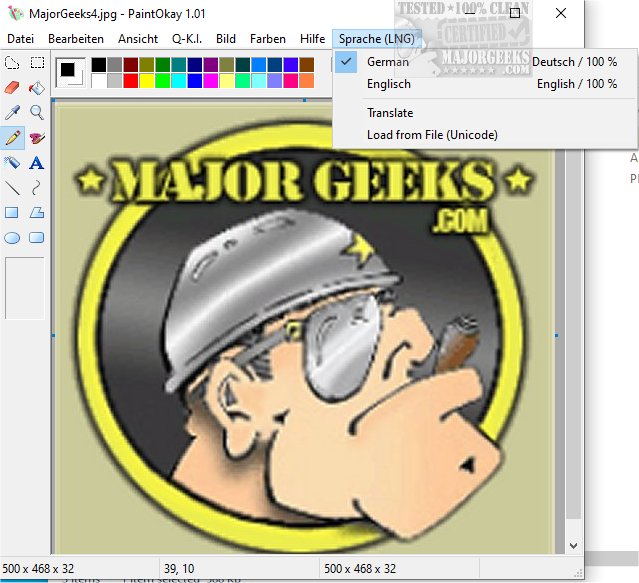
PaintOkay is a newly released image editing software that serves as a streamlined and efficient alternative to the classic MS Paint XP. It focuses primarily on pixel-editing functionality, allowing users to engage in precise image manipulation without the distractions of unnecessary features.
The Evolution of MS Paint
With the introduction of Windows 11, MS Paint has undergone significant changes, moving away from its traditional roots. The latest version presents a modern interface with rounded corners and vibrant colors, offering new functionalities like improved selection tools and advanced shape manipulation. While these features enhance the application's capabilities, they detract from MS Paint's original purpose as a straightforward pixel editor. As Microsoft incorporates more graphic design elements, users seeking a simple painting experience may find the evolving MS Paint less accessible.
Why PaintOkay Stands Out
PaintOkay aims to preserve the essence of the original MS Paint by focusing on pixel editing. It supports features that enhance user experience without complicating the interface. Key features of PaintOkay include:
- Edit Palette: Custom color options and both modern and classic palettes for diverse styles.
- Filters & Effects: A variety of options such as monochrome, grayscale, sepia, and more, along with adjustments for brightness and contrast.
- Optimized Color Modes: Compatibility with 16, 256, or 65536 colors, ensuring flexibility for different projects.
- Image Processing Tools: Including Gaussian Blur, Emboss, Sharpen, and Edge Detection, as well as red-eye reduction for photos.
- AI Integration: The Q-A.I. feature offers AI-generated mini-images inspired by famous artists like Picasso and Gogh.
- Resource Efficiency: Low resource consumption for smooth performance.
Geek Verdict: A Reliable Alternative
As Microsoft transitions MS Paint toward more complex graphic design tools, PaintOkay remains committed to its original goal—delivering a straightforward and powerful pixel editing experience. By eliminating unnecessary features, PaintOkay ensures that users can focus on their creative processes without distractions.
In summary, PaintOkay 1.06 is a worthy alternative for users who appreciate the simplicity and precision of traditional pixel editing, making it an ideal choice as support for older versions of MS Paint dwindles.
Further Reading:
- How to Restore Windows Photo Viewer
- Creating a Screen Snip Shortcut in Windows 10 & 11
- Resetting the Screenshot Index Counter with a Batch File
- Stopping ‘Your Weekend Recap’ Notifications in Windows 10/11 Photos App
As technology continues to evolve, tools like PaintOkay highlight the importance of retaining simplicity in creativity-focused applications, ensuring accessibility for all users who prefer a minimalistic approach to image editing
The Evolution of MS Paint
With the introduction of Windows 11, MS Paint has undergone significant changes, moving away from its traditional roots. The latest version presents a modern interface with rounded corners and vibrant colors, offering new functionalities like improved selection tools and advanced shape manipulation. While these features enhance the application's capabilities, they detract from MS Paint's original purpose as a straightforward pixel editor. As Microsoft incorporates more graphic design elements, users seeking a simple painting experience may find the evolving MS Paint less accessible.
Why PaintOkay Stands Out
PaintOkay aims to preserve the essence of the original MS Paint by focusing on pixel editing. It supports features that enhance user experience without complicating the interface. Key features of PaintOkay include:
- Edit Palette: Custom color options and both modern and classic palettes for diverse styles.
- Filters & Effects: A variety of options such as monochrome, grayscale, sepia, and more, along with adjustments for brightness and contrast.
- Optimized Color Modes: Compatibility with 16, 256, or 65536 colors, ensuring flexibility for different projects.
- Image Processing Tools: Including Gaussian Blur, Emboss, Sharpen, and Edge Detection, as well as red-eye reduction for photos.
- AI Integration: The Q-A.I. feature offers AI-generated mini-images inspired by famous artists like Picasso and Gogh.
- Resource Efficiency: Low resource consumption for smooth performance.
Geek Verdict: A Reliable Alternative
As Microsoft transitions MS Paint toward more complex graphic design tools, PaintOkay remains committed to its original goal—delivering a straightforward and powerful pixel editing experience. By eliminating unnecessary features, PaintOkay ensures that users can focus on their creative processes without distractions.
In summary, PaintOkay 1.06 is a worthy alternative for users who appreciate the simplicity and precision of traditional pixel editing, making it an ideal choice as support for older versions of MS Paint dwindles.
Further Reading:
- How to Restore Windows Photo Viewer
- Creating a Screen Snip Shortcut in Windows 10 & 11
- Resetting the Screenshot Index Counter with a Batch File
- Stopping ‘Your Weekend Recap’ Notifications in Windows 10/11 Photos App
As technology continues to evolve, tools like PaintOkay highlight the importance of retaining simplicity in creativity-focused applications, ensuring accessibility for all users who prefer a minimalistic approach to image editing
PaintOkay 1.06 released
PaintOkay is a streamlined and efficient alternative to the traditional MS Paint XP. It prioritizes pixel-editing functionality, allowing you to focus on precise image manipulation without the distraction of nonessential features.