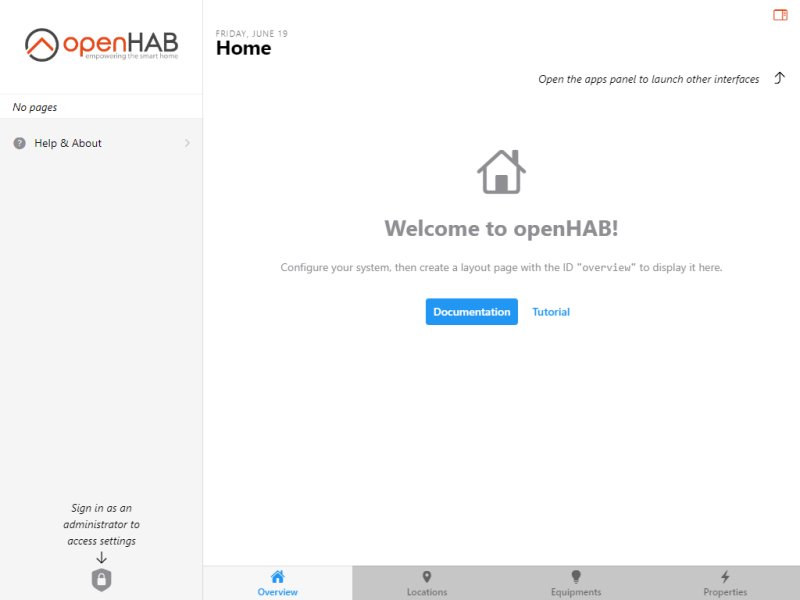
openHAB (Open Home Automation Bus) is a powerful open-source platform designed for home automation, allowing users to unify and control a multitude of smart devices and gadgets. The recent release of version 5.2.0 M2 further enhances its capabilities, making it an attractive option for both casual users and tech enthusiasts focused on automation and privacy.
What is openHAB?
As an open-source solution, openHAB enables users to connect various smart devices, granting centralized control over home automation tasks. Whether you want to automate your lighting, manage climate control, or set up a smart home security system, openHAB can handle it. Users can create complex automation scenarios, such as dimming lights at 9 PM, watering lawns at 5 AM, and brewing coffee at 7 AM, all while keeping their data private.
To get started, users need a compatible computer or server—such as a PC, laptop, or Raspberry Pi—and Java installed. A wealth of smart devices is supported, including smart plugs, bulbs (like Philips Hue), sensors (such as the Aeotec Multi-Sensor), and smart thermostats (like Nest or Ecobee). This flexibility allows users to start small and expand their systems over time.
Key Features of openHAB
One of openHAB's standout features is its local installation, which focuses on privacy by keeping user data within the home rather than relying on cloud services. While it does allow for integration with cloud apps, the core functionality remains offline, enhancing user security. The platform is cross-compatible, running on Windows, macOS, Linux, and lightweight devices like Raspberry Pi.
openHAB boasts over 300 bindings, or plugins, that facilitate integration with various devices and services. These bindings act as bridges, enabling seamless communication between openHAB and different smart devices. Popular brands supported include Philips, Bose, LG, Samsung, and Tesla, while protocols like Zigbee, Z-Wave, MQTT, and HomeKit ensure extensive compatibility.
Setting Up openHAB
Installation varies by operating system. For Windows users, after ensuring Java is installed, the program can be downloaded and run using a simple batch file. macOS users follow a similar process with a shell script. Linux and Raspberry Pi users are encouraged to consult the official documentation for guidance.
Once installed, users can navigate to the openHAB dashboard to add devices by selecting the appropriate bindings, which allows for the discovery and integration of compatible devices on their network.
The Geek Verdict
openHAB is a robust choice for smart home enthusiasts prioritizing privacy and flexibility. With its extensive support for over 300 bindings, users have the power to create a highly customized home automation system. While it offers a wealth of features for free, new users may face a steeper learning curve than typical plug-and-play systems. A basic understanding of Java and technical know-how can significantly enhance the user experience, making openHAB an excellent option for those who enjoy tinkering with technology.
Looking Ahead
As openHAB continues to evolve, users can anticipate even more robust features and enhanced compatibility with emerging smart home technologies. The community-driven nature of the platform ensures ongoing support and development, making it a viable long-term solution for smart home automation. Whether you're beginning your smart home journey or looking to expand an existing setup, openHAB offers a promising roadmap for building a connected, privacy-focused living space
What is openHAB?
As an open-source solution, openHAB enables users to connect various smart devices, granting centralized control over home automation tasks. Whether you want to automate your lighting, manage climate control, or set up a smart home security system, openHAB can handle it. Users can create complex automation scenarios, such as dimming lights at 9 PM, watering lawns at 5 AM, and brewing coffee at 7 AM, all while keeping their data private.
To get started, users need a compatible computer or server—such as a PC, laptop, or Raspberry Pi—and Java installed. A wealth of smart devices is supported, including smart plugs, bulbs (like Philips Hue), sensors (such as the Aeotec Multi-Sensor), and smart thermostats (like Nest or Ecobee). This flexibility allows users to start small and expand their systems over time.
Key Features of openHAB
One of openHAB's standout features is its local installation, which focuses on privacy by keeping user data within the home rather than relying on cloud services. While it does allow for integration with cloud apps, the core functionality remains offline, enhancing user security. The platform is cross-compatible, running on Windows, macOS, Linux, and lightweight devices like Raspberry Pi.
openHAB boasts over 300 bindings, or plugins, that facilitate integration with various devices and services. These bindings act as bridges, enabling seamless communication between openHAB and different smart devices. Popular brands supported include Philips, Bose, LG, Samsung, and Tesla, while protocols like Zigbee, Z-Wave, MQTT, and HomeKit ensure extensive compatibility.
Setting Up openHAB
Installation varies by operating system. For Windows users, after ensuring Java is installed, the program can be downloaded and run using a simple batch file. macOS users follow a similar process with a shell script. Linux and Raspberry Pi users are encouraged to consult the official documentation for guidance.
Once installed, users can navigate to the openHAB dashboard to add devices by selecting the appropriate bindings, which allows for the discovery and integration of compatible devices on their network.
The Geek Verdict
openHAB is a robust choice for smart home enthusiasts prioritizing privacy and flexibility. With its extensive support for over 300 bindings, users have the power to create a highly customized home automation system. While it offers a wealth of features for free, new users may face a steeper learning curve than typical plug-and-play systems. A basic understanding of Java and technical know-how can significantly enhance the user experience, making openHAB an excellent option for those who enjoy tinkering with technology.
Looking Ahead
As openHAB continues to evolve, users can anticipate even more robust features and enhanced compatibility with emerging smart home technologies. The community-driven nature of the platform ensures ongoing support and development, making it a viable long-term solution for smart home automation. Whether you're beginning your smart home journey or looking to expand an existing setup, openHAB offers a promising roadmap for building a connected, privacy-focused living space
openHAB 5.2.0 M2 released
openHAB is an Open-Source home automation platform that lets you unify and control various smart devices and gadgets.