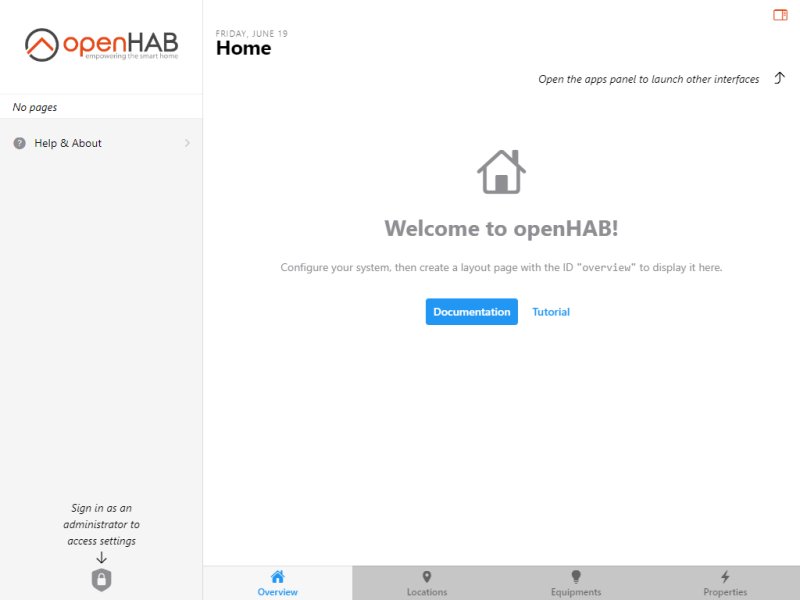
openHAB, which stands for Open Home Automation Bus, is a powerful open-source platform designed for home automation. It allows users to unify and control a variety of smart devices in a seamless manner, making it suitable for both casual users and tech enthusiasts who value privacy and customization. With openHAB, you can automate tasks such as dimming lights, watering the lawn, brewing coffee, and warming up your car—all tailored to your preferences.
To get started with openHAB, you'll need a compatible computer or server (like a PC, laptop, or Raspberry Pi) and have Java installed. The platform supports a multitude of smart devices, including smart plugs, Zigbee or Z-Wave devices, smart bulbs like Philips Hue, motion sensors, and smart thermostats, among others. The flexibility of openHAB allows users to start small and gradually expand their home automation system.
One of the key advantages of openHAB is its local installation and privacy-centric approach. Unlike many cloud-dependent smart home systems, openHAB retains all data locally, ensuring that your information remains private. The platform is cross-compatible, working on Windows, macOS, Linux, and Raspberry Pi, and offers more than 300 bindings to integrate various devices and services. This extensive support enables users to create a highly customized smart home experience that fits their unique needs.
Setting Up openHAB
The installation process for openHAB varies by operating system. Windows users can download the program, unzip it, and run start.bat, while macOS users will use start.sh. Linux and Raspberry Pi users are encouraged to consult the specific documentation available online. After installation, users can add devices by navigating to Settings > Add-ons > Bindings in the openHAB dashboard, searching for their device's protocol, and following the prompts to integrate it into the system.
Plugins and Bindings
openHAB's functionality is greatly enhanced by its plugins, known as bindings. These modular add-ons facilitate the integration of various devices and services, allowing openHAB to control and automate them seamlessly. For instance, a binding for Philips Hue can control Hue lights through their designated bridge. By installing the appropriate bindings, users can discover, monitor, and manage a diverse array of smart devices.
The Geek Verdict
openHAB stands out as a robust solution for smart home enthusiasts who prioritize privacy, flexibility, and control. Its extensive support for over 300 bindings enables the integration of numerous devices and protocols into a unified system, offering a highly customizable home automation experience. While it is free and community-driven—with active forums and comprehensive documentation—openHAB does come with a steeper learning curve compared to many standard applications. A basic understanding of Java and technical know-how is beneficial to fully leverage its capabilities. Yet, for those who enjoy tinkering and building their smart home environment, openHAB provides endless possibilities for scalability and innovation.
Looking Ahead
As openHAB continues to evolve, users can anticipate further enhancements in functionality and user experience. The community-driven nature of the platform ensures that it remains aligned with the latest developments in smart home technology, continually expanding its compatibility with emerging devices and protocols. Whether you are just starting your smart home journey or looking to optimize an existing setup, openHAB remains a compelling choice for anyone interested in home automation
To get started with openHAB, you'll need a compatible computer or server (like a PC, laptop, or Raspberry Pi) and have Java installed. The platform supports a multitude of smart devices, including smart plugs, Zigbee or Z-Wave devices, smart bulbs like Philips Hue, motion sensors, and smart thermostats, among others. The flexibility of openHAB allows users to start small and gradually expand their home automation system.
One of the key advantages of openHAB is its local installation and privacy-centric approach. Unlike many cloud-dependent smart home systems, openHAB retains all data locally, ensuring that your information remains private. The platform is cross-compatible, working on Windows, macOS, Linux, and Raspberry Pi, and offers more than 300 bindings to integrate various devices and services. This extensive support enables users to create a highly customized smart home experience that fits their unique needs.
Setting Up openHAB
The installation process for openHAB varies by operating system. Windows users can download the program, unzip it, and run start.bat, while macOS users will use start.sh. Linux and Raspberry Pi users are encouraged to consult the specific documentation available online. After installation, users can add devices by navigating to Settings > Add-ons > Bindings in the openHAB dashboard, searching for their device's protocol, and following the prompts to integrate it into the system.
Plugins and Bindings
openHAB's functionality is greatly enhanced by its plugins, known as bindings. These modular add-ons facilitate the integration of various devices and services, allowing openHAB to control and automate them seamlessly. For instance, a binding for Philips Hue can control Hue lights through their designated bridge. By installing the appropriate bindings, users can discover, monitor, and manage a diverse array of smart devices.
The Geek Verdict
openHAB stands out as a robust solution for smart home enthusiasts who prioritize privacy, flexibility, and control. Its extensive support for over 300 bindings enables the integration of numerous devices and protocols into a unified system, offering a highly customizable home automation experience. While it is free and community-driven—with active forums and comprehensive documentation—openHAB does come with a steeper learning curve compared to many standard applications. A basic understanding of Java and technical know-how is beneficial to fully leverage its capabilities. Yet, for those who enjoy tinkering and building their smart home environment, openHAB provides endless possibilities for scalability and innovation.
Looking Ahead
As openHAB continues to evolve, users can anticipate further enhancements in functionality and user experience. The community-driven nature of the platform ensures that it remains aligned with the latest developments in smart home technology, continually expanding its compatibility with emerging devices and protocols. Whether you are just starting your smart home journey or looking to optimize an existing setup, openHAB remains a compelling choice for anyone interested in home automation
openHAB 5.1.0 M4 released
openHAB is an Open-Source home automation platform that lets you unify and control various smart devices and gadgets.