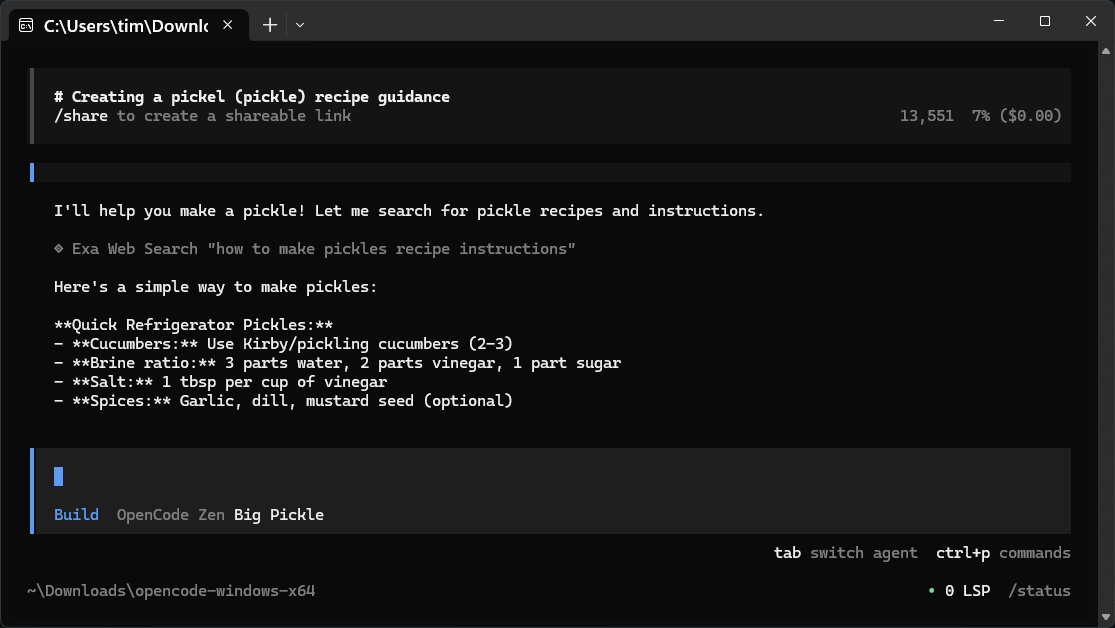
OpenCode is a free and open-source AI coding assistant designed to run directly on your computer. Its primary functions include assisting with code writing, debugging, and providing insights into project files, making it an invaluable tool for developers. OpenCode operates like a command-line companion, interpreting natural language queries into technical actions, compatible with a variety of programming languages.
1. Local Operation: OpenCode runs entirely on your system, ensuring that your data remains private and secure—no need for cloud accounts or extensive setups.
2. Efficient Design: With a lightweight interface and no graphical user interface (GUI), OpenCode is optimized for speed and performance, appealing to those who prefer terminal or script-based environments.
3. Versatile Usage: Beyond coding, OpenCode can assist with a range of inquiries, from technical concepts to everyday questions, making it a multifunctional tool for both developers and casual users.
4. Customizable AI Models: Users can choose from over 75 different language models (LLMs), such as OpenAI and Anthropic, integrating them easily through a simple configuration process.
5. No Fluff: The program's minimalistic design means it lacks a built-in knowledge base, relying instead on its connection to an online repository for updates and answers.
To use OpenCode, users need to download and extract the application, then run the executable file to get started without complex installations. The interaction process is straightforward: users type a query, which is sent to the selected LLM, and the response is displayed in their terminal or editor.
- API Key Management: Users are advised to treat their API keys securely, as they are essential for accessing various LLMs.
- Provider Flexibility: Users can set up multiple LLM providers, switching between them based on task requirements—ideal for balancing cost and performance.
- Session Management: OpenCode does not automatically save sessions, so users should export their work if they wish to keep a record.
- Copying Content: The program offers a built-in export function to facilitate quick content transfer, which can be more reliable than standard copy-paste methods.
OpenCode's compatibility with local models via platforms like LM Studio and Ollama allows users to maintain complete control over their computing resources, whether they prefer cloud-based or GPU-run models.
In summary, OpenCode 1.2.15 is a robust coding assistant that prioritizes user privacy and operational efficiency. It offers flexibility and a no-nonsense approach to coding assistance, appealing to developers who are comfortable with command-line tools. While some might prefer a more polished interface, the benefits of speed, control, and simplicity make OpenCode a strong contender for anyone looking to enhance their coding workflow.
For further assistance or troubleshooting, users can visit the MajorGeeks forums, where community support is readily available
Key Features of OpenCode
1. Local Operation: OpenCode runs entirely on your system, ensuring that your data remains private and secure—no need for cloud accounts or extensive setups.
2. Efficient Design: With a lightweight interface and no graphical user interface (GUI), OpenCode is optimized for speed and performance, appealing to those who prefer terminal or script-based environments.
3. Versatile Usage: Beyond coding, OpenCode can assist with a range of inquiries, from technical concepts to everyday questions, making it a multifunctional tool for both developers and casual users.
4. Customizable AI Models: Users can choose from over 75 different language models (LLMs), such as OpenAI and Anthropic, integrating them easily through a simple configuration process.
5. No Fluff: The program's minimalistic design means it lacks a built-in knowledge base, relying instead on its connection to an online repository for updates and answers.
Getting Started with OpenCode
To use OpenCode, users need to download and extract the application, then run the executable file to get started without complex installations. The interaction process is straightforward: users type a query, which is sent to the selected LLM, and the response is displayed in their terminal or editor.
Using OpenCode Effectively
- API Key Management: Users are advised to treat their API keys securely, as they are essential for accessing various LLMs.
- Provider Flexibility: Users can set up multiple LLM providers, switching between them based on task requirements—ideal for balancing cost and performance.
- Session Management: OpenCode does not automatically save sessions, so users should export their work if they wish to keep a record.
- Copying Content: The program offers a built-in export function to facilitate quick content transfer, which can be more reliable than standard copy-paste methods.
Local Model Integration
OpenCode's compatibility with local models via platforms like LM Studio and Ollama allows users to maintain complete control over their computing resources, whether they prefer cloud-based or GPU-run models.
Conclusion
In summary, OpenCode 1.2.15 is a robust coding assistant that prioritizes user privacy and operational efficiency. It offers flexibility and a no-nonsense approach to coding assistance, appealing to developers who are comfortable with command-line tools. While some might prefer a more polished interface, the benefits of speed, control, and simplicity make OpenCode a strong contender for anyone looking to enhance their coding workflow.
For further assistance or troubleshooting, users can visit the MajorGeeks forums, where community support is readily available
OpenCode 1.2.15 released
OpenCode is a free, Open Source AI assistant that runs on your computer and helps you write code, fix bugs, and understand what your files are doing.