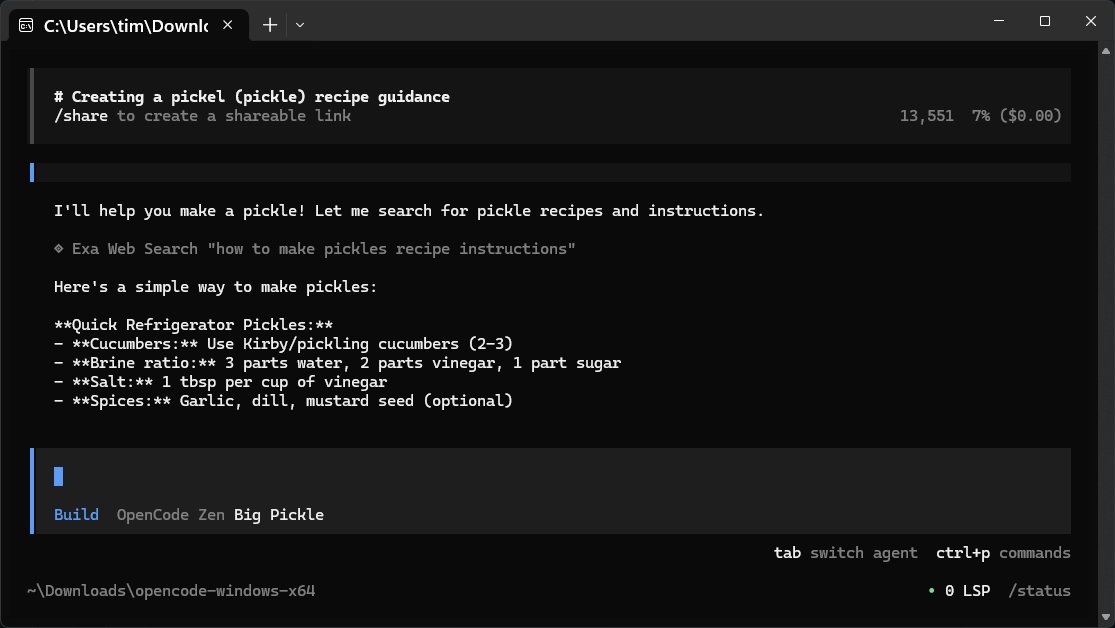
OpenCode is a free, open-source AI assistant designed to streamline coding tasks on your local computer. It assists users in writing code, debugging, and understanding file functions, functioning like a command-line companion that interprets natural language commands into technical actions. Compatible with a wide array of programming languages, OpenCode prioritizes user privacy by operating locally, meaning it does not require cloud interaction or data sharing, making it suitable for work projects.
Key Features of OpenCode:
- User-Friendly Interface: Designed for efficiency, OpenCode has a minimalistic interface without a graphical user interface (GUI), catering to users accustomed to terminal environments.
- Versatility: It supports various programming languages and can integrate with different IDEs, making it adaptable to diverse coding environments.
- Local Operation: By running on local files and utilizing user-provided API keys, OpenCode ensures that your data remains secure and private.
- Flexible AI Integration: Users can connect OpenCode to over 75 different language models (LLMs), including popular providers like OpenAI, Anthropic, and Gemini, allowing for tailored responses based on individual project needs.
Functionality and Usage:
OpenCode does not come with a built-in large language model (LLM); instead, it serves as a conduit to select models through an online repository. This allows users to benefit from continuous updates without managing model versions manually, although an internet connection is necessary for its operation. Users can easily switch between different models for varied tasks, optimizing their coding experience.
Tips for Effective Use:
1. Protect Your API Keys: Treat API credentials with the same care as sensitive financial information.
2. Switch Providers as Needed: Leverage multiple LLMs for different tasks, balancing cost and performance.
3. Session Management: OpenCode does not save sessions automatically; users should export important sessions to text files for future reference.
4. Utilize Export Functions: For seamless content transfer, use the built-in export function instead of standard copy-paste.
Compatibility with Local Models:
OpenCode can integrate with local models via LM Studio or Ollama, allowing users to retain data locally while still accessing powerful AI capabilities.
Conclusion:
OpenCode is an efficient and private coding assistant that emphasizes user control and adaptability. While it may lack certain GUI features and requires an internet connection for its operations, it excels in providing a straightforward, fast, and customizable coding experience. For those comfortable with command-line interfaces, OpenCode represents a compelling choice for a coding assistant. Users seeking assistance can engage with the community on platforms like MajorGeeks for support and troubleshooting.
Future Extensions:
As OpenCode continues to evolve, potential enhancements could include a more intuitive GUI for users who prefer visual interfaces, improved offline functionality for local model use, and expanded integrations with additional programming tools and environments. Additionally, enhancing the user experience through better documentation and community-driven support could further solidify OpenCode's position in the coding assistant landscape
Key Features of OpenCode:
- User-Friendly Interface: Designed for efficiency, OpenCode has a minimalistic interface without a graphical user interface (GUI), catering to users accustomed to terminal environments.
- Versatility: It supports various programming languages and can integrate with different IDEs, making it adaptable to diverse coding environments.
- Local Operation: By running on local files and utilizing user-provided API keys, OpenCode ensures that your data remains secure and private.
- Flexible AI Integration: Users can connect OpenCode to over 75 different language models (LLMs), including popular providers like OpenAI, Anthropic, and Gemini, allowing for tailored responses based on individual project needs.
Functionality and Usage:
OpenCode does not come with a built-in large language model (LLM); instead, it serves as a conduit to select models through an online repository. This allows users to benefit from continuous updates without managing model versions manually, although an internet connection is necessary for its operation. Users can easily switch between different models for varied tasks, optimizing their coding experience.
Tips for Effective Use:
1. Protect Your API Keys: Treat API credentials with the same care as sensitive financial information.
2. Switch Providers as Needed: Leverage multiple LLMs for different tasks, balancing cost and performance.
3. Session Management: OpenCode does not save sessions automatically; users should export important sessions to text files for future reference.
4. Utilize Export Functions: For seamless content transfer, use the built-in export function instead of standard copy-paste.
Compatibility with Local Models:
OpenCode can integrate with local models via LM Studio or Ollama, allowing users to retain data locally while still accessing powerful AI capabilities.
Conclusion:
OpenCode is an efficient and private coding assistant that emphasizes user control and adaptability. While it may lack certain GUI features and requires an internet connection for its operations, it excels in providing a straightforward, fast, and customizable coding experience. For those comfortable with command-line interfaces, OpenCode represents a compelling choice for a coding assistant. Users seeking assistance can engage with the community on platforms like MajorGeeks for support and troubleshooting.
Future Extensions:
As OpenCode continues to evolve, potential enhancements could include a more intuitive GUI for users who prefer visual interfaces, improved offline functionality for local model use, and expanded integrations with additional programming tools and environments. Additionally, enhancing the user experience through better documentation and community-driven support could further solidify OpenCode's position in the coding assistant landscape
OpenCode 1.0.210 released
OpenCode is a free, Open Source AI assistant that runs on your computer and helps you write code, fix bugs, and understand what your files are doing.