The Oobabooga Text Generation Web UI 4.2 has been released, providing users with a locally hosted, customizable interface for interacting with large language models (LLMs). This tool is perfect for those who prefer to experiment with AI without sending their data to the cloud, making it a suitable option for developers, researchers, and hobbyists alike.
The interface is built using Gradio, a Python library that simplifies the creation of web-based user interfaces for machine learning models. With Oobabooga, users have full control over prompts, model selection, and output. The platform supports various backends, such as Hugging Face Transformers, llama.cpp, ExLlamaV2, and NVIDIA’s TensorRT-LLM, allowing for seamless switching between models and functionalities like fine-tuning with LoRA, multi-modal tasks, and more.
Users can run LLMs locally without requiring an internet connection or an OpenAI API, making the tool accessible for testing and development. The built-in extension support enhances its capabilities and provides a clean, responsive interface for engaging with models.
- Fully local, private AI environment
- Compatibility with multiple models and extensions
- Flexibility to swap models effortlessly
- Ideal for development and experimentation
Cons:
- Resource-intensive depending on the model
- Requires a learning curve for initial setup
- Some extensions necessitate additional installations
The interface is built using Gradio, a Python library that simplifies the creation of web-based user interfaces for machine learning models. With Oobabooga, users have full control over prompts, model selection, and output. The platform supports various backends, such as Hugging Face Transformers, llama.cpp, ExLlamaV2, and NVIDIA’s TensorRT-LLM, allowing for seamless switching between models and functionalities like fine-tuning with LoRA, multi-modal tasks, and more.
Users can run LLMs locally without requiring an internet connection or an OpenAI API, making the tool accessible for testing and development. The built-in extension support enhances its capabilities and provides a clean, responsive interface for engaging with models.
Installation and Usage
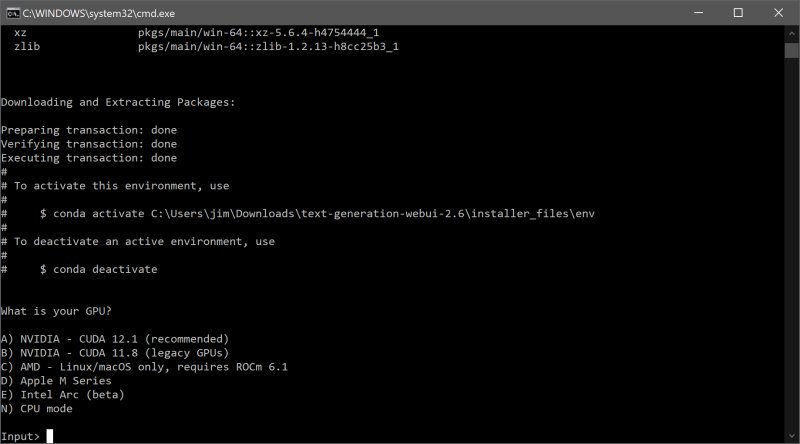
Installing Oobabooga requires basic familiarity with Python and DMS. Users need to download the zip file, extract it, and run the appropriate script for their operating system. Once set up, users can load various models from sources like Hugging Face, either manually or using a built-in download script.AI Model Recommendations
For users looking to explore, recommended models include Mistral 7B for those with ample resources and Tiny Llama for those with less powerful setups.Pros and Cons
Pros:- Fully local, private AI environment
- Compatibility with multiple models and extensions
- Flexibility to swap models effortlessly
- Ideal for development and experimentation
Cons:
- Resource-intensive depending on the model
- Requires a learning curve for initial setup
- Some extensions necessitate additional installations
Conclusion
The Oobabooga Text Generation Web UI is an excellent tool for AI enthusiasts, providing a robust environment for running and customizing large language models without reliance on cloud services. It serves as a personal AI laboratory, ideal for anyone interested in exploring the capabilities of LLMs. If you have the necessary disk space and computational power, this tool is certainly worth downloading.Future Directions
As the field of AI continues to evolve, future versions of Oobabooga may include enhancements such as improved user interfaces, additional model integrations, and advanced features for better user experience. The ongoing support for community-driven extensions may further increase its versatility, making it an even more indispensable resource for AI experimentation and developmentOobabooga Text Generation Web UI 4.2 released
Oobabooga Text Generation Web UI is a locally hosted, customizable interface designed for working with large language models (LLMs).