The recently released Oobabooga Text Generation Web UI 4.0 is a locally hosted, customizable interface that allows users to work with large language models (LLMs) without the need to send data to the cloud, providing a personal AI playground. Built using Gradio, this web-based environment offers a user-friendly chat and text generation experience, giving users complete control over prompts, model selection, and output. This tool is particularly advantageous for developers, researchers, and hobbyists who want to experiment with LLMs while ensuring their data remains private.
The interface supports various backends, including Hugging Face Transformers, llama.cpp, ExLlamaV2, and NVIDIA’s TensorRT-LLM via Docker. Users can load models, fine-tune them with LoRA, switch between chat modes, and utilize OpenAI-compatible APIs all in one platform. The built-in extension support enhances functionality, enabling features like multimodal capabilities and streaming. Everything operates directly in the browser, providing a clean and responsive way to engage with AI models.
Key features of Oobabooga Text Generation Web UI include:
- Local operation of LLMs without internet or OpenAI API requirements.
- The ability to switch models seamlessly without restarting.
- Fine-tuning capabilities for custom models.
- Support for multiple extensions for added functionalities like streaming and multi-modal tasks.
- The option to save chat histories and modify advanced generation settings.
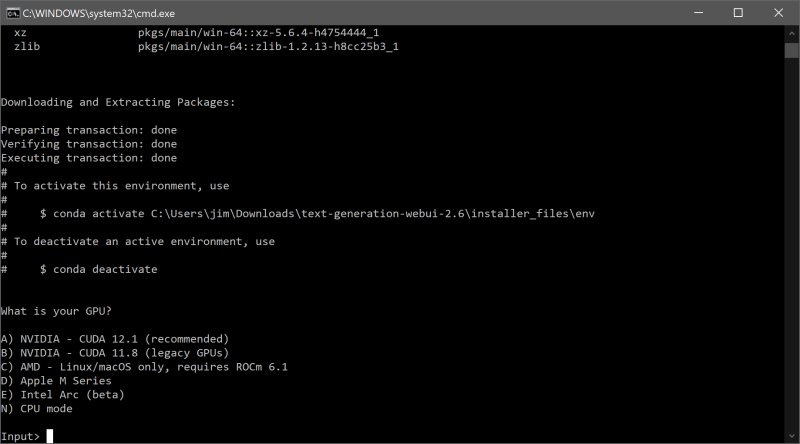
To install and run the Oobabooga Text Generation Web UI, users need to ensure sufficient disk space (about 2GB after installation). The setup process involves downloading the zip file, unzipping it, and executing the appropriate file for the operating system. Users then select their GPU vendor to optimize performance. Once set up, models can be easily downloaded from sources like Hugging Face and integrated into the UI.
While Oobabooga offers numerous benefits, it does have some downsides, such as being resource-intensive depending on the model and a potentially steep learning curve for manual setup. However, it stands out as an excellent tool for those looking to explore the potential of LLMs locally and privately.
This innovative interface is ideal for anyone involved in AI, whether for building chatbots, writing content, or simply experimenting with language generation. With its extensive customization options and local operation, Oobabooga Text Generation Web UI has the potential to become a go-to platform for AI enthusiasts and developers alike. As AI technologies continue to evolve, tools like Oobabooga will play a crucial role in democratizing access to powerful models and fostering creativity in AI applications
The interface supports various backends, including Hugging Face Transformers, llama.cpp, ExLlamaV2, and NVIDIA’s TensorRT-LLM via Docker. Users can load models, fine-tune them with LoRA, switch between chat modes, and utilize OpenAI-compatible APIs all in one platform. The built-in extension support enhances functionality, enabling features like multimodal capabilities and streaming. Everything operates directly in the browser, providing a clean and responsive way to engage with AI models.
Key features of Oobabooga Text Generation Web UI include:
- Local operation of LLMs without internet or OpenAI API requirements.
- The ability to switch models seamlessly without restarting.
- Fine-tuning capabilities for custom models.
- Support for multiple extensions for added functionalities like streaming and multi-modal tasks.
- The option to save chat histories and modify advanced generation settings.
To install and run the Oobabooga Text Generation Web UI, users need to ensure sufficient disk space (about 2GB after installation). The setup process involves downloading the zip file, unzipping it, and executing the appropriate file for the operating system. Users then select their GPU vendor to optimize performance. Once set up, models can be easily downloaded from sources like Hugging Face and integrated into the UI.
While Oobabooga offers numerous benefits, it does have some downsides, such as being resource-intensive depending on the model and a potentially steep learning curve for manual setup. However, it stands out as an excellent tool for those looking to explore the potential of LLMs locally and privately.
This innovative interface is ideal for anyone involved in AI, whether for building chatbots, writing content, or simply experimenting with language generation. With its extensive customization options and local operation, Oobabooga Text Generation Web UI has the potential to become a go-to platform for AI enthusiasts and developers alike. As AI technologies continue to evolve, tools like Oobabooga will play a crucial role in democratizing access to powerful models and fostering creativity in AI applications
Oobabooga Text Generation Web UI 4.0 released
Oobabooga Text Generation Web UI is a locally hosted, customizable interface designed for working with large language models (LLMs).