The Oobabooga Text Generation Web UI version 3.21 has been released, providing a locally hosted, customizable interface for working with large language models (LLMs). This tool allows users to create their own ChatGPT-like systems without the need to send data to the cloud, ensuring privacy and control over their AI experiments. Built using Gradio, a Python library for developing web-based machine learning interfaces, it offers a user-friendly environment for text generation and AI model interaction.
Key features of Oobabooga Text Generation Web UI include support for multiple backends such as Hugging Face Transformers and NVIDIA's TensorRT-LLM, the ability to fine-tune models with LoRA, and access to OpenAI-compatible APIs. Users can load models, switch between chat modes, and utilize built-in extensions for enhanced functionalities like multimodal tasks and streaming—all from within their browser.
The tool is designed for various applications, including testing custom models, building chatbots, or automating content creation. Users can run LLMs locally without internet access, swap models easily, save chat histories, and adjust advanced generation settings to align with project requirements.
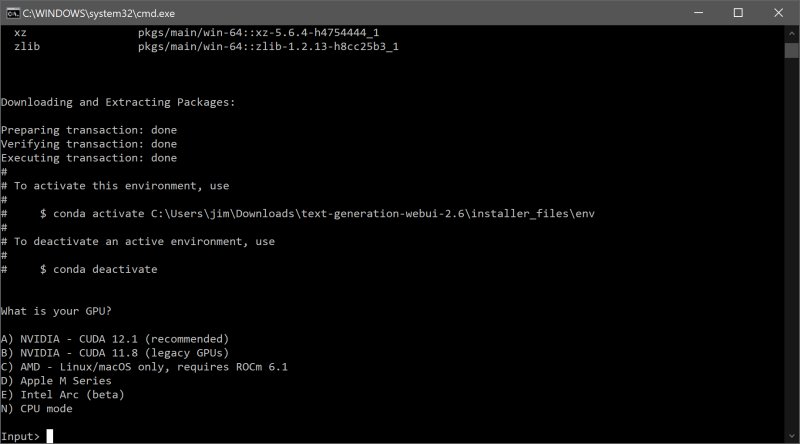
For installation, users need to ensure they have sufficient disk space, as the initial download is around 28MB but can grow to approximately 2GB after all dependencies are installed. The setup process involves downloading the zip file, extracting it, selecting the appropriate startup file for their operating system, and choosing their GPU vendor. After installation, models can be downloaded from sources like Hugging Face and placed in the designated folder.
Pros of the Oobabooga Text Generation Web UI include its local and private nature, support for multiple backends and extensions, easy model swapping, and suitability for development and experimentation. However, it may require significant resources depending on the model, has a learning curve for manual setup, and some extensions may necessitate additional installations.
In conclusion, Oobabooga Text Generation Web UI provides a robust platform for AI enthusiasts, developers, and researchers interested in experimenting with LLMs locally. Its flexibility, privacy, and user control make it an appealing choice for anyone looking to explore AI capabilities without relying on cloud services. The tool is an invaluable asset for those who have the necessary hardware and are eager to delve into the world of AI model development and testing
Key features of Oobabooga Text Generation Web UI include support for multiple backends such as Hugging Face Transformers and NVIDIA's TensorRT-LLM, the ability to fine-tune models with LoRA, and access to OpenAI-compatible APIs. Users can load models, switch between chat modes, and utilize built-in extensions for enhanced functionalities like multimodal tasks and streaming—all from within their browser.
The tool is designed for various applications, including testing custom models, building chatbots, or automating content creation. Users can run LLMs locally without internet access, swap models easily, save chat histories, and adjust advanced generation settings to align with project requirements.
For installation, users need to ensure they have sufficient disk space, as the initial download is around 28MB but can grow to approximately 2GB after all dependencies are installed. The setup process involves downloading the zip file, extracting it, selecting the appropriate startup file for their operating system, and choosing their GPU vendor. After installation, models can be downloaded from sources like Hugging Face and placed in the designated folder.
Pros of the Oobabooga Text Generation Web UI include its local and private nature, support for multiple backends and extensions, easy model swapping, and suitability for development and experimentation. However, it may require significant resources depending on the model, has a learning curve for manual setup, and some extensions may necessitate additional installations.
In conclusion, Oobabooga Text Generation Web UI provides a robust platform for AI enthusiasts, developers, and researchers interested in experimenting with LLMs locally. Its flexibility, privacy, and user control make it an appealing choice for anyone looking to explore AI capabilities without relying on cloud services. The tool is an invaluable asset for those who have the necessary hardware and are eager to delve into the world of AI model development and testing
Oobabooga Text Generation Web UI 3.21 released
Oobabooga Text Generation Web UI is a locally hosted, customizable interface designed for working with large language models (LLMs).