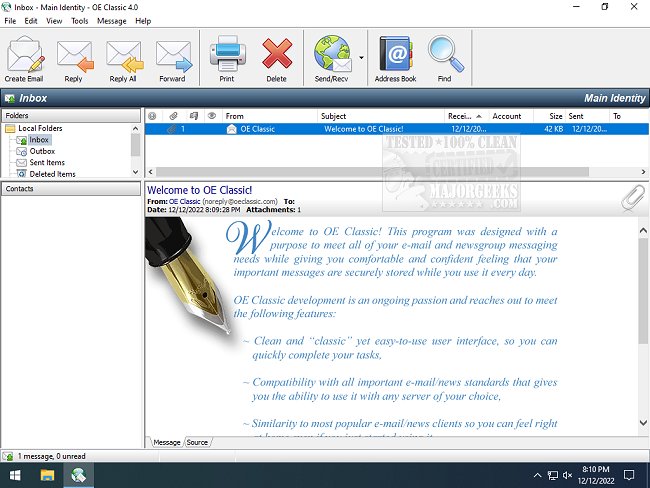
OE Classic is a modern email and Usenet reader that captures the essence of the classic Outlook Express, which many users fondly remember for its simplicity and ease of use. The latest release, version 5.4.0, brings back the familiar interface with vibrant buttons that provide quick access to key features such as creating, replying, forwarding emails, managing the address book, and more.
One of the standout aspects of OE Classic is its user-friendly layout, reminiscent of Outlook Express, making it appealing for users who prefer straightforward interaction. However, a notable omission in this version is the absence of a built-in spam filter, a significant drawback for those concerned about email security and organization. While users appreciate the retro aesthetic, the lack of modern spam management tools is a considerable downside.
The program’s interface includes a comprehensive options menu with traditional categories like File, Edit, Tools, and Help, ensuring users feel right at home. Although it successfully emulates the classic experience, it leaves out some functionalities that have become standard in contemporary email applications.
- Multilingual Support: Available in over 20 languages with customizable settings for window sizes, layouts, and fonts.
- Easy Account Setup: A user-friendly wizard helps to add email and news accounts, with auto-detection for various email servers.
- Secure Protocols: Supports secure IMAP/POP/SMTP/NNTP protocols with detailed logging for error diagnostics.
- Advanced IMAP Features: Includes capabilities like multicolored flags and minimal network usage.
- Rich Message Editor: Full text formatting, emojis, and customizable signatures are supported.
- Enhanced Security Features: Message display options protect against insecure content and external tracking.
- Flexible Address Book: Organize contacts into groups with customizable layouts.
- Import/Export Options: Users can import emails and contacts from various formats, enhancing flexibility.
- Compatibility: Optimized for Windows 10 but also supports older Windows versions.
In conclusion, while OE Classic 5.4.0 effectively brings back the nostalgic feel of Outlook Express with a range of essential features, its lack of a spam filter may deter some users seeking a modern email experience. Nevertheless, for those who appreciate the classic interface and straightforward functionality, OE Classic provides a refreshing alternative in the email client landscape. Future updates may need to address the spam filter issue to enhance its appeal further and compete effectively with other email clients in the market
One of the standout aspects of OE Classic is its user-friendly layout, reminiscent of Outlook Express, making it appealing for users who prefer straightforward interaction. However, a notable omission in this version is the absence of a built-in spam filter, a significant drawback for those concerned about email security and organization. While users appreciate the retro aesthetic, the lack of modern spam management tools is a considerable downside.
The program’s interface includes a comprehensive options menu with traditional categories like File, Edit, Tools, and Help, ensuring users feel right at home. Although it successfully emulates the classic experience, it leaves out some functionalities that have become standard in contemporary email applications.
Key Features of OE Classic 5.4.0:
- User-Friendly Interface: Designed for simplicity and efficiency, closely resembling Outlook Express.- Multilingual Support: Available in over 20 languages with customizable settings for window sizes, layouts, and fonts.
- Easy Account Setup: A user-friendly wizard helps to add email and news accounts, with auto-detection for various email servers.
- Secure Protocols: Supports secure IMAP/POP/SMTP/NNTP protocols with detailed logging for error diagnostics.
- Advanced IMAP Features: Includes capabilities like multicolored flags and minimal network usage.
- Rich Message Editor: Full text formatting, emojis, and customizable signatures are supported.
- Enhanced Security Features: Message display options protect against insecure content and external tracking.
- Flexible Address Book: Organize contacts into groups with customizable layouts.
- Import/Export Options: Users can import emails and contacts from various formats, enhancing flexibility.
- Compatibility: Optimized for Windows 10 but also supports older Windows versions.
In conclusion, while OE Classic 5.4.0 effectively brings back the nostalgic feel of Outlook Express with a range of essential features, its lack of a spam filter may deter some users seeking a modern email experience. Nevertheless, for those who appreciate the classic interface and straightforward functionality, OE Classic provides a refreshing alternative in the email client landscape. Future updates may need to address the spam filter issue to enhance its appeal further and compete effectively with other email clients in the market
OE Classic 5.4.0 released
OE Classic is an email and Usenet reader designed to look and feel like the classic Outlook Express.