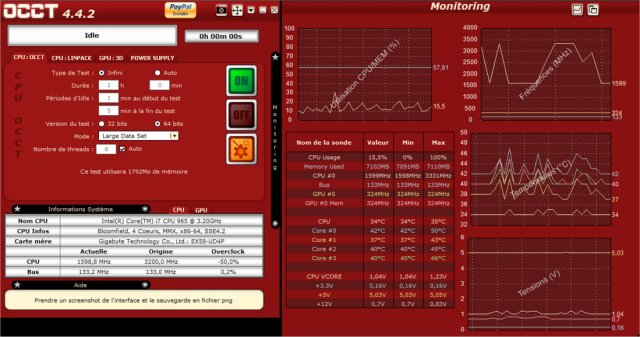
The latest version of OCCT (OverClock Checking Tool) has just been released, offering an indispensable utility for benchmarking, overclocking, and monitoring your PC's components. Designed for overclockers, system builders, and hardware enthusiasts, OCCT helps ensure that your system can handle maximum loads without crashing, making it an essential addition to your toolkit.
What is OCCT?
OCCT is a powerful utility dedicated to stress-testing crucial PC components, including the CPU, GPU, RAM, and power supply unit (PSU). It not only evaluates system stability under extreme conditions but also provides real-time monitoring to help identify potential hardware failures before they disrupt your computing experience.
Key Features of OCCT:
- Stress Testing: OCCT rigorously tests your CPU, GPU, memory, and PSU to ensure they can perform under high loads.
- Hardware Monitoring: Real-time tracking of temperatures, voltages, clock speeds, and power consumption helps catch overheating or power issues early.
- Power Supply Testing: Simulate extreme power conditions to assess your PSU's reliability and longevity.
- Benchmarking: Easily compare system performance pre- and post-hardware upgrades.
- Error Detection: Identify faulty components with targeted stress tests that reveal system instability.
Real-World Applications of OCCT:
OCCT serves a wide range of purposes beyond just overclocking. Here are some practical uses:
- Troubleshooting Crashes: Diagnose random system crashes by pinpointing the problematic component.
- New Builds Verification: Ensure that your newly assembled rig can handle daily operations reliably.
- Overheating Diagnosis: Identify which component is causing excessive heat levels.
- Power Stability Verification: Confirm that your PSU can handle peak loads effectively.
- Stability Checks Post-BIOS Update: Make sure your system remains stable after BIOS modifications.
- Laptop Cooling Management: Test whether your laptop's cooling system is adequate, potentially prompting the use of a cooling pad.
- Performance Benchmarking: Assess the performance before and after upgrading hardware like CPUs or RAM.
- Stress Testing Workstations: Essential for professionals in video editing, 3D rendering, and game development, ensuring stability during high workloads.
- Preventative Maintenance: Regular stress tests can help identify aging or failing hardware before they cause significant issues.
- Undervolting Stability Testing: Ensure your system remains stable after reducing voltage to minimize heat and power consumption.
Pros and Cons of OCCT:
Pros:
- Comprehensive stress tests for critical components
- Real-time hardware monitoring with detailed graphs
- Excellent for overclocking and troubleshooting stability issues
- Benchmarking capabilities to track performance improvements
- Free version available with essential features
Cons:
- Some advanced features require a paid version
- Can push hardware to extreme limits; caution is advised
- May not be as user-friendly for beginners compared to other tools
Geek Verdict:
For anyone serious about maintaining system stability, overclocking, or ensuring reliable hardware performance, OCCT is a must-have tool. Think of it as a personal trainer for your PC, pushing it to its limits while providing insights on potential improvements. Whether you are an intense overclocker or simply want a dependable machine, OCCT delivers exceptional results. Download OCCT and challenge your system to its ultimate test!
Similar Resources:
- Explore guides on how to benchmark your computer.
- Learn how to update and find your Windows Experience Index score.
- Discover how to identify the hardware within your computer.
With the release of OCCT 15.0.12, users can expect enhanced functionality and insights into their system's performance, making it an even more valuable asset for both casual users and hardcore enthusiasts alike
What is OCCT?
OCCT is a powerful utility dedicated to stress-testing crucial PC components, including the CPU, GPU, RAM, and power supply unit (PSU). It not only evaluates system stability under extreme conditions but also provides real-time monitoring to help identify potential hardware failures before they disrupt your computing experience.
Key Features of OCCT:
- Stress Testing: OCCT rigorously tests your CPU, GPU, memory, and PSU to ensure they can perform under high loads.
- Hardware Monitoring: Real-time tracking of temperatures, voltages, clock speeds, and power consumption helps catch overheating or power issues early.
- Power Supply Testing: Simulate extreme power conditions to assess your PSU's reliability and longevity.
- Benchmarking: Easily compare system performance pre- and post-hardware upgrades.
- Error Detection: Identify faulty components with targeted stress tests that reveal system instability.
Real-World Applications of OCCT:
OCCT serves a wide range of purposes beyond just overclocking. Here are some practical uses:
- Troubleshooting Crashes: Diagnose random system crashes by pinpointing the problematic component.
- New Builds Verification: Ensure that your newly assembled rig can handle daily operations reliably.
- Overheating Diagnosis: Identify which component is causing excessive heat levels.
- Power Stability Verification: Confirm that your PSU can handle peak loads effectively.
- Stability Checks Post-BIOS Update: Make sure your system remains stable after BIOS modifications.
- Laptop Cooling Management: Test whether your laptop's cooling system is adequate, potentially prompting the use of a cooling pad.
- Performance Benchmarking: Assess the performance before and after upgrading hardware like CPUs or RAM.
- Stress Testing Workstations: Essential for professionals in video editing, 3D rendering, and game development, ensuring stability during high workloads.
- Preventative Maintenance: Regular stress tests can help identify aging or failing hardware before they cause significant issues.
- Undervolting Stability Testing: Ensure your system remains stable after reducing voltage to minimize heat and power consumption.
Pros and Cons of OCCT:
Pros:
- Comprehensive stress tests for critical components
- Real-time hardware monitoring with detailed graphs
- Excellent for overclocking and troubleshooting stability issues
- Benchmarking capabilities to track performance improvements
- Free version available with essential features
Cons:
- Some advanced features require a paid version
- Can push hardware to extreme limits; caution is advised
- May not be as user-friendly for beginners compared to other tools
Geek Verdict:
For anyone serious about maintaining system stability, overclocking, or ensuring reliable hardware performance, OCCT is a must-have tool. Think of it as a personal trainer for your PC, pushing it to its limits while providing insights on potential improvements. Whether you are an intense overclocker or simply want a dependable machine, OCCT delivers exceptional results. Download OCCT and challenge your system to its ultimate test!
Similar Resources:
- Explore guides on how to benchmark your computer.
- Learn how to update and find your Windows Experience Index score.
- Discover how to identify the hardware within your computer.
With the release of OCCT 15.0.12, users can expect enhanced functionality and insights into their system's performance, making it an even more valuable asset for both casual users and hardcore enthusiasts alike
OCCT 15.0.12 released
OCCT (OverClock Checking Tool) will let you benchmark, overclock, and monitor your system components.