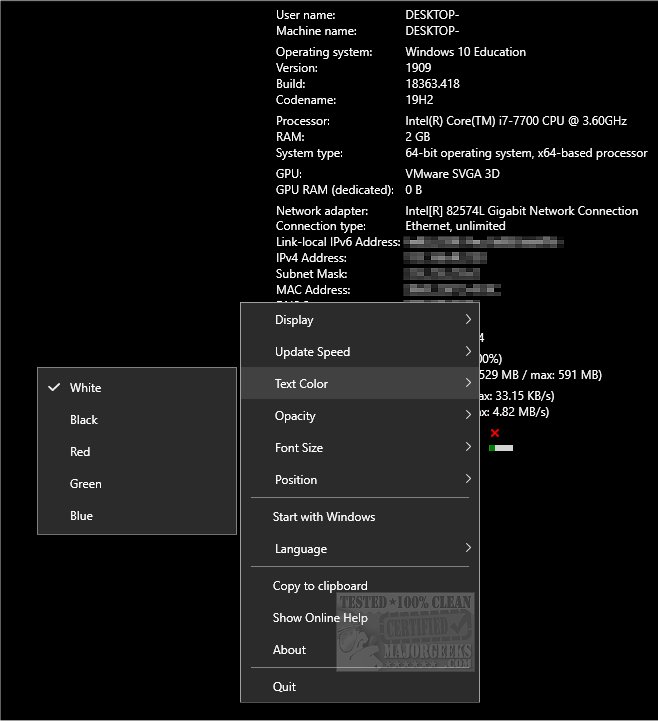
O&O DeskInfo 2.0.1033.1 has been released, offering users a portable application that provides a comprehensive overview of system information directly on their desktop. This intuitive app allows users to access crucial data such as CPU and memory usage, network information, operating system details, and more—all at a glance.
One of the key features of O&O DeskInfo is its customization options. Users can adjust the display settings, including update speed, opacity, text color, and position on the desktop. Additionally, the app supports clipboard functionality, enabling users to easily copy system data when necessary. It can be configured to start automatically with Windows or be launched manually, and all settings can be accessed through a right-click on the system tray icon. For advanced users, further modifications can be made via a configuration file.
O&O DeskInfo is designed for anyone who values quick access to their system information, combined with the flexibility to tailor the display to their preferences. This makes it a practical tool for both casual users and tech enthusiasts alike.
In addition to its main features, O&O DeskInfo also complements various tasks related to hardware identification and system diagnostics. Users interested in expanding their knowledge can explore resources on identifying hardware components, such as motherboard details and processor specifications, to enhance their understanding of their systems. Overall, O&O DeskInfo stands out as a versatile tool for monitoring and managing system performance
One of the key features of O&O DeskInfo is its customization options. Users can adjust the display settings, including update speed, opacity, text color, and position on the desktop. Additionally, the app supports clipboard functionality, enabling users to easily copy system data when necessary. It can be configured to start automatically with Windows or be launched manually, and all settings can be accessed through a right-click on the system tray icon. For advanced users, further modifications can be made via a configuration file.
O&O DeskInfo is designed for anyone who values quick access to their system information, combined with the flexibility to tailor the display to their preferences. This makes it a practical tool for both casual users and tech enthusiasts alike.
In addition to its main features, O&O DeskInfo also complements various tasks related to hardware identification and system diagnostics. Users interested in expanding their knowledge can explore resources on identifying hardware components, such as motherboard details and processor specifications, to enhance their understanding of their systems. Overall, O&O DeskInfo stands out as a versatile tool for monitoring and managing system performance
O and O DeskInfo 2.0.1033.1 released
O&O DeskInfo is a portable app that displays various bits of system information right on your desktop.