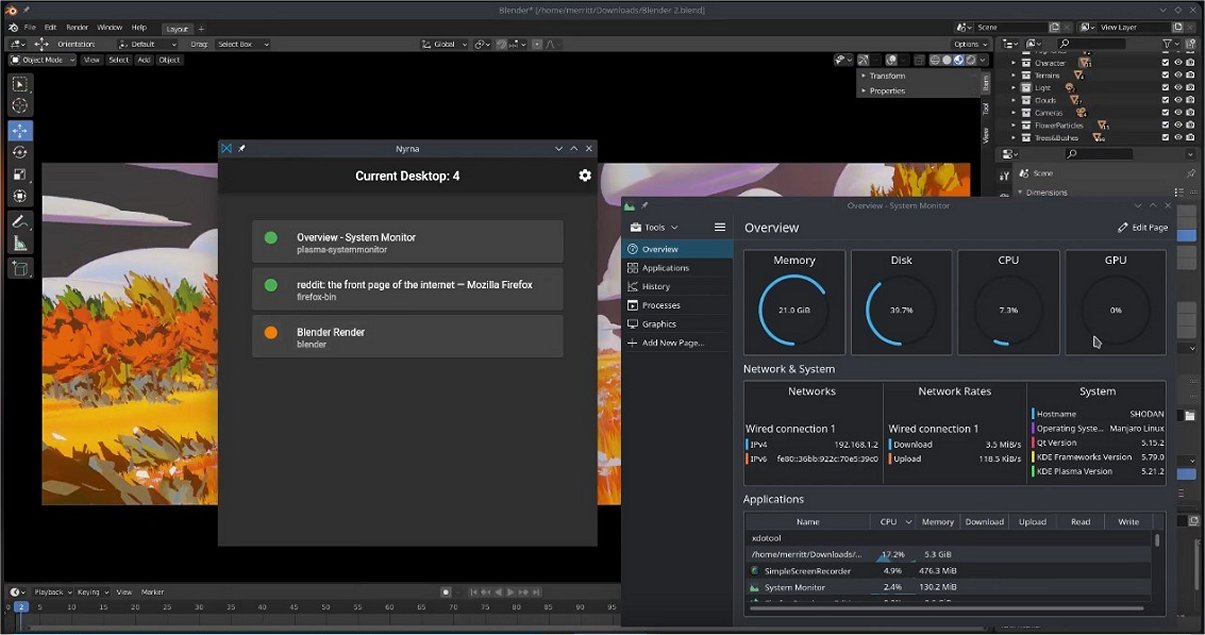
Nyrna 2.26.1 has been released as a free, open-source utility for Windows and Linux that allows users to "freeze" running applications and games, effectively suspending them so they no longer consume CPU and GPU resources until resumed. This function is particularly beneficial for managing resource-heavy programs that often struggle to run smoothly in the background, such as web browsers with multiple tabs, games that don’t support pausing, and applications involved in long renders or encodes.
The tool works by suspending active processes, allowing them to remain in memory while halting their resource consumption. When the user decides to continue, the application resumes exactly where it left off, similar to the sleep feature found in gaming consoles. This is especially helpful for users who want to free up resources without having to close and restart their applications, which can lead to lost sessions and data.
Nyrna offers several useful features, including customizable hotkeys for quick suspension and resumption of applications, a lightweight interface that displays currently running processes, and multiple color configuration options for the GUI. It is entirely free of ads and telemetry, making it a user-friendly choice for those who value privacy in their software.
To use Nyrna, users simply launch the program, select the desired application from a list of active processes, and click suspend. The application's CPU and GPU usage will drop to near zero, allowing for smoother operation of other tasks. Resuming the application is just as easy, ensuring that users can pick up right where they left off.
However, it’s worth noting that not all applications may handle the suspension perfectly, especially those that require consistent network communication or have strict timing dependencies. For instance, some online games may need to reconnect to servers or reload assets after being suspended.
Overall, Nyrna proves to be a surprisingly useful tool for managing resource-heavy applications with ease. Its lightweight design, combined with the convenience of hotkey support, makes it an excellent addition for users who frequently deal with applications that demand significant system resources. For anyone looking to improve their multitasking capabilities on their PC, keeping Nyrna on hand is advisable.
As technology continues to evolve, tools like Nyrna may see enhancements, such as improved compatibility with more applications, advanced customization features, and perhaps even more intuitive user interfaces, further streamlining the process of managing multiple resource-intensive tasks
The tool works by suspending active processes, allowing them to remain in memory while halting their resource consumption. When the user decides to continue, the application resumes exactly where it left off, similar to the sleep feature found in gaming consoles. This is especially helpful for users who want to free up resources without having to close and restart their applications, which can lead to lost sessions and data.
Nyrna offers several useful features, including customizable hotkeys for quick suspension and resumption of applications, a lightweight interface that displays currently running processes, and multiple color configuration options for the GUI. It is entirely free of ads and telemetry, making it a user-friendly choice for those who value privacy in their software.
To use Nyrna, users simply launch the program, select the desired application from a list of active processes, and click suspend. The application's CPU and GPU usage will drop to near zero, allowing for smoother operation of other tasks. Resuming the application is just as easy, ensuring that users can pick up right where they left off.
However, it’s worth noting that not all applications may handle the suspension perfectly, especially those that require consistent network communication or have strict timing dependencies. For instance, some online games may need to reconnect to servers or reload assets after being suspended.
Overall, Nyrna proves to be a surprisingly useful tool for managing resource-heavy applications with ease. Its lightweight design, combined with the convenience of hotkey support, makes it an excellent addition for users who frequently deal with applications that demand significant system resources. For anyone looking to improve their multitasking capabilities on their PC, keeping Nyrna on hand is advisable.
As technology continues to evolve, tools like Nyrna may see enhancements, such as improved compatibility with more applications, advanced customization features, and perhaps even more intuitive user interfaces, further streamlining the process of managing multiple resource-intensive tasks
Nyrna 2.26.1 released
Nyrna is a free, Open Source utility for Windows and Linux that lets you "freeze" running games and apps so they stop consuming CPU and GPU resources until you’re ready to resume them.