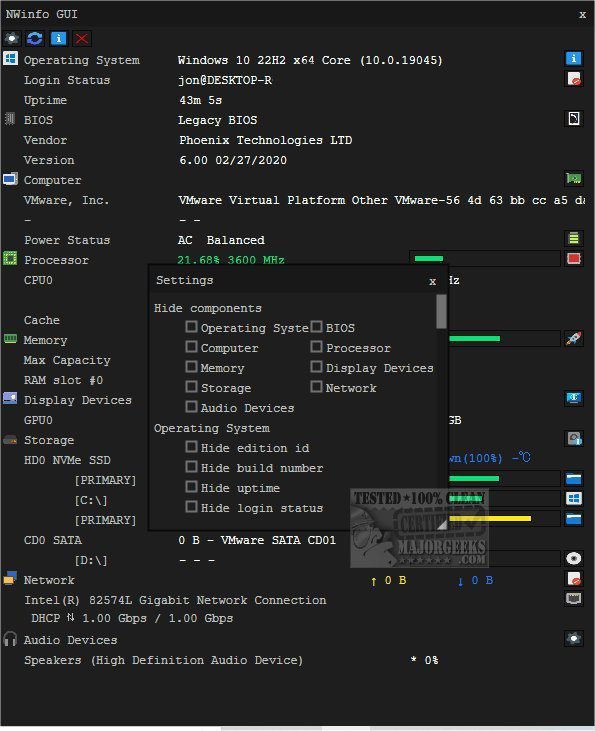
NWinfo is a robust application designed to assist users in retrieving crucial system and hardware information effectively. With its latest version, 1.6.2, NWinfo continues to provide an intuitive platform for accessing and analyzing important details about both hardware and software configurations. This tool is particularly beneficial for optimizing system performance, as it offers insights that can help users identify and resolve potential issues.
One of NWinfo's key features is its ability to facilitate troubleshooting by quickly pinpointing system problems, ensuring that users can address them efficiently. Additionally, the tool ensures hardware compatibility, allowing users to confidently integrate various components within their systems.
NWinfo also boasts several flexible data export options, enabling users to save their findings in widely-used formats such as JSON, YAML, and LUA tables. This functionality enhances the tool's versatility, as it allows for seamless integration of data into different applications or collaboration with colleagues for deeper analysis. Moreover, NWinfo supports Command Line usage, with all available options documented on the developer's website.
The tool provides detailed insights into several computer components, including:
- SMBIOS (System Management BIOS): Access essential data about the system's firmware and hardware components.
- CPUID: Obtain processor-specific information, including model number, capabilities, and features.
- S.M.A.R.T. (Self-Monitoring, Analysis, and Reporting Technology): Monitor the health and reliability of storage devices, predicting potential failures.
- PCI (Peripheral Component Interconnect): Gather data on installed PCI devices such as graphics cards, network interfaces, and other peripherals.
- EDID (Extended Display Identification Data): Retrieve information about connected display devices for better configuration and compatibility.
For users seeking additional guidance, NWinfo is complemented by various resources on identifying hardware, such as how to find the serial number of a Windows PC, check the GPU, or determine RAM speed and slots.
In summary, NWinfo 1.6.2 stands out as an essential tool for anyone looking to gather in-depth system information, optimize performance, and streamline troubleshooting processes. As technology evolves, NWinfo continues to adapt, ensuring that users have the necessary insights to maintain and improve their systems effectively
One of NWinfo's key features is its ability to facilitate troubleshooting by quickly pinpointing system problems, ensuring that users can address them efficiently. Additionally, the tool ensures hardware compatibility, allowing users to confidently integrate various components within their systems.
NWinfo also boasts several flexible data export options, enabling users to save their findings in widely-used formats such as JSON, YAML, and LUA tables. This functionality enhances the tool's versatility, as it allows for seamless integration of data into different applications or collaboration with colleagues for deeper analysis. Moreover, NWinfo supports Command Line usage, with all available options documented on the developer's website.
The tool provides detailed insights into several computer components, including:
- SMBIOS (System Management BIOS): Access essential data about the system's firmware and hardware components.
- CPUID: Obtain processor-specific information, including model number, capabilities, and features.
- S.M.A.R.T. (Self-Monitoring, Analysis, and Reporting Technology): Monitor the health and reliability of storage devices, predicting potential failures.
- PCI (Peripheral Component Interconnect): Gather data on installed PCI devices such as graphics cards, network interfaces, and other peripherals.
- EDID (Extended Display Identification Data): Retrieve information about connected display devices for better configuration and compatibility.
For users seeking additional guidance, NWinfo is complemented by various resources on identifying hardware, such as how to find the serial number of a Windows PC, check the GPU, or determine RAM speed and slots.
In summary, NWinfo 1.6.2 stands out as an essential tool for anyone looking to gather in-depth system information, optimize performance, and streamline troubleshooting processes. As technology evolves, NWinfo continues to adapt, ensuring that users have the necessary insights to maintain and improve their systems effectively
NWinfo 1.6.2 released
NWinfo is a comprehensive tool designed to help you retrieve essential system/hardware information and more.