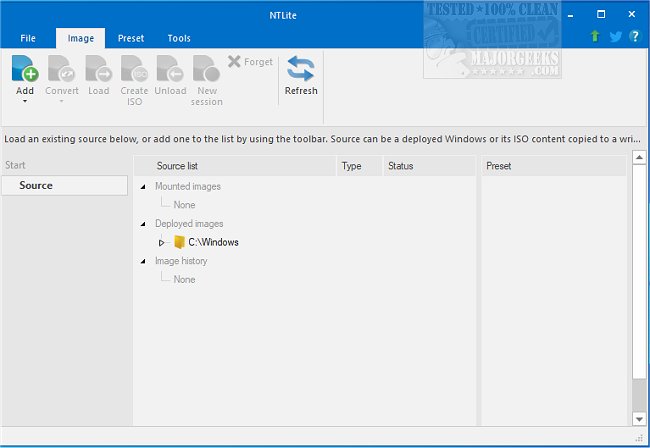
NTLite has released version 2026.03.10852, an advanced Windows customization tool designed to streamline the operating system by allowing users to modify and remove unnecessary elements from the standard Windows distribution. This tool provides a wide range of functionalities, including the removal of unwanted locations, integration of operating system updates, and the addition of essential drivers.
NTLite is user-friendly while being powerful, featuring a dynamic toolbar, an overview of image lists, presets, and a variety of productivity-enhancing details. It supports various image formats, including WIM (Windows Imaging Format), decrypted ESD (Electronic Software Download), and SWM (spanned, split images). Users can perform multiple image-related operations such as ESD to WIM conversions, SWM to WIM (image joining), and WIM to SWM (image splitting). Additionally, NTLite allows the creation of bootable ISO files, given that the required Boot and Sources folder structure is maintained.
Users can also edit Windows images across different host operating systems, facilitating flexibility for those who might need to modify a Windows 10 image from a Windows 7 environment. Key features of NTLite include:
- Image conversion capabilities
- Basic component removal
- Host hardware checklist
- Integration of updates and drivers
- Various tweaks for enhanced performance
- Unattended installation setup options
- Post-setup automation features
As a complementary note, users interested in further customization or enhancements can also explore related tools and processes, such as creating a bootable USB flash drive with the Windows 10 Media Creation Tool, removing pre-installed apps using PowerShell, and disabling the Activity History and 'Get Even More Out of Windows' prompts in Windows 10 and 11.
In conclusion, NTLite presents a comprehensive solution for users looking to tailor their Windows experience, making it more efficient and personalized by removing bloat and integrating necessary components seamlessly
NTLite is user-friendly while being powerful, featuring a dynamic toolbar, an overview of image lists, presets, and a variety of productivity-enhancing details. It supports various image formats, including WIM (Windows Imaging Format), decrypted ESD (Electronic Software Download), and SWM (spanned, split images). Users can perform multiple image-related operations such as ESD to WIM conversions, SWM to WIM (image joining), and WIM to SWM (image splitting). Additionally, NTLite allows the creation of bootable ISO files, given that the required Boot and Sources folder structure is maintained.
Users can also edit Windows images across different host operating systems, facilitating flexibility for those who might need to modify a Windows 10 image from a Windows 7 environment. Key features of NTLite include:
- Image conversion capabilities
- Basic component removal
- Host hardware checklist
- Integration of updates and drivers
- Various tweaks for enhanced performance
- Unattended installation setup options
- Post-setup automation features
As a complementary note, users interested in further customization or enhancements can also explore related tools and processes, such as creating a bootable USB flash drive with the Windows 10 Media Creation Tool, removing pre-installed apps using PowerShell, and disabling the Activity History and 'Get Even More Out of Windows' prompts in Windows 10 and 11.
In conclusion, NTLite presents a comprehensive solution for users looking to tailor their Windows experience, making it more efficient and personalized by removing bloat and integrating necessary components seamlessly
NTLite 2026.03.10852 released
NTLite is an all-in-one Windows customization tool that offers a robust set of options for modifying and removing unnecessary components from the standard distribution of Windows.