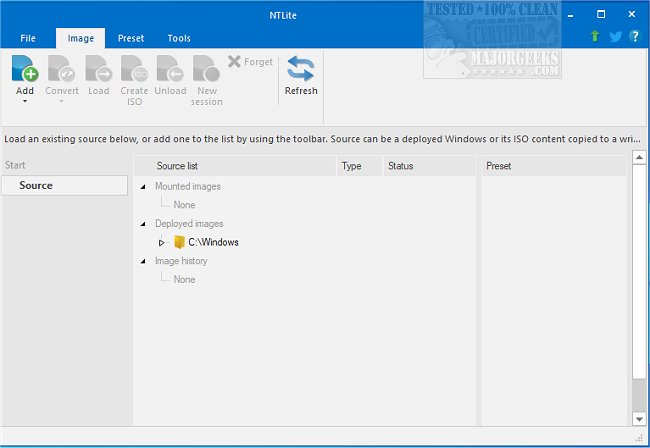
The recently released NTLite version 2026.01.10761 continues to enhance its reputation as a comprehensive Windows customization tool, allowing users to modify and streamline their Windows operating systems effectively. With a wide range of capabilities, NTLite empowers users to eliminate unnecessary features and components from the standard Windows distribution, such as outdated updates and superfluous locations, while also enabling the integration of essential drivers.
One of NTLite's standout functionalities is its ability to modify already installed operating systems seamlessly. The tool boasts a user-friendly interface that includes a dynamic toolbar, an image list overview, and various presets, all designed to boost productivity when managing Windows images. It supports multiple image formats, including WIM, decrypted ESD, and SWM, and facilitates conversions between these formats, such as ESD to WIM and vice versa.
Furthermore, NTLite allows users to create bootable ISO images from any custom configuration, provided the standard folder structure is maintained. This flexibility also extends to editing Windows images across different host systems, making it versatile for users working with various Windows versions.
Key features of NTLite include:
- Image conversion capabilities
- Basic component removal
- Host hardware compatibility checklist
- Integration of drivers and updates
- Tweaks for system optimization
- Unattended installation setup
- Automation of post-setup tasks
In addition to its primary functions, NTLite can serve as a valuable resource for those looking to create bootable USB flash drives for Windows 10 and streamline the removal of unwanted Windows apps through PowerShell. It also provides guidance on disabling specific features in Windows 10 and 11, such as activity history.
Overall, NTLite 2026.01.10761 remains a powerful yet accessible tool for users seeking to customize their Windows experience, whether for personal use or deployment across multiple machines. Its continuous updates and feature enhancements ensure it meets the evolving needs of Windows users, making it an indispensable asset for anyone looking to optimize their operating systems
One of NTLite's standout functionalities is its ability to modify already installed operating systems seamlessly. The tool boasts a user-friendly interface that includes a dynamic toolbar, an image list overview, and various presets, all designed to boost productivity when managing Windows images. It supports multiple image formats, including WIM, decrypted ESD, and SWM, and facilitates conversions between these formats, such as ESD to WIM and vice versa.
Furthermore, NTLite allows users to create bootable ISO images from any custom configuration, provided the standard folder structure is maintained. This flexibility also extends to editing Windows images across different host systems, making it versatile for users working with various Windows versions.
Key features of NTLite include:
- Image conversion capabilities
- Basic component removal
- Host hardware compatibility checklist
- Integration of drivers and updates
- Tweaks for system optimization
- Unattended installation setup
- Automation of post-setup tasks
In addition to its primary functions, NTLite can serve as a valuable resource for those looking to create bootable USB flash drives for Windows 10 and streamline the removal of unwanted Windows apps through PowerShell. It also provides guidance on disabling specific features in Windows 10 and 11, such as activity history.
Overall, NTLite 2026.01.10761 remains a powerful yet accessible tool for users seeking to customize their Windows experience, whether for personal use or deployment across multiple machines. Its continuous updates and feature enhancements ensure it meets the evolving needs of Windows users, making it an indispensable asset for anyone looking to optimize their operating systems
NTLite 2026.01.10761 released
NTLite is an all-in-one Windows customization tool that offers a robust set of options for modifying and removing unnecessary components from the standard distribution of Windows.