NTLite version 2025.12.10723 has been released, providing users with a comprehensive tool for customizing Windows installations. This powerful application allows for extensive modifications to the standard Windows distribution, enabling users to remove unnecessary components, streamline the operating system, and integrate updates and drivers. NTLite is designed to enhance both new installations and existing setups, making it easier to manage Windows images, which include formats such as WIM, ESD, and SWM.
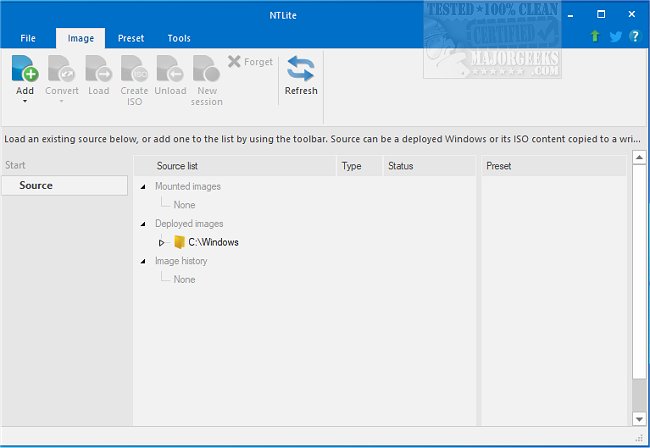
Key features of NTLite include image conversion capabilities, basic component removal, a host hardware checklist, integration of updates, system tweaks, unattended setup options, and post-setup automation. The user-friendly interface includes a dynamic toolbar and an image list overview, which helps users efficiently manage their Windows images.
Additionally, NTLite facilitates the creation of bootable ISO files from any compatible image, provided the proper folder structure (Boot and Sources) is in place. The tool also supports a wide range of host operating systems, allowing users to edit images across various Windows versions, such as modifying a Windows 10 image from a Windows 7 host.
In summary, NTLite stands out as an essential tool for IT professionals and enthusiasts looking to optimize their Windows experience by tailoring installations to their specific needs.
As NTLite continues to evolve, future updates may include even more advanced features, such as enhanced automation capabilities, improved support for the latest Windows versions, and a more extensive library of predefined presets to simplify the customization process further. Users can also expect ongoing improvements to the user interface to make the tool even more intuitive and accessible
Key features of NTLite include image conversion capabilities, basic component removal, a host hardware checklist, integration of updates, system tweaks, unattended setup options, and post-setup automation. The user-friendly interface includes a dynamic toolbar and an image list overview, which helps users efficiently manage their Windows images.
Additionally, NTLite facilitates the creation of bootable ISO files from any compatible image, provided the proper folder structure (Boot and Sources) is in place. The tool also supports a wide range of host operating systems, allowing users to edit images across various Windows versions, such as modifying a Windows 10 image from a Windows 7 host.
In summary, NTLite stands out as an essential tool for IT professionals and enthusiasts looking to optimize their Windows experience by tailoring installations to their specific needs.
As NTLite continues to evolve, future updates may include even more advanced features, such as enhanced automation capabilities, improved support for the latest Windows versions, and a more extensive library of predefined presets to simplify the customization process further. Users can also expect ongoing improvements to the user interface to make the tool even more intuitive and accessible
NTLite 2025.12.10723 released
NTLite is an all-in-one Windows customization tool that offers a robust set of options for modifying and removing unnecessary components from the standard distribution of Windows.