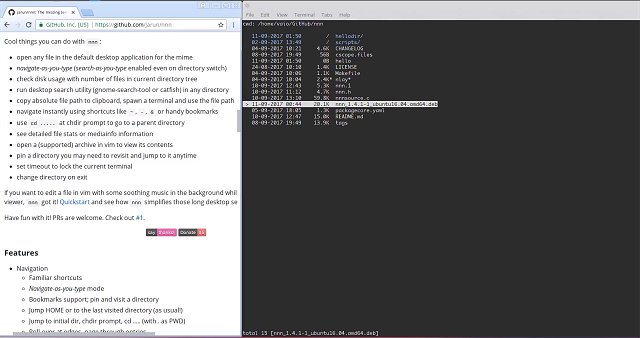
The latest version 5.2 of nnn, a fast and resource-efficient file manager, has been released. nnn excels at integrating seamlessly with various GUI utilities, making it an ideal choice for modern Linux distributions. It features a unique "navigate-as-you-type" mode that automatically selects directories, alongside a disk usage analyzer mode, bookmarks, context management, and an application launcher.
Key features of nnn include:
- User-Friendly Navigation: Familiar shortcuts and easy-to-use navigation options.
- Context Management: Supports multiple "tabs" or workspaces for organizing tasks.
- Sorting and Searching: Directories are prioritized in listings, with options to sort files by various criteria and instant search functionality.
- File Operations: Users can create, rename, copy, move, and delete files, as well as perform batch operations.
- Integration with Other Utilities: Can work with applications like sxiv for image viewing or fzy for fuzzy searching, and can be utilized as a file picker within Vim or Neovim.
- Detailed File Information: Provides comprehensive stats and media information, requiring additional tools like MediaInfo or ExifTool.
- Customization Options: Users can specify custom applications for opening files, and there are optional features for directory color coding and script execution.
nnn does not use a configuration file, and mime types are hard-coded, which simplifies setup while ensuring rapid performance. The file manager is designed to enhance user experience by integrating well with desktop environments, allowing for a more cohesive workflow.
In addition, nnn supports Unicode and is optimized for speed through static analysis integrated into its codebase. It is available across multiple Linux distributions.
Overall, nnn 5.2 offers a robust set of features that cater to both casual users and power users who require efficiency and flexibility in file management. As the demand for lightweight yet powerful tools grows, nnn positions itself as a go-to solution for file navigation and management within the Linux community
Key features of nnn include:
- User-Friendly Navigation: Familiar shortcuts and easy-to-use navigation options.
- Context Management: Supports multiple "tabs" or workspaces for organizing tasks.
- Sorting and Searching: Directories are prioritized in listings, with options to sort files by various criteria and instant search functionality.
- File Operations: Users can create, rename, copy, move, and delete files, as well as perform batch operations.
- Integration with Other Utilities: Can work with applications like sxiv for image viewing or fzy for fuzzy searching, and can be utilized as a file picker within Vim or Neovim.
- Detailed File Information: Provides comprehensive stats and media information, requiring additional tools like MediaInfo or ExifTool.
- Customization Options: Users can specify custom applications for opening files, and there are optional features for directory color coding and script execution.
nnn does not use a configuration file, and mime types are hard-coded, which simplifies setup while ensuring rapid performance. The file manager is designed to enhance user experience by integrating well with desktop environments, allowing for a more cohesive workflow.
In addition, nnn supports Unicode and is optimized for speed through static analysis integrated into its codebase. It is available across multiple Linux distributions.
Overall, nnn 5.2 offers a robust set of features that cater to both casual users and power users who require efficiency and flexibility in file management. As the demand for lightweight yet powerful tools grows, nnn positions itself as a go-to solution for file navigation and management within the Linux community
nnn 5.2 released
nnn is a fast and resource-sensitive file manager that can integrate with your favorite GUI utilities.