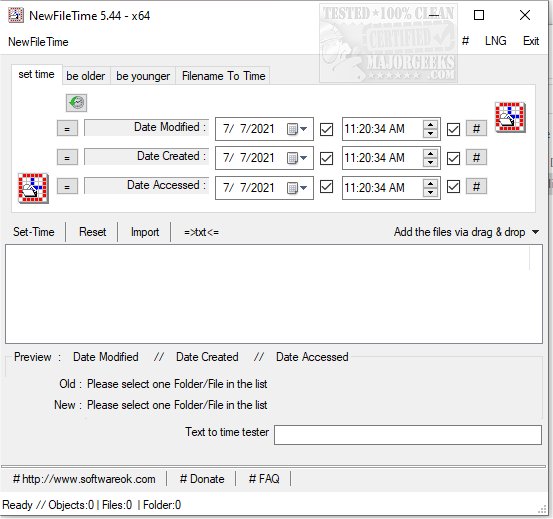
NewFileTime 8.21 has been released as a free application designed for users to manipulate file and folder timestamps on their systems. This versatile tool enables users to make files appear younger or older or to set them to specific dates and times. One of its standout features is the ability to modify multiple files and folders simultaneously, enhancing efficiency for users who need to make bulk adjustments.
The application supports easy file addition through a simple drag-and-drop interface or by importing them from a designated folder, ensuring quick access to the necessary files for editing. As a portable utility, NewFileTime allows users to make timestamp corrections—specifically to creation, last access, and modification dates—anywhere and anytime, providing flexibility and convenience.
In addition to its core functionality, NewFileTime can be particularly useful in scenarios where users encounter issues such as access denied errors or need to manage file ownership. This makes it a valuable tool for those looking to maintain control over their file management in Windows 10 and 11 environments.
Looking ahead, future versions of NewFileTime could potentially introduce features such as cloud integration for timestamp management across devices, enhanced user interfaces for easier navigation, or automated timestamp adjustments based on user-defined criteria. These improvements would further solidify its position as an essential utility for managing file metadata
The application supports easy file addition through a simple drag-and-drop interface or by importing them from a designated folder, ensuring quick access to the necessary files for editing. As a portable utility, NewFileTime allows users to make timestamp corrections—specifically to creation, last access, and modification dates—anywhere and anytime, providing flexibility and convenience.
In addition to its core functionality, NewFileTime can be particularly useful in scenarios where users encounter issues such as access denied errors or need to manage file ownership. This makes it a valuable tool for those looking to maintain control over their file management in Windows 10 and 11 environments.
Looking ahead, future versions of NewFileTime could potentially introduce features such as cloud integration for timestamp management across devices, enhanced user interfaces for easier navigation, or automated timestamp adjustments based on user-defined criteria. These improvements would further solidify its position as an essential utility for managing file metadata
NewFileTime 8.21 released
NewFileTime is a free app that allows you to manipulate timestamps on any file or folder on your system, making them younger or older or setting a specific date/time.