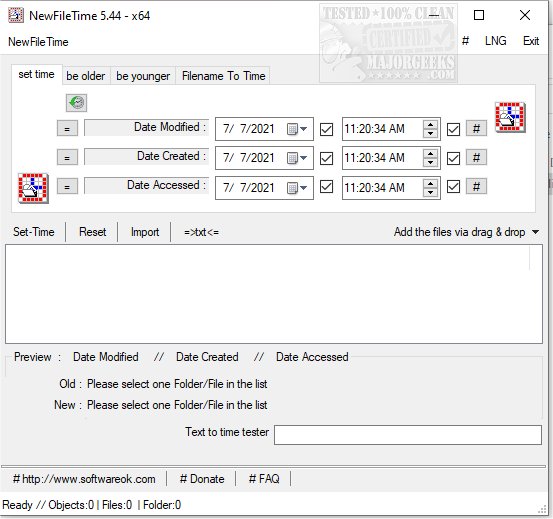
NewFileTime version 8.16 has been released, offering users a free and efficient tool to alter timestamps on any file or folder within their system. This application enables users to adjust timestamps to make files or folders appear younger or older or to set them to a specific date and time. Notably, NewFileTime allows for batch modifications, meaning multiple files and folders can be adjusted simultaneously. Users can easily add files through a simple drag-and-drop feature or by importing them from a designated folder, streamlining the process of timestamp manipulation.
As a portable utility, NewFileTime provides the flexibility to make quick corrections to creation, last access, and modification dates and times on files and folders, regardless of location. This makes it a convenient choice for users who need to manage file timestamps on the go. Additionally, the app offers various methods for accessing its features, ensuring that users can quickly get to the task at hand.
In the broader context, NewFileTime can be particularly useful in situations where file timestamps need to be corrected for organizational purposes, compliance with regulatory requirements, or simply for personal preference. It can also serve as a handy tool for developers and IT professionals who need to manage file attributes regularly.
NewFileTime stands alongside other helpful utilities, such as tools for securely deleting files in Windows 10 and 11, and methods for taking full ownership of files and folders, making it a valuable addition to any user’s software toolkit
As a portable utility, NewFileTime provides the flexibility to make quick corrections to creation, last access, and modification dates and times on files and folders, regardless of location. This makes it a convenient choice for users who need to manage file timestamps on the go. Additionally, the app offers various methods for accessing its features, ensuring that users can quickly get to the task at hand.
In the broader context, NewFileTime can be particularly useful in situations where file timestamps need to be corrected for organizational purposes, compliance with regulatory requirements, or simply for personal preference. It can also serve as a handy tool for developers and IT professionals who need to manage file attributes regularly.
NewFileTime stands alongside other helpful utilities, such as tools for securely deleting files in Windows 10 and 11, and methods for taking full ownership of files and folders, making it a valuable addition to any user’s software toolkit
NewFileTime 8.16 released
NewFileTime is a free app that allows you to manipulate timestamps on any file or folder on your system, making them younger or older or setting a specific date/time.