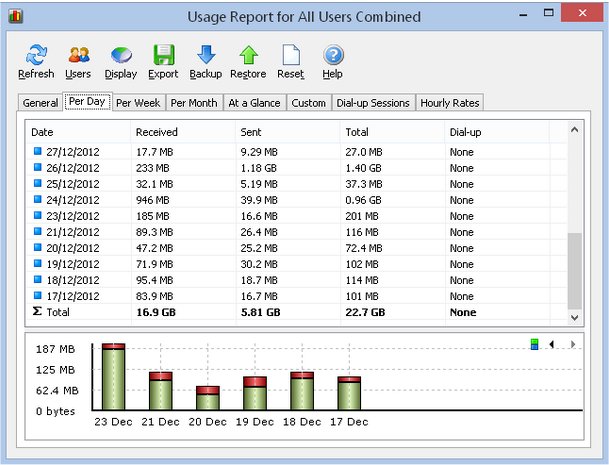
Networx has recently released two versions: Networx 25.12 Pro and Networx 5.5 Free, both designed to provide users with comprehensive monitoring of their network connections. Whether you're using Ethernet, PPP, or other internet services, Networx enables you to track bandwidth usage, measure internet speeds, and identify potential network issues. This tool is particularly useful for ensuring compliance with your Internet Service Provider's bandwidth limits and detecting unusual network activities that may indicate security threats, such as trojans or hacking attempts.
The application presents incoming and outgoing traffic in a clear line chart, and it logs data to a file for easy access to daily, weekly, and monthly statistics on bandwidth usage and dial-up duration. Users can conveniently export detailed reports in various formats including HTML, MS Word, and Excel for further analysis.
Key features of Networx include:
- A clear graphic and numeric display of network activity.
- Comprehensive usage reports that can be exported.
- Close monitoring of upload and download speeds.
- Compatibility with various connection types including dial-up, ISDN, cable modems, ADSL, and Ethernet cards.
- Tools for network information and testing, including advanced net stat display applications.
- User notifications and automatic disconnection options when network activity exceeds set thresholds.
- A speed meter that accurately measures download times and average transfer rates.
- A detailed journal of dial-up sessions for enhanced tracking.
Importantly, Networx is offered free of charge and is free from adware, spyware, or malware, ensuring a safe user experience.
In summary, Networx serves as an essential tool for anyone looking to gain deeper insights into their network performance and security, making it suitable for both casual users and IT professionals. With its robust features and user-friendly interface, Networx stands out as a reliable solution for comprehensive network monitoring
The application presents incoming and outgoing traffic in a clear line chart, and it logs data to a file for easy access to daily, weekly, and monthly statistics on bandwidth usage and dial-up duration. Users can conveniently export detailed reports in various formats including HTML, MS Word, and Excel for further analysis.
Key features of Networx include:
- A clear graphic and numeric display of network activity.
- Comprehensive usage reports that can be exported.
- Close monitoring of upload and download speeds.
- Compatibility with various connection types including dial-up, ISDN, cable modems, ADSL, and Ethernet cards.
- Tools for network information and testing, including advanced net stat display applications.
- User notifications and automatic disconnection options when network activity exceeds set thresholds.
- A speed meter that accurately measures download times and average transfer rates.
- A detailed journal of dial-up sessions for enhanced tracking.
Importantly, Networx is offered free of charge and is free from adware, spyware, or malware, ensuring a safe user experience.
In summary, Networx serves as an essential tool for anyone looking to gain deeper insights into their network performance and security, making it suitable for both casual users and IT professionals. With its robust features and user-friendly interface, Networx stands out as a reliable solution for comprehensive network monitoring
Networx 25.12 Pro / 5.5 Free released
Networx allows you to monitor all your network connections or a specific network connection (such as Ethernet or PPP).