The latest version of Network Speed Test, version 3.2, is now available and continues to serve as an intuitive tool for accurately measuring both download and upload speeds of your internet or LAN connection. This application is designed with user-friendliness in mind, enabling users to easily evaluate their network's performance and make informed decisions regarding their internet service.
Getting Started with Network Speed Test
To begin using the Network Speed Test application, follow these straightforward steps for a smooth experience:
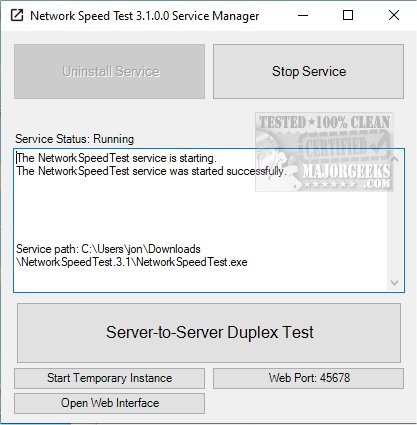
1. Installation: Upon your first launch of the app, look for the "Install Service" button located at the top left corner of the window. Click it to start the installation process.
2. Service Activation: Once the installation is complete, activate the service by pressing the "Start Service" button.
3. Initiating Tests: To start testing your network speed, click on the "Start Temporary Instance" button found at the bottom left corner. You can choose the duration of the test, selecting from options of 3, 5, 10, or 15 seconds.
4. Configuration Options: Users have the flexibility to specify a remote host for the test and can adjust UDP and TCP settings according to their preferences.
5. Conducting the Test: After setting up, click on the "Duplex Test" button in the center of the interface. This will open a new window where you can further customize your test settings. Here, you can choose to measure download speed, upload speed, or both. For those using a LAN connection, the app can also measure that connection's speed accurately.
Why Use Network Speed Test?
If you've ever wondered about the performance of your internet connection, Network Speed Test is the ideal tool to help you assess it. It provides a simple yet effective way to measure your internet speed, granting you important insights into your network's performance. With its reliable and seamless functionality, Network Speed Test is an essential application for anyone seeking to understand and optimize their internet connectivity.
Additional Resources
For those looking to enhance their network experience further, consider exploring related topics such as:
- How to Improve Your Wireless Network Performance
- Hide or Block Neighbor's Wi-Fi Networks on Windows
- Troubleshooting Windows Network Issues
- Viewing Your Network Adapter Speed in Windows 10 & 11
- Resetting Network Settings in Windows 10 & 11
With the advancements in Network Speed Test 3.2, users are equipped with a powerful tool to ensure their internet performance meets their needs, allowing for a more efficient online experience
Getting Started with Network Speed Test
To begin using the Network Speed Test application, follow these straightforward steps for a smooth experience:
1. Installation: Upon your first launch of the app, look for the "Install Service" button located at the top left corner of the window. Click it to start the installation process.
2. Service Activation: Once the installation is complete, activate the service by pressing the "Start Service" button.
3. Initiating Tests: To start testing your network speed, click on the "Start Temporary Instance" button found at the bottom left corner. You can choose the duration of the test, selecting from options of 3, 5, 10, or 15 seconds.
4. Configuration Options: Users have the flexibility to specify a remote host for the test and can adjust UDP and TCP settings according to their preferences.
5. Conducting the Test: After setting up, click on the "Duplex Test" button in the center of the interface. This will open a new window where you can further customize your test settings. Here, you can choose to measure download speed, upload speed, or both. For those using a LAN connection, the app can also measure that connection's speed accurately.
Why Use Network Speed Test?
If you've ever wondered about the performance of your internet connection, Network Speed Test is the ideal tool to help you assess it. It provides a simple yet effective way to measure your internet speed, granting you important insights into your network's performance. With its reliable and seamless functionality, Network Speed Test is an essential application for anyone seeking to understand and optimize their internet connectivity.
Additional Resources
For those looking to enhance their network experience further, consider exploring related topics such as:
- How to Improve Your Wireless Network Performance
- Hide or Block Neighbor's Wi-Fi Networks on Windows
- Troubleshooting Windows Network Issues
- Viewing Your Network Adapter Speed in Windows 10 & 11
- Resetting Network Settings in Windows 10 & 11
With the advancements in Network Speed Test 3.2, users are equipped with a powerful tool to ensure their internet performance meets their needs, allowing for a more efficient online experience
Network Speed Test 3.2 released
Network Speed Test is a user-friendly tool that accurately measures the download and upload speed of your internet or LAN connection.