The Network Activity Indicator version 1.9 has been released, providing users with a nostalgic touch by featuring the classic 'two monitors' icon from Windows 7. This icon flashes blue to indicate network activity within the System Tray. Unlike its predecessor from Windows XP, which had separate indicators for each interface, this updated version monitors network traffic for all available interfaces collectively.
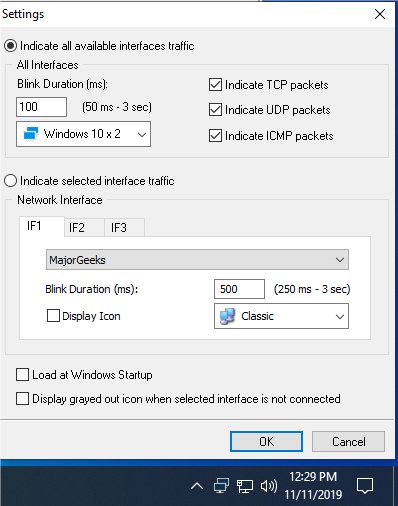
To use the utility, simply run the standalone executable, and the new system tray icon will appear, allowing users to easily keep track of incoming and outgoing network packets. Customization options are available through a right-click on the system tray icon, enabling users to tailor the settings to their preferences.
In addition to the Network Activity Indicator, users may find other related resources helpful, such as guides on improving wireless network performance, checking network adapter speed in Windows 10, hiding or blocking neighbors' Wi-Fi networks, resetting TCP/IP or Internet Protocol, and troubleshooting slow internet issues in Windows 10.
As a further extension of this text, the Network Activity Indicator not only appeals to those who fondly remember the functionalities of older Windows versions but also serves as a practical tool for users looking to enhance their network monitoring experience. The simplicity of the interface and the familiar iconography can make network management more intuitive for users transitioning from older systems. This update reflects a growing trend in software development where developers are looking to merge nostalgia with modern functionality, catering to both seasoned users and newcomers alike
To use the utility, simply run the standalone executable, and the new system tray icon will appear, allowing users to easily keep track of incoming and outgoing network packets. Customization options are available through a right-click on the system tray icon, enabling users to tailor the settings to their preferences.
In addition to the Network Activity Indicator, users may find other related resources helpful, such as guides on improving wireless network performance, checking network adapter speed in Windows 10, hiding or blocking neighbors' Wi-Fi networks, resetting TCP/IP or Internet Protocol, and troubleshooting slow internet issues in Windows 10.
As a further extension of this text, the Network Activity Indicator not only appeals to those who fondly remember the functionalities of older Windows versions but also serves as a practical tool for users looking to enhance their network monitoring experience. The simplicity of the interface and the familiar iconography can make network management more intuitive for users transitioning from older systems. This update reflects a growing trend in software development where developers are looking to merge nostalgia with modern functionality, catering to both seasoned users and newcomers alike
Network Activity Indicator 1.9 released
Network Activity Indicator displays the old 'two monitors' icon in Windows 7 that flashed blue to show network activity on the System Tray.