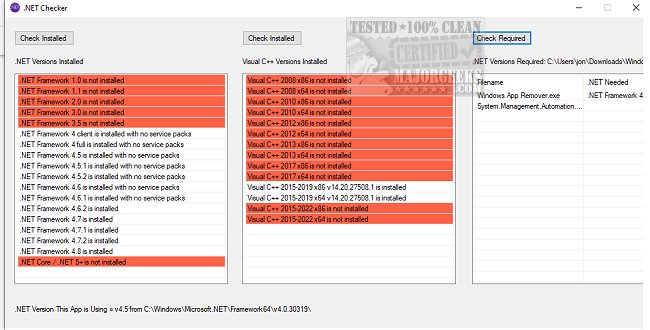
The recently launched .NET Checker 1.5 is a utility designed to simplify the process of identifying the installed versions of Microsoft .NET and Visual C++ on your device. This tool provides a straightforward way to check which versions are currently available and determine the specific .NET version required by various applications.
Eliminating Guesswork
Many applications depend on specific versions of .NET and Visual C++ to function correctly. Some installations may require users to download the necessary components, while others may not provide clear guidance. .NET Checker helps streamline this process by allowing users to preemptively check their system's compatibility, thus empowering them to make informed decisions about where to download the required versions.
User-Friendly Interface
The tool features an intuitive interface with three primary options: checking installed .NET versions, inspecting installed Visual C++ versions, and identifying the .NET versions needed for a specific application. Each action can be executed with a single click, and results are presented in a color-coded format for quick comprehension.
A Must-Have Utility
.NET Checker is an essential addition to any user's toolkit. Its compact and portable nature, coupled with rapid result compilation and ease of use, makes it ideal for users at any technical level seeking to obtain specific system information. By facilitating the identification of installed and required versions, .NET Checker enhances user control over software installations.
Additional Resources
For users looking to further their understanding of .NET and Visual C++, related resources include guides on checking installed .NET versions, troubleshooting installation issues, and a comprehensive overview of the Microsoft .NET Framework and its runtimes
Eliminating Guesswork
Many applications depend on specific versions of .NET and Visual C++ to function correctly. Some installations may require users to download the necessary components, while others may not provide clear guidance. .NET Checker helps streamline this process by allowing users to preemptively check their system's compatibility, thus empowering them to make informed decisions about where to download the required versions.
User-Friendly Interface
The tool features an intuitive interface with three primary options: checking installed .NET versions, inspecting installed Visual C++ versions, and identifying the .NET versions needed for a specific application. Each action can be executed with a single click, and results are presented in a color-coded format for quick comprehension.
A Must-Have Utility
.NET Checker is an essential addition to any user's toolkit. Its compact and portable nature, coupled with rapid result compilation and ease of use, makes it ideal for users at any technical level seeking to obtain specific system information. By facilitating the identification of installed and required versions, .NET Checker enhances user control over software installations.
Additional Resources
For users looking to further their understanding of .NET and Visual C++, related resources include guides on checking installed .NET versions, troubleshooting installation issues, and a comprehensive overview of the Microsoft .NET Framework and its runtimes
.NET Checker 1.5 released
.Net Checker displays installed Microsoft .NET and Visual C++ versions and more.