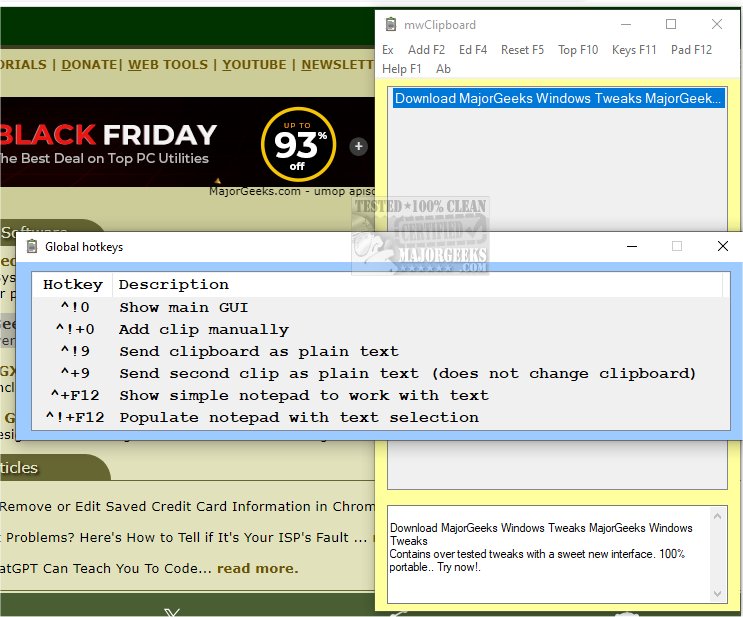
mwClipboard is a user-friendly application designed to streamline clipboard management on Windows. The latest version, 1.3.5, offers enhanced features that allow users to store and organize copied items conveniently in a portable interface. The app's functionality includes the ability to display a list of clips using a hotkey, with the most recent text clips appearing at the top. Users can easily view and manage their clips in an edit control located at the bottom of the main window.
Key features of mwClipboard include the ability to select and duplicate one or multiple clips with a simple right-click, facilitating efficient pasting without the need for manual copying. Users can paste all selected clips at once by pressing the Enter key or by double-clicking on a clip to paste it directly. When multiple clips are selected, they are pasted in reverse order to reflect the original clipping sequence.
Additional functionalities include hotkeys for sending clips as plain text without altering the clipboard, a built-in notepad for text editing and note-taking, and the option to save all text clips in a plain text file. Upon exiting the application, mwClipboard automatically manages clip backups by recycling the previous clip file and renaming the current one.
Key Features of mwClipboard:
- Fast and user-friendly interface
- Ability to select and paste multiple clips
- Clips are pasted in reverse order, maintaining original sequence
- Full text of selected clips is displayed during pasting
- Temporary clipboard population for selected clips
- Option to send clips as plain text without affecting the clipboard
- Clips saved in a plain text file format
- Notifications through sound effects upon clipboard changes
- Resizable GUI for clip management
- Keyboard navigation support in the ListView control
- Option to clear the ListView without deleting text files
- Automatic redisplay of the main GUI after pasting
- Manual addition of clips through an input box
- Right-click functionality for clipboard copying
- Menu access for editing, viewing, and searching the text file of clips
- Integrated simple notepad for temporary text editing
Conclusion:
With its versatile features, mwClipboard 1.3.5 is designed to enhance productivity and streamline clipboard usage for Windows users. It not only simplifies copying and pasting tasks but also provides tools for effective text management and editing. Whether you need to manage multiple clips for work or maintain a personal note-taking system, mwClipboard serves as a reliable solution for all your clipboard needs
Key features of mwClipboard include the ability to select and duplicate one or multiple clips with a simple right-click, facilitating efficient pasting without the need for manual copying. Users can paste all selected clips at once by pressing the Enter key or by double-clicking on a clip to paste it directly. When multiple clips are selected, they are pasted in reverse order to reflect the original clipping sequence.
Additional functionalities include hotkeys for sending clips as plain text without altering the clipboard, a built-in notepad for text editing and note-taking, and the option to save all text clips in a plain text file. Upon exiting the application, mwClipboard automatically manages clip backups by recycling the previous clip file and renaming the current one.
Key Features of mwClipboard:
- Fast and user-friendly interface
- Ability to select and paste multiple clips
- Clips are pasted in reverse order, maintaining original sequence
- Full text of selected clips is displayed during pasting
- Temporary clipboard population for selected clips
- Option to send clips as plain text without affecting the clipboard
- Clips saved in a plain text file format
- Notifications through sound effects upon clipboard changes
- Resizable GUI for clip management
- Keyboard navigation support in the ListView control
- Option to clear the ListView without deleting text files
- Automatic redisplay of the main GUI after pasting
- Manual addition of clips through an input box
- Right-click functionality for clipboard copying
- Menu access for editing, viewing, and searching the text file of clips
- Integrated simple notepad for temporary text editing
Conclusion:
With its versatile features, mwClipboard 1.3.5 is designed to enhance productivity and streamline clipboard usage for Windows users. It not only simplifies copying and pasting tasks but also provides tools for effective text management and editing. Whether you need to manage multiple clips for work or maintain a personal note-taking system, mwClipboard serves as a reliable solution for all your clipboard needs
mwClipboard 1.3.5 released
mwClipboard is a user-friendly app designed to manage your clipboard activities on Windows.