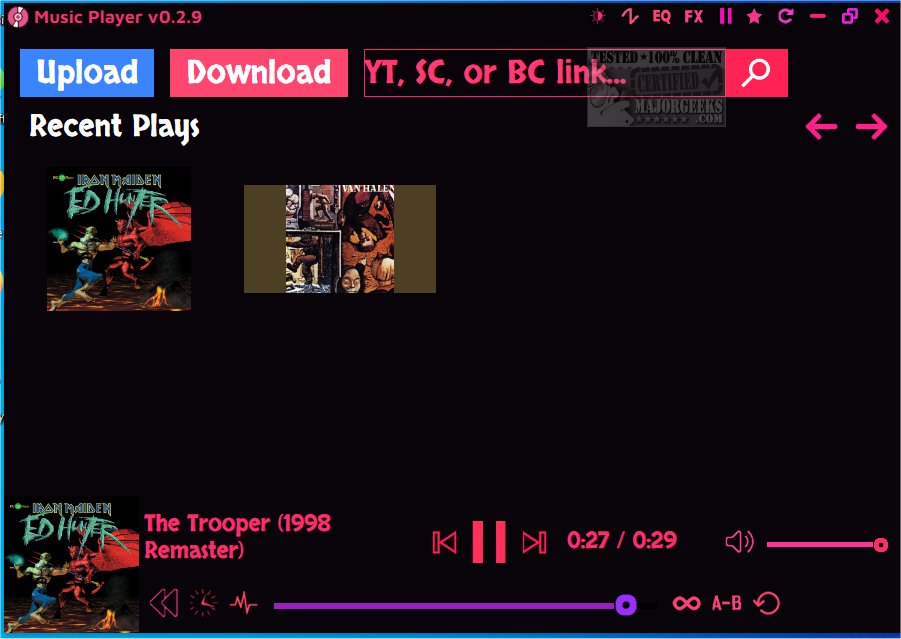
The latest version of Music Player, version 0.3.4, brings a host of innovative features aimed at enhancing your music listening experience. This open-source application is designed to allow users to play and manipulate audio from various sources including local files, YouTube, and SoundCloud.
Key features of Music Player include real-time audio manipulation capabilities such as time stretching, pitch shifting, and audio reversing. These effects enable users to customize their favorite tracks in unique ways, preserving or altering pitch as desired. Additionally, the app provides comprehensive EQ and FX menus, giving users the power to fine-tune audio filters and effects according to their preferences. The inclusion of a MIDI Synth section allows for further customization, letting users tailor synthesizer controls to match their creative vision.
The player also enhances the visual experience by automatically displaying cover art for uploaded tracks, and it supports easy uploading of songs either directly from your computer or by adding links from YouTube and SoundCloud. Notably, users can modify tracks from these platforms and download the adjusted versions directly, streamlining the process.
While Music Player has received praise for its diverse features, it does have some drawbacks. Users have reported occasional sluggishness and issues with processing links from streaming platforms promptly. However, once tracks are queued, the real-time adjustment capabilities prove to be engaging and enjoyable.
Notable Features:
- Support for audio formats like MP3, WAV, and MIDI files.
- Volume adjustment and real-time audio reversing.
- Options for looping between specified points.
- Record of recent plays for easy access.
- Keyboard shortcuts for convenient control.
Keyboard Shortcuts:
- Space: Play/Pause
- Left Arrow: Rewind
- Right Arrow: Fast forward
- Up Arrow: Increase volume
- Down Arrow: Decrease volume
- Ctrl O: Upload file
- Ctrl S: Download file
- Drag and Drop: Upload file
Additional Resources:
Users seeking to enhance their audio experience can also explore related topics such as enabling Windows Sonic Surround Sound, toggling key sounds, and troubleshooting low computer sound volume.
In summary, Music Player 0.3.4 stands out for its extensive capabilities in music manipulation and playback, making it a valuable tool for music enthusiasts and creators alike, despite some minor performance hiccups
Key features of Music Player include real-time audio manipulation capabilities such as time stretching, pitch shifting, and audio reversing. These effects enable users to customize their favorite tracks in unique ways, preserving or altering pitch as desired. Additionally, the app provides comprehensive EQ and FX menus, giving users the power to fine-tune audio filters and effects according to their preferences. The inclusion of a MIDI Synth section allows for further customization, letting users tailor synthesizer controls to match their creative vision.
The player also enhances the visual experience by automatically displaying cover art for uploaded tracks, and it supports easy uploading of songs either directly from your computer or by adding links from YouTube and SoundCloud. Notably, users can modify tracks from these platforms and download the adjusted versions directly, streamlining the process.
While Music Player has received praise for its diverse features, it does have some drawbacks. Users have reported occasional sluggishness and issues with processing links from streaming platforms promptly. However, once tracks are queued, the real-time adjustment capabilities prove to be engaging and enjoyable.
Notable Features:
- Support for audio formats like MP3, WAV, and MIDI files.
- Volume adjustment and real-time audio reversing.
- Options for looping between specified points.
- Record of recent plays for easy access.
- Keyboard shortcuts for convenient control.
Keyboard Shortcuts:
- Space: Play/Pause
- Left Arrow: Rewind
- Right Arrow: Fast forward
- Up Arrow: Increase volume
- Down Arrow: Decrease volume
- Ctrl O: Upload file
- Ctrl S: Download file
- Drag and Drop: Upload file
Additional Resources:
Users seeking to enhance their audio experience can also explore related topics such as enabling Windows Sonic Surround Sound, toggling key sounds, and troubleshooting low computer sound volume.
In summary, Music Player 0.3.4 stands out for its extensive capabilities in music manipulation and playback, making it a valuable tool for music enthusiasts and creators alike, despite some minor performance hiccups
Music Player 0.3.4 released
Music Player comes equipped with cool features like time stretching and pitch-shifting effects, allowing you to customize and enhance the playback of your favorite tracks.