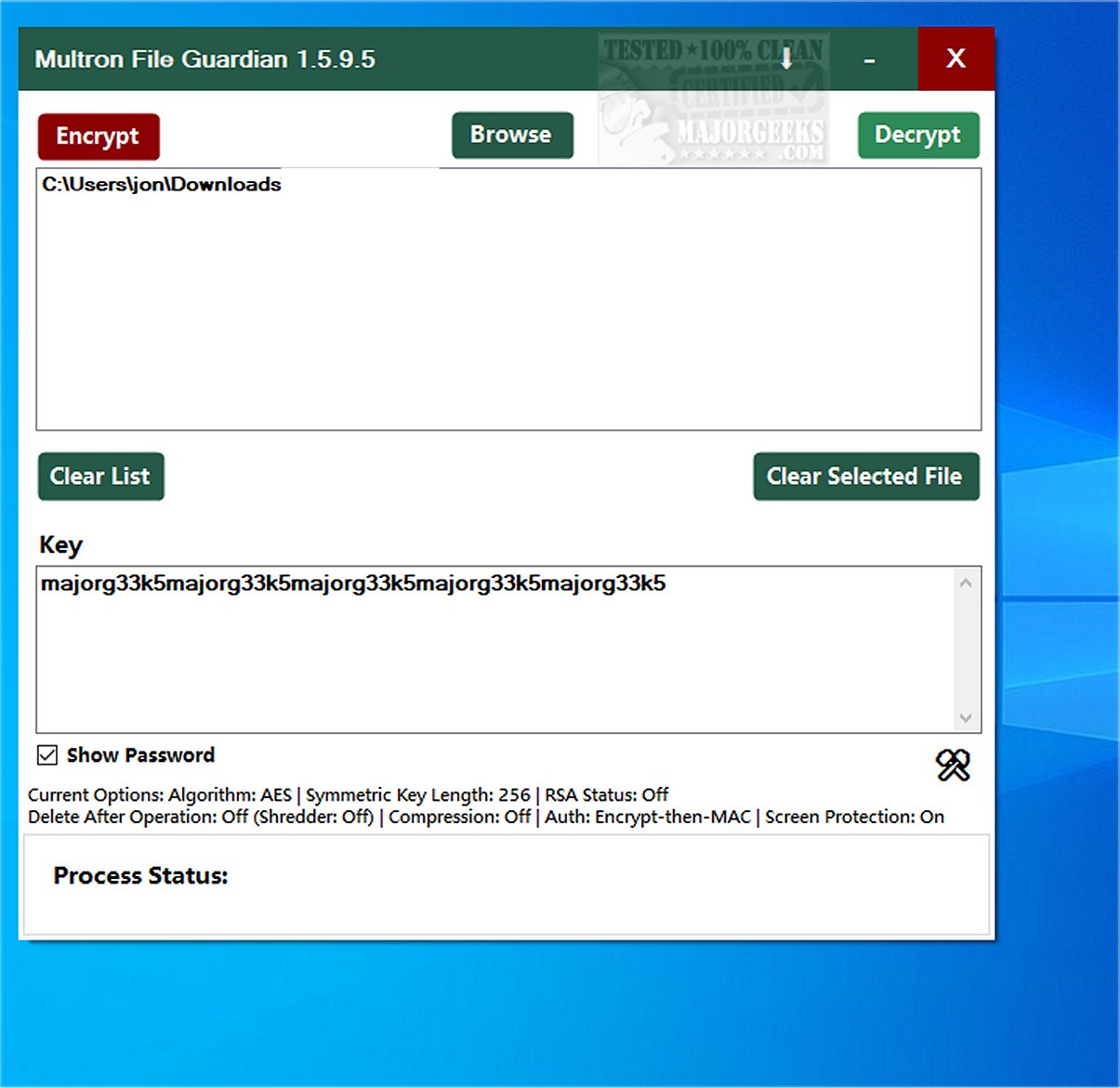
Multron File Guardian has recently launched version 1.5.9.5, providing an advanced encryption solution for protecting sensitive documents and images, particularly on shared computers. This software is especially beneficial in scenarios where IT support technicians are present or when laptops are sent for servicing, ensuring that confidential data remains secure.
Key Features and Functionality:
Multron File Guardian is designed to offer robust file encryption with a user-friendly interface. Users can secure their files with just one click, and the software includes a companion feature called Multron NoteGuard for securing notes. File selection is easy: users can select multiple folders using the CTRL key and can include subfolders with CTRL+Shift.
The software supports a range of encryption algorithms, including:
- AES
- Serpent
- Twofish
- ThreeFish
- Camellia
- ChaCha20
- SM4
- HC
- RSA hybridized with symmetric algorithms (Key Encapsulation Method)
Users can customize various settings, such as:
- RSA Key Length (from 2048 to 16384 bits, with a default of 3072)
- Password-Iteration Rate (default of four iterations)
- Argon2id Memory Rate (options of 256, 512, or 1024 MB)
- Shredder Iteration Rate (1-99, default of 3)
- Symmetric Algorithm Key Size (if supported)
For secure file sharing, hybrid algorithms can be employed, and files can be compressed before encryption. The encrypted files will carry the extension .mfg, while those protected by Multron NoteGuard will be labeled .mng. Security features include Argon2id Key Derivation, CBC block cipher mode, random IV/Nonce, and salt for each file, along with an encrypt-then-MAC authentication method. A notable screen protection feature prevents the software from being captured in screenshots.
Ease of Use:
Multron File Guardian emphasizes user-friendliness, offering right-click context menu support, making encryption and file sharing quicker and more convenient. Users can also evaluate the complexity of their encryption passwords without the limitations of special-character requirements often imposed by other services. However, it is crucial for users to remember their security key, as loss of this key renders the encrypted data inaccessible.
Conclusion:
The release of Multron File Guardian 1.5.9.5 significantly enhances data security for personal and professional documents. With its advanced encryption features and user-centered design, the software provides users with peace of mind, safeguarding against unauthorized access and potential data breaches. Whether you are protecting personal files or vital business information, Multron File Guardian stands as a formidable tool in your cybersecurity arsenal.
Future Developments:
As cybersecurity threats evolve, it is anticipated that future updates to Multron File Guardian will include even more sophisticated encryption algorithms and enhanced user features, further solidifying its position as a leading solution for data protection. Users can look forward to continued improvements that cater to the ever-growing need for secure file management in an increasingly digital world
Key Features and Functionality:
Multron File Guardian is designed to offer robust file encryption with a user-friendly interface. Users can secure their files with just one click, and the software includes a companion feature called Multron NoteGuard for securing notes. File selection is easy: users can select multiple folders using the CTRL key and can include subfolders with CTRL+Shift.
The software supports a range of encryption algorithms, including:
- AES
- Serpent
- Twofish
- ThreeFish
- Camellia
- ChaCha20
- SM4
- HC
- RSA hybridized with symmetric algorithms (Key Encapsulation Method)
Users can customize various settings, such as:
- RSA Key Length (from 2048 to 16384 bits, with a default of 3072)
- Password-Iteration Rate (default of four iterations)
- Argon2id Memory Rate (options of 256, 512, or 1024 MB)
- Shredder Iteration Rate (1-99, default of 3)
- Symmetric Algorithm Key Size (if supported)
For secure file sharing, hybrid algorithms can be employed, and files can be compressed before encryption. The encrypted files will carry the extension .mfg, while those protected by Multron NoteGuard will be labeled .mng. Security features include Argon2id Key Derivation, CBC block cipher mode, random IV/Nonce, and salt for each file, along with an encrypt-then-MAC authentication method. A notable screen protection feature prevents the software from being captured in screenshots.
Ease of Use:
Multron File Guardian emphasizes user-friendliness, offering right-click context menu support, making encryption and file sharing quicker and more convenient. Users can also evaluate the complexity of their encryption passwords without the limitations of special-character requirements often imposed by other services. However, it is crucial for users to remember their security key, as loss of this key renders the encrypted data inaccessible.
Conclusion:
The release of Multron File Guardian 1.5.9.5 significantly enhances data security for personal and professional documents. With its advanced encryption features and user-centered design, the software provides users with peace of mind, safeguarding against unauthorized access and potential data breaches. Whether you are protecting personal files or vital business information, Multron File Guardian stands as a formidable tool in your cybersecurity arsenal.
Future Developments:
As cybersecurity threats evolve, it is anticipated that future updates to Multron File Guardian will include even more sophisticated encryption algorithms and enhanced user features, further solidifying its position as a leading solution for data protection. Users can look forward to continued improvements that cater to the ever-growing need for secure file management in an increasingly digital world
Multron File Guardian 1.5.9.5 released
Multron File Guardian offers encryption for your private documents and images, ensuring your sensitive information is protected on shared computers.