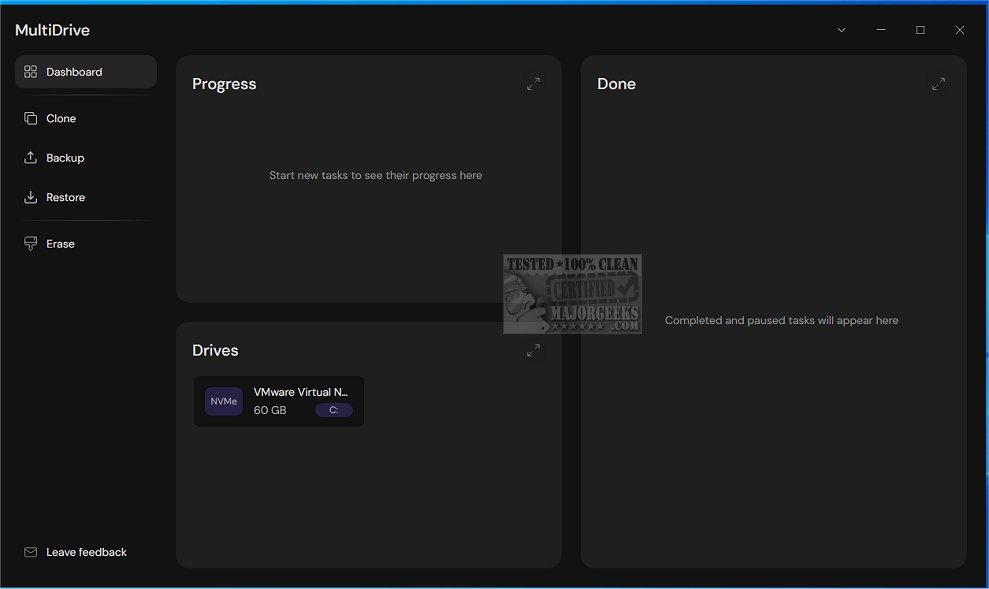
MultiDrive has launched its latest version, 1.3, which offers an advanced disk management toolkit tailored for efficient data organization. This comprehensive software suite includes a variety of functionalities that allow users to seamlessly back up, clone, erase, and restore entire drives, ensuring high-speed performance and data security.
What is MultiDrive?
MultiDrive is a sophisticated tool designed to streamline disk management tasks. It simplifies the process of handling storage devices, making data backup and recovery straightforward and efficient. With features like disk cloning, secure erasure, and restoration, MultiDrive provides users with a robust and reliable solution for managing their data.
User-Friendly Interface and Functionality
The sleek interface of MultiDrive enhances user experience by making it intuitive and easy to navigate. Users can easily access dedicated menus for cloning, backing up, and restoring data. Each function is clearly outlined, guiding users through the processes to ensure that even complex tasks can be executed with minimal hassle.
Versatile Options for Users
MultiDrive caters to a wide range of users, from novices to advanced professionals. It allows for simple cloning of partitions, backing up files, and securely wiping data to guarantee complete deletion. For those who prefer more control, a Command Line Interface (CLI) version is available, enabling advanced users to automate tasks and manage their drives with precision.
Key Features of MultiDrive 1.3:
- Drive backup options in .RAW or .ZIP formats
- Secure drive erasure for data protection
- Bit-by-bit cloning for accurate data duplication
- Pause and resume functionality for convenience
- CLI support for advanced automation
- Parallel tasking for improved efficiency
Geek Verdict
MultiDrive stands out as a comprehensive solution for drive management, equipping both casual users and professionals with an array of features that enhance data security and workflow efficiency. With its ease of use, MultiDrive allows users to confidently manage their drives, ensuring that tasks like cloning, backing up, and securely wiping drives are carried out smoothly.
Additional Resources
For further assistance, users can explore guides on downloading the latest drivers for Windows, how to backup and restore drivers, and troubleshooting driver issues using Driver Verifier Manager. These resources complement MultiDrive's capabilities by providing comprehensive support for maintaining system performance and reliability.
In summary, MultiDrive 1.3 not only simplifies disk management tasks but also empowers users with the tools they need to protect and manage their data effectively, making it an essential addition to any data management toolkit
What is MultiDrive?
MultiDrive is a sophisticated tool designed to streamline disk management tasks. It simplifies the process of handling storage devices, making data backup and recovery straightforward and efficient. With features like disk cloning, secure erasure, and restoration, MultiDrive provides users with a robust and reliable solution for managing their data.
User-Friendly Interface and Functionality
The sleek interface of MultiDrive enhances user experience by making it intuitive and easy to navigate. Users can easily access dedicated menus for cloning, backing up, and restoring data. Each function is clearly outlined, guiding users through the processes to ensure that even complex tasks can be executed with minimal hassle.
Versatile Options for Users
MultiDrive caters to a wide range of users, from novices to advanced professionals. It allows for simple cloning of partitions, backing up files, and securely wiping data to guarantee complete deletion. For those who prefer more control, a Command Line Interface (CLI) version is available, enabling advanced users to automate tasks and manage their drives with precision.
Key Features of MultiDrive 1.3:
- Drive backup options in .RAW or .ZIP formats
- Secure drive erasure for data protection
- Bit-by-bit cloning for accurate data duplication
- Pause and resume functionality for convenience
- CLI support for advanced automation
- Parallel tasking for improved efficiency
Geek Verdict
MultiDrive stands out as a comprehensive solution for drive management, equipping both casual users and professionals with an array of features that enhance data security and workflow efficiency. With its ease of use, MultiDrive allows users to confidently manage their drives, ensuring that tasks like cloning, backing up, and securely wiping drives are carried out smoothly.
Additional Resources
For further assistance, users can explore guides on downloading the latest drivers for Windows, how to backup and restore drivers, and troubleshooting driver issues using Driver Verifier Manager. These resources complement MultiDrive's capabilities by providing comprehensive support for maintaining system performance and reliability.
In summary, MultiDrive 1.3 not only simplifies disk management tasks but also empowers users with the tools they need to protect and manage their data effectively, making it an essential addition to any data management toolkit
MultiDrive 1.3 released
MultiDrive provides a solid disk management toolkit designed for efficient data management. It includes a range of functionalities, including the ability to effortlessly back up, clone, erase, and restore entire drives.