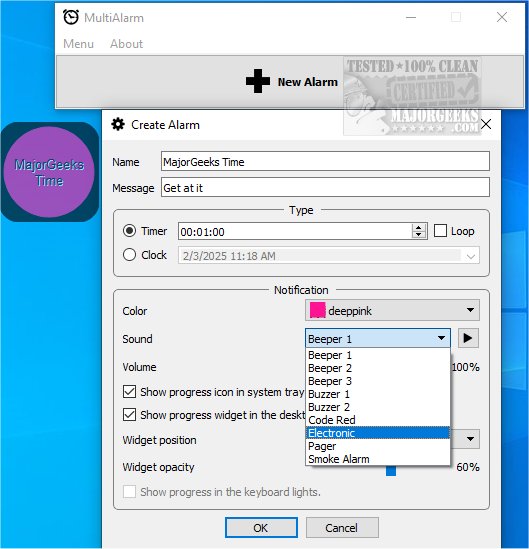
MultiAlarm is a highly functional application designed to help users efficiently manage their time through multiple timers and clock alarms. The latest version, 1.4.1, introduces enhancements that make it even more user-friendly. Its standout features include systray and desktop notification widgets, ensuring that important reminders or scheduled events are never overlooked.
Key Features of MultiAlarm
With MultiAlarm, users can set alarms that loop continuously for up to 24 hours, making it perfect for long-duration tasks. This flexibility allows users to stop, restart, and reconfigure their alarms as their schedules change. Notably, alarms are stored permanently in the system's memory until deleted, eliminating the need for frequent reprogramming and enhancing organization.
Each alarm comes equipped with three playback controls that simplify management. Users can easily remove alarms, start countdowns, adjust settings, or stop alarms altogether. A dedicated customization window allows for an array of settings to personalize alarms according to individual preferences.
Once alarms are set, users can access the app via its tray icon, which offers quick-access features for effective alarm management. Customization options include personalized notification messages and color-coding for easy visual identification. Alarms can be displayed as floating elements on the desktop, providing flexibility in positioning.
Conclusion: Why Choose MultiAlarm?
MultiAlarm stands out as an advanced alarm management tool that strikes a balance between sophistication and functionality. It provides an extensive suite of features for seamless alarm management, coupled with customizable desktop notifications that enhance its practical application. MultiAlarm is an essential tool for anyone aiming to improve their time management skills and foster a more organized lifestyle.
Future Enhancements and Potential Features
Looking ahead, the development team behind MultiAlarm may consider integrating additional features, such as:
- Integration with Calendar Apps: Syncing alarms with popular calendar applications to automate reminders for scheduled events.
- Voice Activation: Allowing users to set or modify alarms using voice commands for added convenience.
- Cross-Platform Compatibility: Expanding the application to work seamlessly across various operating systems and devices.
- Snooze Functionality: Implementing a customizable snooze feature for users who may need a little extra time before an alarm goes off again.
With these potential enhancements, MultiAlarm could further solidify its position as a top-tier time management tool
Key Features of MultiAlarm
With MultiAlarm, users can set alarms that loop continuously for up to 24 hours, making it perfect for long-duration tasks. This flexibility allows users to stop, restart, and reconfigure their alarms as their schedules change. Notably, alarms are stored permanently in the system's memory until deleted, eliminating the need for frequent reprogramming and enhancing organization.
Each alarm comes equipped with three playback controls that simplify management. Users can easily remove alarms, start countdowns, adjust settings, or stop alarms altogether. A dedicated customization window allows for an array of settings to personalize alarms according to individual preferences.
Once alarms are set, users can access the app via its tray icon, which offers quick-access features for effective alarm management. Customization options include personalized notification messages and color-coding for easy visual identification. Alarms can be displayed as floating elements on the desktop, providing flexibility in positioning.
Conclusion: Why Choose MultiAlarm?
MultiAlarm stands out as an advanced alarm management tool that strikes a balance between sophistication and functionality. It provides an extensive suite of features for seamless alarm management, coupled with customizable desktop notifications that enhance its practical application. MultiAlarm is an essential tool for anyone aiming to improve their time management skills and foster a more organized lifestyle.
Future Enhancements and Potential Features
Looking ahead, the development team behind MultiAlarm may consider integrating additional features, such as:
- Integration with Calendar Apps: Syncing alarms with popular calendar applications to automate reminders for scheduled events.
- Voice Activation: Allowing users to set or modify alarms using voice commands for added convenience.
- Cross-Platform Compatibility: Expanding the application to work seamlessly across various operating systems and devices.
- Snooze Functionality: Implementing a customizable snooze feature for users who may need a little extra time before an alarm goes off again.
With these potential enhancements, MultiAlarm could further solidify its position as a top-tier time management tool
MultiAlarm 1.4.1 released
MultiAlarm is a versatile application that enables users to set multiple timers and clock alarms. It features convenient systray and desktop notification widgets, ensuring you never miss an important reminder or scheduled event.