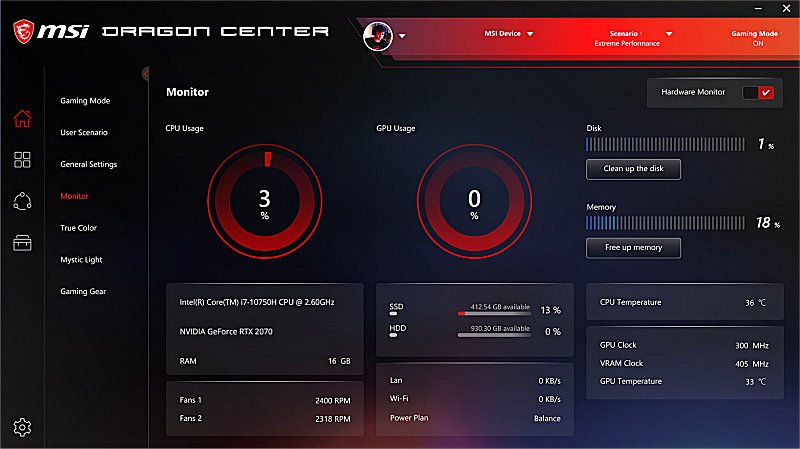
MSI has released version 2.0.152.0 of its Dragon Center software, specifically aimed at gamers looking to enhance their experience on MSI devices. This tool allows users to effectively monitor and optimize system performance, making it user-friendly with a one-click setup for various features. Users can effortlessly adjust settings related to user scenarios, display color modes, sound effects, and LED-backlit colors, ensuring a personalized gaming environment.
The new innovative user interface facilitates seamless navigation across different MSI devices, allowing gamers to maintain a competitive edge. However, it's important to note that some features may differ depending on the specific product being used.
In addition to the updates in Dragon Center, MSI users may also explore various resources, such as guides on discovering indie games, utilizing the Windows 10 & 11 Gaming Task Manager, and tips for uninstalling the Xbox Game Bar and Console Companion. These resources can further enhance the gaming experience for MSI device users.
As MSI continues to innovate, future updates may introduce even more features aimed at improving performance, customization, and overall user engagement in gaming. Gamers are encouraged to stay informed about these developments to fully leverage the capabilities of their MSI devices
The new innovative user interface facilitates seamless navigation across different MSI devices, allowing gamers to maintain a competitive edge. However, it's important to note that some features may differ depending on the specific product being used.
In addition to the updates in Dragon Center, MSI users may also explore various resources, such as guides on discovering indie games, utilizing the Windows 10 & 11 Gaming Task Manager, and tips for uninstalling the Xbox Game Bar and Console Companion. These resources can further enhance the gaming experience for MSI device users.
As MSI continues to innovate, future updates may introduce even more features aimed at improving performance, customization, and overall user engagement in gaming. Gamers are encouraged to stay informed about these developments to fully leverage the capabilities of their MSI devices
MSI Dragon Center 2.0.152.0 released
MSI Dragon Center is designed for gamers to enhance users’ gaming experience on MSI devices.