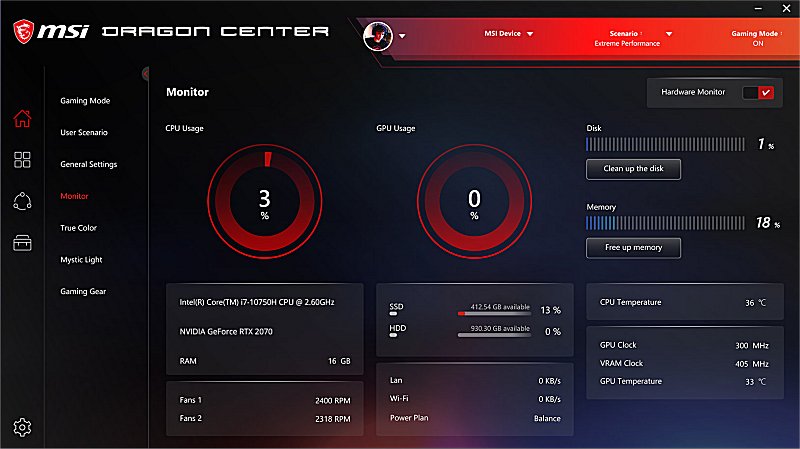
The MSI Dragon Center version 2.0.151.0 has been released, aimed at enhancing the gaming experience for users of MSI devices. This software allows gamers to monitor and optimize their system performance easily. Users can quickly adjust settings such as user scenarios, display color modes, sound effects, and LED-backlit colors with just a click. The updated user interface facilitates seamless navigation across various MSI devices, empowering gamers to reach their full potential in gameplay. It's important to note that some features may differ depending on the specific MSI product in use.
In addition to its core functionalities, MSI Dragon Center offers features like system diagnostics, game optimization settings, and customizable profiles tailored to different gaming scenarios. Furthermore, it may include integration with other gaming software to provide a comprehensive gaming management experience. As gamers continue to seek tools that enhance performance and personalization, MSI Dragon Center serves as a valuable resource in the competitive gaming landscape.
For additional assistance, users can explore guides related to indie games, the Windows 10 & 11 gaming task manager, and tutorials on uninstalling gaming applications like the Xbox Game Bar and Xbox Console Companion. Monitoring gaming FPS is also a critical aspect that users can learn more about to improve their gaming performance
In addition to its core functionalities, MSI Dragon Center offers features like system diagnostics, game optimization settings, and customizable profiles tailored to different gaming scenarios. Furthermore, it may include integration with other gaming software to provide a comprehensive gaming management experience. As gamers continue to seek tools that enhance performance and personalization, MSI Dragon Center serves as a valuable resource in the competitive gaming landscape.
For additional assistance, users can explore guides related to indie games, the Windows 10 & 11 gaming task manager, and tutorials on uninstalling gaming applications like the Xbox Game Bar and Xbox Console Companion. Monitoring gaming FPS is also a critical aspect that users can learn more about to improve their gaming performance
MSI Dragon Center 2.0.151.0 released
MSI Dragon Center is designed for gamers to enhance users’ gaming experience on MSI devices.