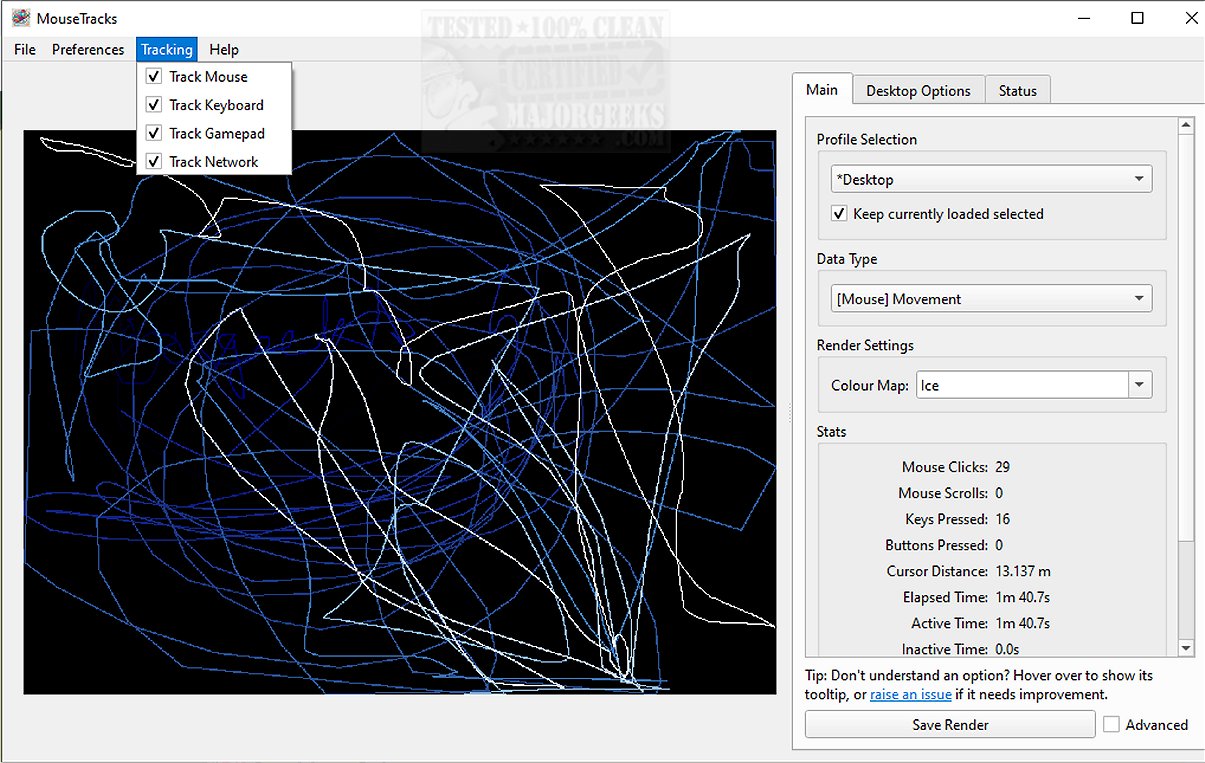
MouseTracks is an advanced application designed to meticulously track and visualize various forms of user input over time, including mouse movements, clicks, keyboard activity, and gamepad input. Its user-centric design emphasizes unobtrusiveness, allowing for continuous operation—even for extended periods—so users can revisit detailed visualizations of their activity data.
Core Features of MouseTracks
1. Mouse Movement and Click Monitoring: MouseTracks continuously captures mouse movements and clicks, with older data gradually fading to maintain focus on recent interactions. This dynamic interface helps users easily interpret their activity patterns.
2. Keyboard and Gamepad Tracking: In addition to mouse tracking, the application generates detailed keyboard heatmaps and records gamepad input, offering a comprehensive view of user interactions.
3. Live Preview Functionality: A standout feature of MouseTracks is its Live Preview capability, which provides real-time rendering of tracking data in the graphical user interface (GUI). Notably, the application maintains high-quality rendering regardless of screen resolution changes, ensuring clarity and precision in visualizations.
4. Multi-Monitor Support: MouseTracks excels in multi-monitor environments, seamlessly tracking activity across multiple displays. When linked to a specific application, the rendering bounds adjust to align with the application's window geometry, enhancing data relevance.
5. Silent Background Operation: Designed for user convenience, MouseTracks runs silently in the background and can be configured to launch at system startup, minimizing directly to the systray for an uninterrupted user experience.
6. Modular Architecture for Stability: The application's architecture is structured around multiple components that communicate efficiently while operating independently. This design ensures stable and reliable live tracking, even during resource-intensive tasks.
The Geek Verdict: MouseTracks goes beyond simple tracking; it is a sophisticated tool for users seeking deep insights into their input behaviors over time. With its clarity, efficiency, and seamless workflow integration, MouseTracks empowers users to analyze their interactions with minimal disruption.
Looking Ahead: Future versions of MouseTracks may include additional features, such as enhanced data analytics tools, customizable visualizations, and integration with other productivity applications. Users are encouraged to check out the developer's repository for more information, including instructions on running or building from source, a mini-FAQ, and other resources.
In summary, MouseTracks 2.4.0 represents a significant leap in user input tracking technology, blending functionality with user-friendly design for an unparalleled experience
Core Features of MouseTracks
1. Mouse Movement and Click Monitoring: MouseTracks continuously captures mouse movements and clicks, with older data gradually fading to maintain focus on recent interactions. This dynamic interface helps users easily interpret their activity patterns.
2. Keyboard and Gamepad Tracking: In addition to mouse tracking, the application generates detailed keyboard heatmaps and records gamepad input, offering a comprehensive view of user interactions.
3. Live Preview Functionality: A standout feature of MouseTracks is its Live Preview capability, which provides real-time rendering of tracking data in the graphical user interface (GUI). Notably, the application maintains high-quality rendering regardless of screen resolution changes, ensuring clarity and precision in visualizations.
4. Multi-Monitor Support: MouseTracks excels in multi-monitor environments, seamlessly tracking activity across multiple displays. When linked to a specific application, the rendering bounds adjust to align with the application's window geometry, enhancing data relevance.
5. Silent Background Operation: Designed for user convenience, MouseTracks runs silently in the background and can be configured to launch at system startup, minimizing directly to the systray for an uninterrupted user experience.
6. Modular Architecture for Stability: The application's architecture is structured around multiple components that communicate efficiently while operating independently. This design ensures stable and reliable live tracking, even during resource-intensive tasks.
The Geek Verdict: MouseTracks goes beyond simple tracking; it is a sophisticated tool for users seeking deep insights into their input behaviors over time. With its clarity, efficiency, and seamless workflow integration, MouseTracks empowers users to analyze their interactions with minimal disruption.
Looking Ahead: Future versions of MouseTracks may include additional features, such as enhanced data analytics tools, customizable visualizations, and integration with other productivity applications. Users are encouraged to check out the developer's repository for more information, including instructions on running or building from source, a mini-FAQ, and other resources.
In summary, MouseTracks 2.4.0 represents a significant leap in user input tracking technology, blending functionality with user-friendly design for an unparalleled experience
MouseTracks 2.4.0 released
MouseTracks is a sophisticated application crafted to meticulously track and visualize various forms of user input over time, including mouse movements, clicks, keyboard activity, and gamepad input.