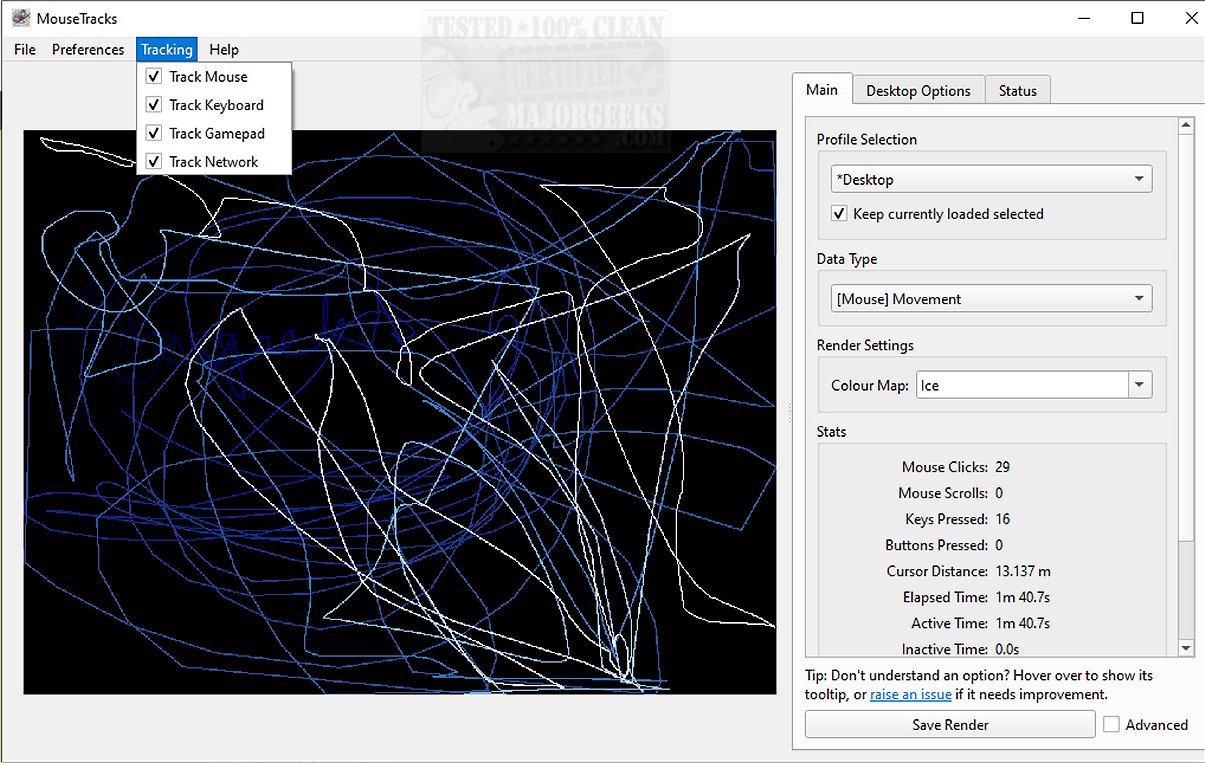
MouseTracks is an advanced application designed to meticulously monitor and visualize a variety of user inputs over time, including mouse movements, clicks, keyboard activity, and gamepad interactions. Its primary aim is to deliver a user-friendly experience by operating unobtrusively in the background, allowing users to run the software continuously—potentially for years—before revisiting to explore detailed visualizations of their activity data.
Core Features of MouseTracks
At the heart of MouseTracks is its robust monitoring system that efficiently records mouse movements and clicks with remarkable precision. To facilitate a clear understanding, older interactions gradually fade from the display, creating a dynamic and intuitive interface. Furthermore, the application offers detailed keyboard heatmaps and captures gamepad inputs, enabling users to gain a comprehensive understanding of their interaction patterns over time.
Live Preview Capability
One of the application's standout features is its Live Preview functionality, which optimizes real-time rendering of tracking data in the graphical user interface (GUI). Despite changes in screen resolution, MouseTracks maintains high-quality renders, independently tracking each resolution and merging final visual outputs for clarity and accuracy.
Multi-Monitor Support
MouseTracks shines in multi-monitor environments, offering seamless tracking across multiple displays. The application intelligently adjusts rendering bounds to align with the geometry of specific application windows, enhancing the relevance and usability of the presented data.
Silent Background Operation
Designed with user convenience in mind, MouseTracks operates silently in the background. Users can configure it to launch automatically at system startup and minimize to the systray, ensuring a hassle-free experience that does not interrupt daily tasks.
Modular Architecture for Stability
The architectural design of MouseTracks is modular, allowing various components to communicate effectively while functioning independently. This structure ensures stable and reliable live tracking, even during resource-intensive tasks like rendering visualizations or managing GUI operations.
Conclusion: The Geek Verdict
MouseTracks is more than just a tracking tool; it is a sophisticated solution for users who wish to delve deeply into their input behavior over time. Its clarity, efficiency, and seamless integration into everyday workflows empower users to analyze their interactions with ease and minimal disruption. Plus, the unique insights it provides are pretty cool!
For those interested in exploring further, the developer's repository offers additional resources, including information on running/building from the source, a mini-FAQ, and much more.
Future Prospects: Enhancements and Community Engagement
Looking ahead, the developers of MouseTracks are committed to continuous improvement and innovation. Possible future enhancements might include advanced analytics features, integration with third-party applications for enriched data analysis, and community-driven updates based on user feedback. Engaging with the user community could lead to new feature requests, further customization options, and collaborative development efforts that enhance the overall user experience. As MouseTracks evolves, users can anticipate an even more powerful tool for understanding and optimizing their digital interactions
Core Features of MouseTracks
At the heart of MouseTracks is its robust monitoring system that efficiently records mouse movements and clicks with remarkable precision. To facilitate a clear understanding, older interactions gradually fade from the display, creating a dynamic and intuitive interface. Furthermore, the application offers detailed keyboard heatmaps and captures gamepad inputs, enabling users to gain a comprehensive understanding of their interaction patterns over time.
Live Preview Capability
One of the application's standout features is its Live Preview functionality, which optimizes real-time rendering of tracking data in the graphical user interface (GUI). Despite changes in screen resolution, MouseTracks maintains high-quality renders, independently tracking each resolution and merging final visual outputs for clarity and accuracy.
Multi-Monitor Support
MouseTracks shines in multi-monitor environments, offering seamless tracking across multiple displays. The application intelligently adjusts rendering bounds to align with the geometry of specific application windows, enhancing the relevance and usability of the presented data.
Silent Background Operation
Designed with user convenience in mind, MouseTracks operates silently in the background. Users can configure it to launch automatically at system startup and minimize to the systray, ensuring a hassle-free experience that does not interrupt daily tasks.
Modular Architecture for Stability
The architectural design of MouseTracks is modular, allowing various components to communicate effectively while functioning independently. This structure ensures stable and reliable live tracking, even during resource-intensive tasks like rendering visualizations or managing GUI operations.
Conclusion: The Geek Verdict
MouseTracks is more than just a tracking tool; it is a sophisticated solution for users who wish to delve deeply into their input behavior over time. Its clarity, efficiency, and seamless integration into everyday workflows empower users to analyze their interactions with ease and minimal disruption. Plus, the unique insights it provides are pretty cool!
For those interested in exploring further, the developer's repository offers additional resources, including information on running/building from the source, a mini-FAQ, and much more.
Future Prospects: Enhancements and Community Engagement
Looking ahead, the developers of MouseTracks are committed to continuous improvement and innovation. Possible future enhancements might include advanced analytics features, integration with third-party applications for enriched data analysis, and community-driven updates based on user feedback. Engaging with the user community could lead to new feature requests, further customization options, and collaborative development efforts that enhance the overall user experience. As MouseTracks evolves, users can anticipate an even more powerful tool for understanding and optimizing their digital interactions
MouseTracks 2.3.0 released
MouseTracks is a sophisticated application crafted to meticulously track and visualize various forms of user input over time, including mouse movements, clicks, keyboard activity, and gamepad input.