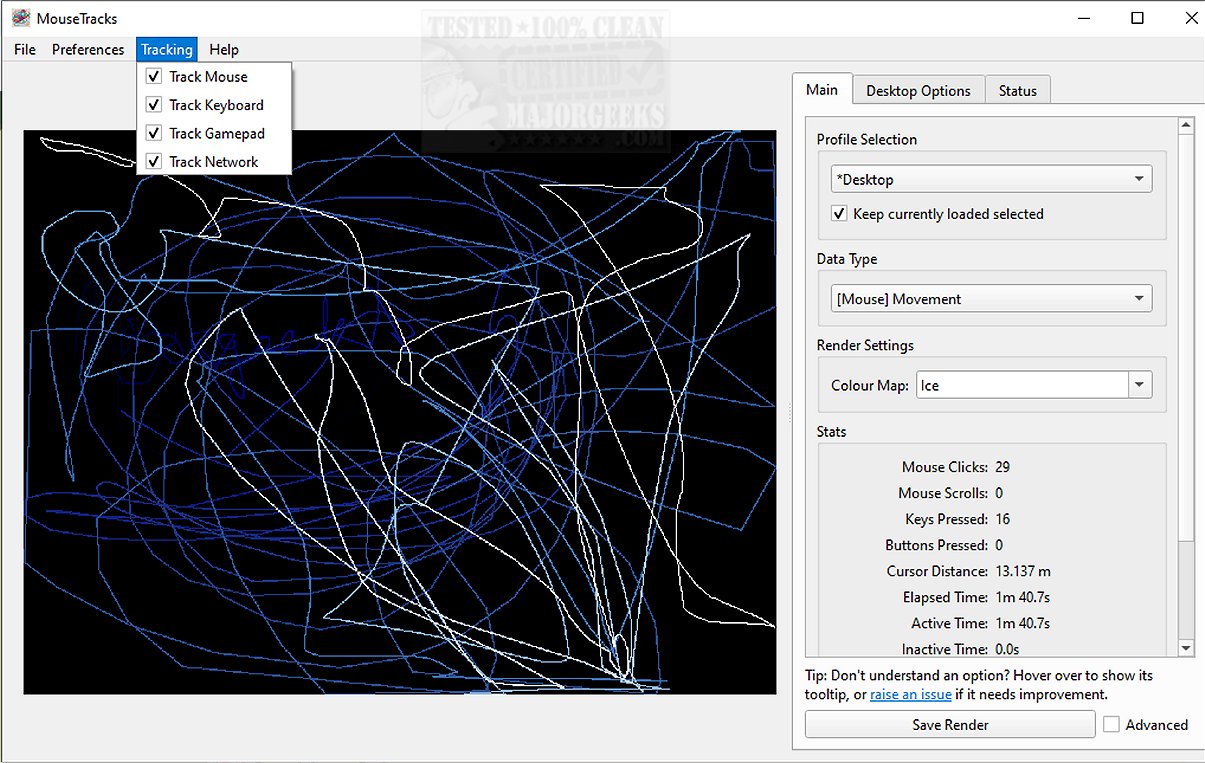
MouseTracks is an advanced application designed to meticulously track and visualize various forms of user input over time, such as mouse movements, clicks, keyboard activity, and gamepad input. Its unobtrusive design allows users to run the software continuously, even for extended periods, providing vivid visualizations of their activity data upon returning.
Key Features of MouseTracks
1. Steadfast Monitoring: At its core, MouseTracks continuously records mouse movements and clicks with high precision. An innovative fading mechanism is employed for older movements, maintaining a clear and dynamic interface. Alongside mouse tracking, the application generates keyboard heatmaps and captures gamepad input, offering a comprehensive view of interaction patterns.
2. Live Preview Functionality: A standout feature is the Live Preview capability, which enables real-time rendering of tracking data in the graphical user interface (GUI). Users can change their screen resolution without compromising the quality of the visualizations. The application tracks each resolution independently, ensuring clarity by merging final representations accurately.
3. Multi-Monitor Support: MouseTracks excels in environments with multiple monitors, efficiently tracking user activity across all displays. When connected to a specific application, it intuitively adjusts rendering bounds to align with the application's window geometry, enhancing data relevance.
4. Silent Background Operation: Designed for convenience, MouseTracks operates silently in the background, with options for automatic launching at system startup and minimizing to the system tray. This ensures a seamless, non-intrusive experience that doesn't disrupt daily tasks.
5. Modular Architecture for Stability: The application is constructed with a modular architecture, allowing components to communicate efficiently while operating independently. This design ensures stable and reliable live tracking, even during resource-intensive tasks like rendering visualizations or managing GUI operations.
Conclusion and Additional Resources
MouseTracks transcends basic tracking functionalities, providing a sophisticated solution for individuals eager to gain deep insights into their input behaviors over time. With its clarity, efficiency, and seamless integration into everyday workflows, MouseTracks empowers users to analyze their interactions with minimal disruption. For further information, including guidance on running and building from source, a mini-FAQ, and other resources, users are encouraged to visit the developer's repository.
Future Enhancements and Community Engagement
As MouseTracks continues to evolve, future updates may introduce enhanced customization options for visualizations, more robust analytical tools, and even broader support for different input devices. The community is invited to engage with the developers through feedback and feature requests, ensuring that MouseTracks remains a cutting-edge tool for tracking user interactions effectively
Key Features of MouseTracks
1. Steadfast Monitoring: At its core, MouseTracks continuously records mouse movements and clicks with high precision. An innovative fading mechanism is employed for older movements, maintaining a clear and dynamic interface. Alongside mouse tracking, the application generates keyboard heatmaps and captures gamepad input, offering a comprehensive view of interaction patterns.
2. Live Preview Functionality: A standout feature is the Live Preview capability, which enables real-time rendering of tracking data in the graphical user interface (GUI). Users can change their screen resolution without compromising the quality of the visualizations. The application tracks each resolution independently, ensuring clarity by merging final representations accurately.
3. Multi-Monitor Support: MouseTracks excels in environments with multiple monitors, efficiently tracking user activity across all displays. When connected to a specific application, it intuitively adjusts rendering bounds to align with the application's window geometry, enhancing data relevance.
4. Silent Background Operation: Designed for convenience, MouseTracks operates silently in the background, with options for automatic launching at system startup and minimizing to the system tray. This ensures a seamless, non-intrusive experience that doesn't disrupt daily tasks.
5. Modular Architecture for Stability: The application is constructed with a modular architecture, allowing components to communicate efficiently while operating independently. This design ensures stable and reliable live tracking, even during resource-intensive tasks like rendering visualizations or managing GUI operations.
Conclusion and Additional Resources
MouseTracks transcends basic tracking functionalities, providing a sophisticated solution for individuals eager to gain deep insights into their input behaviors over time. With its clarity, efficiency, and seamless integration into everyday workflows, MouseTracks empowers users to analyze their interactions with minimal disruption. For further information, including guidance on running and building from source, a mini-FAQ, and other resources, users are encouraged to visit the developer's repository.
Future Enhancements and Community Engagement
As MouseTracks continues to evolve, future updates may introduce enhanced customization options for visualizations, more robust analytical tools, and even broader support for different input devices. The community is invited to engage with the developers through feedback and feature requests, ensuring that MouseTracks remains a cutting-edge tool for tracking user interactions effectively
MouseTracks 2.2.8 released
MouseTracks is a sophisticated application crafted to meticulously track and visualize various forms of user input over time, including mouse movements, clicks, keyboard activity, and gamepad input.