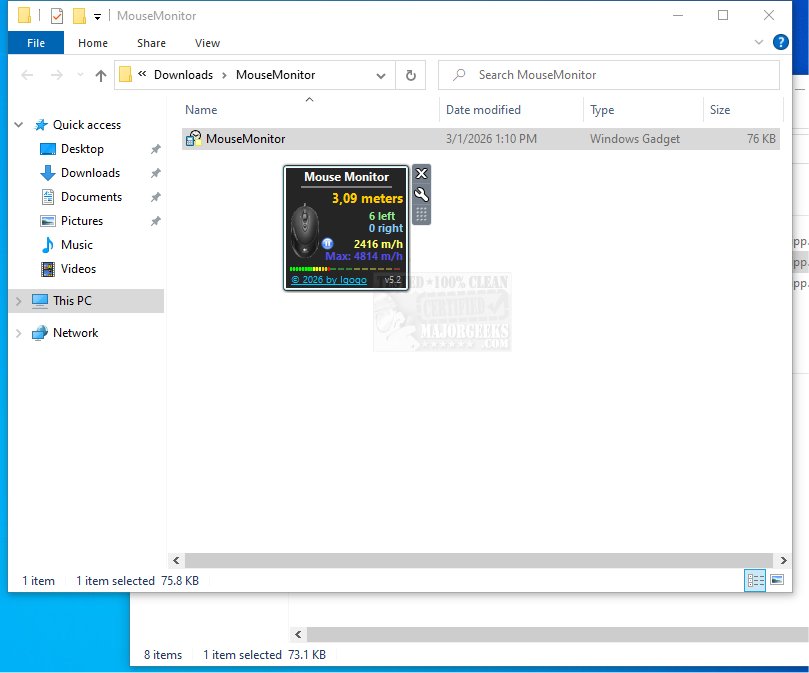
The newly released Mouse Monitor 6.2 is a Windows desktop gadget designed to provide users with in-depth statistics on their mouse usage, including the total number of left and right clicks as well as the distance the mouse has traveled. This tool serves as a real-time tracker, enabling users to monitor their mouse activity over specified time intervals.
Key Features of Mouse Monitor
Mouse Monitor offers a user-friendly display of various metrics related to mouse movements. Users can easily view the count of left and right clicks, the distance the mouse cursor has traveled, and the cursor's speed measured in meters per hour. The gadget not only tracks the current speed but also records the maximum speed achieved during the current session. Additionally, users have the option to reset the counters either manually or automatically upon shutting down the computer.
Customization Options
One of the notable aspects of Mouse Monitor is its customization capabilities. Users can tailor the gadget to blend seamlessly with their desktop environment by adjusting its background or color preferences. Specific elements, such as the title, can be hidden, and text colors can be modified to improve readability or match personal aesthetics. The gadget is also designed for flexible positioning on the desktop and can be set to stay visible above other windows, allowing for continuous monitoring of mouse statistics. Moreover, users can replace the default mouse icon with a custom image to further personalize their experience.
Conclusion and Additional Insights
Mouse Monitor stands out as an excellent tool for those who wish to track their mouse usage meticulously. Its lightweight design and precision make it an ideal companion for enhancing productivity and gaining insights from every click.
For those looking to optimize their workflow, Mouse Monitor can be an invaluable resource. It complements other productivity tools and tips, such as keyboard shortcuts for efficiency, methods to manage sticky keys in Windows, and techniques for altering click settings. As users explore Mouse Monitor, they may also discover additional ways to enhance their overall computing experience.
In summary, Mouse Monitor 6.2 not only provides detailed mouse usage statistics but also offers customization options that cater to individual preferences, making it a must-have for users eager to understand their interaction with their devices better
Key Features of Mouse Monitor
Mouse Monitor offers a user-friendly display of various metrics related to mouse movements. Users can easily view the count of left and right clicks, the distance the mouse cursor has traveled, and the cursor's speed measured in meters per hour. The gadget not only tracks the current speed but also records the maximum speed achieved during the current session. Additionally, users have the option to reset the counters either manually or automatically upon shutting down the computer.
Customization Options
One of the notable aspects of Mouse Monitor is its customization capabilities. Users can tailor the gadget to blend seamlessly with their desktop environment by adjusting its background or color preferences. Specific elements, such as the title, can be hidden, and text colors can be modified to improve readability or match personal aesthetics. The gadget is also designed for flexible positioning on the desktop and can be set to stay visible above other windows, allowing for continuous monitoring of mouse statistics. Moreover, users can replace the default mouse icon with a custom image to further personalize their experience.
Conclusion and Additional Insights
Mouse Monitor stands out as an excellent tool for those who wish to track their mouse usage meticulously. Its lightweight design and precision make it an ideal companion for enhancing productivity and gaining insights from every click.
For those looking to optimize their workflow, Mouse Monitor can be an invaluable resource. It complements other productivity tools and tips, such as keyboard shortcuts for efficiency, methods to manage sticky keys in Windows, and techniques for altering click settings. As users explore Mouse Monitor, they may also discover additional ways to enhance their overall computing experience.
In summary, Mouse Monitor 6.2 not only provides detailed mouse usage statistics but also offers customization options that cater to individual preferences, making it a must-have for users eager to understand their interaction with their devices better
Mouse Monitor 6.2 released
Mouse Monitor provides detailed statistics on mouse usage, including the total number of left and right clicks and the distance the mouse has traveled.