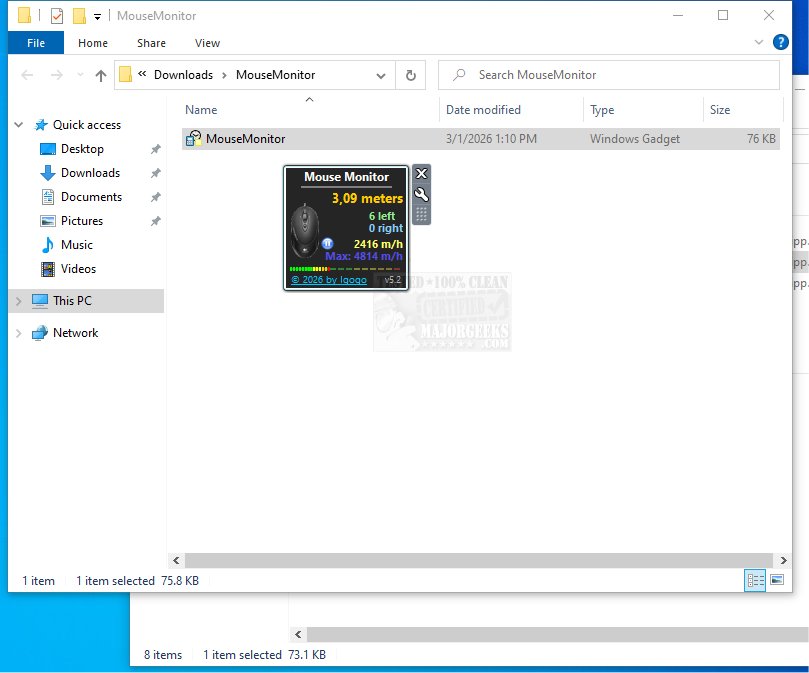
Mouse Monitor is a specialized Windows gadget that tracks and provides detailed statistics on mouse usage, including metrics such as the total number of left and right clicks and the distance the mouse has traveled. This tool is designed for users who want to gain insights into their mouse activity in real-time, allowing them to monitor clicks over specified time intervals.
Key Features of Mouse Monitor
1. Detailed Tracking: The gadget displays various mouse metrics clearly, including click counts for both left and right buttons, as well as the distance traveled by the mouse cursor. It also tracks cursor speed in meters per hour, providing both current and maximum speeds recorded during the session.
2. Customizability: Users can personalize the Mouse Monitor interface to suit their preferences. Customization options allow for adjustments in color and text visibility, hiding certain elements like the title, and positioning the gadget on the desktop. The gadget can be set to remain visible above other windows for constant access to mouse statistics.
3. Counter Management: The counter can be reset manually by the user or automatically upon shutting down the computer, providing flexibility in monitoring sessions.
User Experience and Verdict
Mouse Monitor is praised for its lightweight design and precision, making it an ideal companion for users interested in enhancing their productivity through insight into mouse usage. With its customization features and real-time monitoring capabilities, it caters to those who want to optimize their desktop experience.
Conclusion
If you're looking to boost your productivity and gain a better understanding of your mouse activity, Mouse Monitor is a valuable tool that combines functionality with aesthetic flexibility. Its easy-to-use interface and comprehensive tracking make it a great addition to your desktop environment.
Related Tips and Tools:
- Explore keyboard shortcuts to increase productivity.
- Learn how to toggle Sticky Keys in Windows 10 & 11.
- Discover how to change file opening settings from double-click to single-click.
- Find ways to make the Scroll Lock key more functional
Key Features of Mouse Monitor
1. Detailed Tracking: The gadget displays various mouse metrics clearly, including click counts for both left and right buttons, as well as the distance traveled by the mouse cursor. It also tracks cursor speed in meters per hour, providing both current and maximum speeds recorded during the session.
2. Customizability: Users can personalize the Mouse Monitor interface to suit their preferences. Customization options allow for adjustments in color and text visibility, hiding certain elements like the title, and positioning the gadget on the desktop. The gadget can be set to remain visible above other windows for constant access to mouse statistics.
3. Counter Management: The counter can be reset manually by the user or automatically upon shutting down the computer, providing flexibility in monitoring sessions.
User Experience and Verdict
Mouse Monitor is praised for its lightweight design and precision, making it an ideal companion for users interested in enhancing their productivity through insight into mouse usage. With its customization features and real-time monitoring capabilities, it caters to those who want to optimize their desktop experience.
Conclusion
If you're looking to boost your productivity and gain a better understanding of your mouse activity, Mouse Monitor is a valuable tool that combines functionality with aesthetic flexibility. Its easy-to-use interface and comprehensive tracking make it a great addition to your desktop environment.
Related Tips and Tools:
- Explore keyboard shortcuts to increase productivity.
- Learn how to toggle Sticky Keys in Windows 10 & 11.
- Discover how to change file opening settings from double-click to single-click.
- Find ways to make the Scroll Lock key more functional
Mouse Monitor 5.3 released
Mouse Monitor provides detailed statistics on mouse usage, including the total number of left and right clicks and the distance the mouse has traveled.