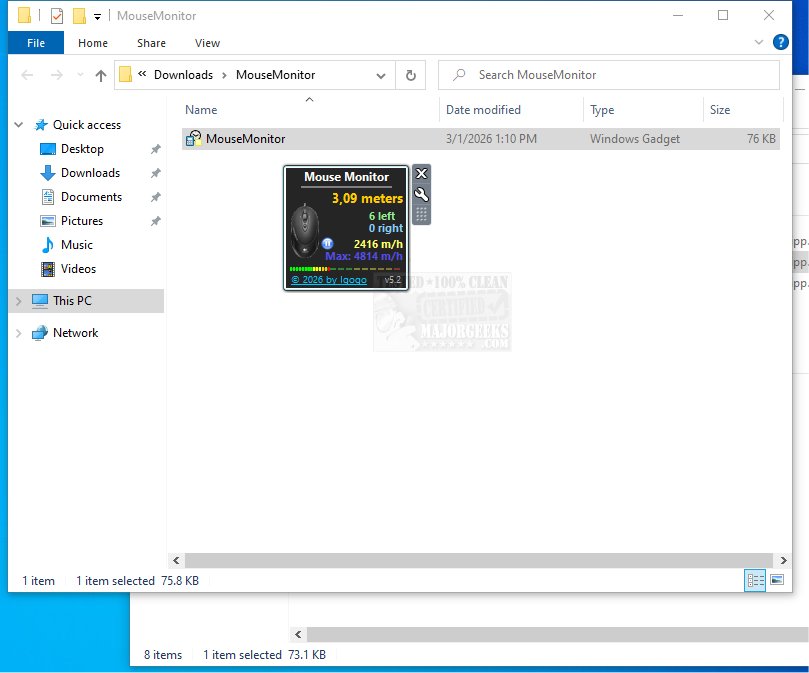
Mouse Monitor is a newly released Windows gadget that offers users in-depth statistics related to mouse usage. This innovative tool tracks important metrics such as the total number of left and right clicks, as well as the total distance the mouse has traveled, providing real-time insights into mouse activity.
Key Features of Mouse Monitor
The primary function of Mouse Monitor is to deliver detailed analytics on mouse interactions within specified time intervals. The gadget displays various mouse movement metrics, including click counts and cursor speed, measured in meters per hour. Users can easily view both the current speed and the maximum speed recorded during the session. Additionally, the counter can be reset manually or automatically when the computer shuts down.
Customization Options for Personalization
Mouse Monitor offers a range of customization options, allowing users to adjust its appearance to suit their desktop preferences. Users can modify elements like the text color for better readability and aesthetics, hide specific components such as the title, and reposition the gadget anywhere on the desktop. It also has the capability to remain visible above other windows, enabling continuous monitoring of mouse statistics. Furthermore, users have the option to personalize the gadget by replacing the default mouse icon with a custom image.
Why Choose Mouse Monitor?
If you are interested in analyzing your mouse usage for productivity or personal insight, Mouse Monitor stands out as a lightweight and precise tool for your desktop environment. Its combination of functionality and customization makes it a valuable addition for anyone looking to enhance their performance with each click.
Related Tools and Tips
In addition to Mouse Monitor, users may also find it beneficial to explore other productivity-enhancing tools and tips, such as keyboard shortcuts to increase efficiency, methods to toggle Sticky Keys on or off in Windows 10 and 11, and techniques for changing double-click settings to single-click for file and folder access. Moreover, users can learn how to make the Scroll Lock key more functional.
Conclusion
Overall, Mouse Monitor 5.2 is a powerful gadget designed to provide users with essential insights into their mouse usage, making it an ideal tool for those looking to optimize their computing experience
Key Features of Mouse Monitor
The primary function of Mouse Monitor is to deliver detailed analytics on mouse interactions within specified time intervals. The gadget displays various mouse movement metrics, including click counts and cursor speed, measured in meters per hour. Users can easily view both the current speed and the maximum speed recorded during the session. Additionally, the counter can be reset manually or automatically when the computer shuts down.
Customization Options for Personalization
Mouse Monitor offers a range of customization options, allowing users to adjust its appearance to suit their desktop preferences. Users can modify elements like the text color for better readability and aesthetics, hide specific components such as the title, and reposition the gadget anywhere on the desktop. It also has the capability to remain visible above other windows, enabling continuous monitoring of mouse statistics. Furthermore, users have the option to personalize the gadget by replacing the default mouse icon with a custom image.
Why Choose Mouse Monitor?
If you are interested in analyzing your mouse usage for productivity or personal insight, Mouse Monitor stands out as a lightweight and precise tool for your desktop environment. Its combination of functionality and customization makes it a valuable addition for anyone looking to enhance their performance with each click.
Related Tools and Tips
In addition to Mouse Monitor, users may also find it beneficial to explore other productivity-enhancing tools and tips, such as keyboard shortcuts to increase efficiency, methods to toggle Sticky Keys on or off in Windows 10 and 11, and techniques for changing double-click settings to single-click for file and folder access. Moreover, users can learn how to make the Scroll Lock key more functional.
Conclusion
Overall, Mouse Monitor 5.2 is a powerful gadget designed to provide users with essential insights into their mouse usage, making it an ideal tool for those looking to optimize their computing experience
Mouse Monitor 5.2 released
Mouse Monitor provides detailed statistics on mouse usage, including the total number of left and right clicks and the distance the mouse has traveled.