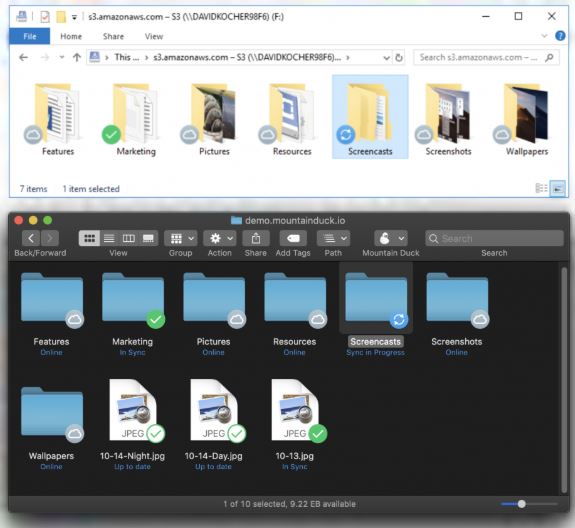
Mountain Duck 5.1.1 has been released, offering a powerful tool for integrating remote storage with local file systems on Windows and macOS. This paid utility allows users to mount various types of remote storage—including FTP, SFTP, WebDAV, Amazon S3, and Google Cloud—directly as local drives. This means that users can easily open, save, and edit files in the cloud using their familiar file-based applications without the hassle of syncing or switching between different applications.
Mountain Duck functions as a seamless bridge between your desktop environment and cloud storage, mapping remote servers so that they appear as additional local drives. This eliminates the need for manual uploads or downloads, enabling a straightforward workflow akin to using a USB drive, but with cloud resources. For example, if Google Drive is mounted as the D: drive, users can interact with files as if they are stored locally on their hard drive.
This tool is particularly beneficial for professionals who frequently manage remote servers, cloud storage, or off-site file systems, as it significantly streamlines operations. For instance, editing files directly on a remote server becomes effortless, allowing for immediate changes without the tedious process of downloading and re-uploading files.
Mountain Duck offers a fully functional 14-day trial with no restrictions, allowing potential users to explore its features, including support for various protocols, deep OS integration, smart caching, and file versioning. Users can quickly get started without the need for credit card details or complicated sign-up processes.
- Integration with Finder and Explorer for a seamless user experience
- Smart caching for consistent file access
- Compatibility with major applications like Photoshop and Visual Studio
- Bookmarking and secure credential management for easy access
- Quick-launch options from the menu bar or taskbar
- Supports a wide range of cloud and server protocols
- Works seamlessly with existing applications
- Provides offline access in case of connectivity issues
Cons:
- Not free after the trial period—requires a license purchase
- Users may need time to familiarize themselves with remote mounting
- Performance may be affected by slow networks or servers
Mountain Duck functions as a seamless bridge between your desktop environment and cloud storage, mapping remote servers so that they appear as additional local drives. This eliminates the need for manual uploads or downloads, enabling a straightforward workflow akin to using a USB drive, but with cloud resources. For example, if Google Drive is mounted as the D: drive, users can interact with files as if they are stored locally on their hard drive.
This tool is particularly beneficial for professionals who frequently manage remote servers, cloud storage, or off-site file systems, as it significantly streamlines operations. For instance, editing files directly on a remote server becomes effortless, allowing for immediate changes without the tedious process of downloading and re-uploading files.
Mountain Duck offers a fully functional 14-day trial with no restrictions, allowing potential users to explore its features, including support for various protocols, deep OS integration, smart caching, and file versioning. Users can quickly get started without the need for credit card details or complicated sign-up processes.
Key Features:
- Extensive protocol support: FTP, SFTP, WebDAV, S3, Azure, Google Cloud, Backblaze B2- Integration with Finder and Explorer for a seamless user experience
- Smart caching for consistent file access
- Compatibility with major applications like Photoshop and Visual Studio
- Bookmarking and secure credential management for easy access
- Quick-launch options from the menu bar or taskbar
Usage Scenarios:
Users can mount remote drives for various purposes, such as editing configuration files on servers or archiving project files to S3 without additional applications or syncing processes.Pros & Cons:
Pros:- Supports a wide range of cloud and server protocols
- Works seamlessly with existing applications
- Provides offline access in case of connectivity issues
Cons:
- Not free after the trial period—requires a license purchase
- Users may need time to familiarize themselves with remote mounting
- Performance may be affected by slow networks or servers
Conclusion:
Mountain Duck effectively simplifies remote file management, providing a user-friendly experience that mimics local file access. The generous trial period allows users to fully explore its capabilities, making it a worthwhile option for anyone frustrated by traditional cloud syncing methods. Whether you're a developer, designer, or anyone who regularly interacts with cloud storage, Mountain Duck is worth considering for its efficiency and ease of useMountain Duck 5.1.1 released
Mountain Duck lets you mount remote storage like FTP, SFTP, WebDAV, Amazon S3, and more as local disks on Windows and macOS, so any file‑based app can open, save, or edit files directly in the cloud.