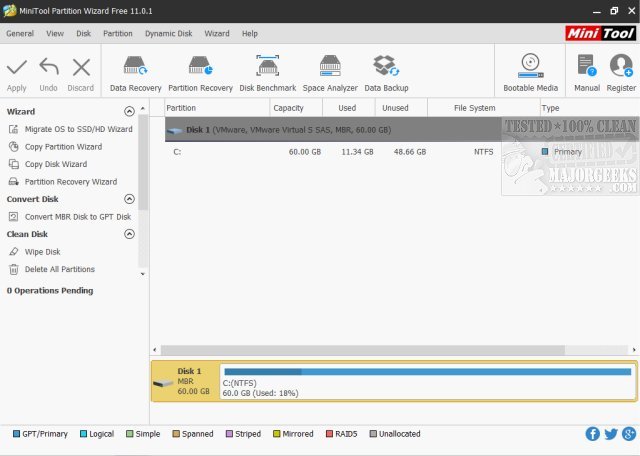
MiniTool Partition Wizard Free Edition 13.6 has been released, offering a robust and user-friendly solution for managing hard drive partitions without any cost. This powerful partition manager facilitates various complex operations such as resizing, creating, deleting, merging, and formatting partitions. It is designed to cater to a wide audience, including tech enthusiasts and casual PC users, making it an essential tool in any software arsenal.
Key Features of MiniTool Partition Wizard include:
1. User-Friendly Interface: The intuitive visual layout simplifies managing disk storage, making it easy to navigate through different functionalities.
2. Data Protection: Users can recover lost partitions, clone hard drives, and create backups to ensure data safety.
3. Performance Improvement: The tool aids in reallocating disk space and optimizing SSD setups, enhancing overall system performance.
4. Conversion and Compatibility: Users can seamlessly convert between different file systems and partition types without complications.
5. Large Storage Support: It effectively manages partitions over 2TB, accommodating larger drives without issues.
6. Disk Analysis Tools: Features like disk surface testing and space analyzers help diagnose problems and uncover hidden storage usage.
What sets MiniTool Partition Wizard apart from other disk management utilities is its combination of comprehensive features and ease of use. The visual disk maps allow users to preview changes, and the hot-extend feature lets you adjust partitions on the fly without rebooting. Additionally, the free version is sufficiently equipped for most users, with an upgrade option available for those needing advanced functionalities.
In conclusion, MiniTool Partition Wizard Free Edition is a standout choice for anyone seeking a reliable and effective disk management tool. Its combination of simplicity, versatility, and no cost makes it a desirable option for managing storage solutions. Millions of users have already embraced MiniTool, so consider trying it out for your disk management needs and experience the ease it brings to partitioning tasks.
Future Considerations: As technology continues to evolve, keeping an eye on updates and enhancements to software like MiniTool will be crucial. Users may also want to explore additional functionalities in future versions, including improved cloud integration or advanced file recovery options, to further streamline their disk management processes
Key Features of MiniTool Partition Wizard include:
1. User-Friendly Interface: The intuitive visual layout simplifies managing disk storage, making it easy to navigate through different functionalities.
2. Data Protection: Users can recover lost partitions, clone hard drives, and create backups to ensure data safety.
3. Performance Improvement: The tool aids in reallocating disk space and optimizing SSD setups, enhancing overall system performance.
4. Conversion and Compatibility: Users can seamlessly convert between different file systems and partition types without complications.
5. Large Storage Support: It effectively manages partitions over 2TB, accommodating larger drives without issues.
6. Disk Analysis Tools: Features like disk surface testing and space analyzers help diagnose problems and uncover hidden storage usage.
What sets MiniTool Partition Wizard apart from other disk management utilities is its combination of comprehensive features and ease of use. The visual disk maps allow users to preview changes, and the hot-extend feature lets you adjust partitions on the fly without rebooting. Additionally, the free version is sufficiently equipped for most users, with an upgrade option available for those needing advanced functionalities.
In conclusion, MiniTool Partition Wizard Free Edition is a standout choice for anyone seeking a reliable and effective disk management tool. Its combination of simplicity, versatility, and no cost makes it a desirable option for managing storage solutions. Millions of users have already embraced MiniTool, so consider trying it out for your disk management needs and experience the ease it brings to partitioning tasks.
Future Considerations: As technology continues to evolve, keeping an eye on updates and enhancements to software like MiniTool will be crucial. Users may also want to explore additional functionalities in future versions, including improved cloud integration or advanced file recovery options, to further streamline their disk management processes
MiniTool Partition Wizard Free Edition 13.6 released
MiniTool Partition Wizard Free Edition is a powerful yet free partition manager that can perform complicated partition operations to manage your hard drive partitions.
MiniTool Partition Wizard Free Edition 13.6 released @ MajorGeeks