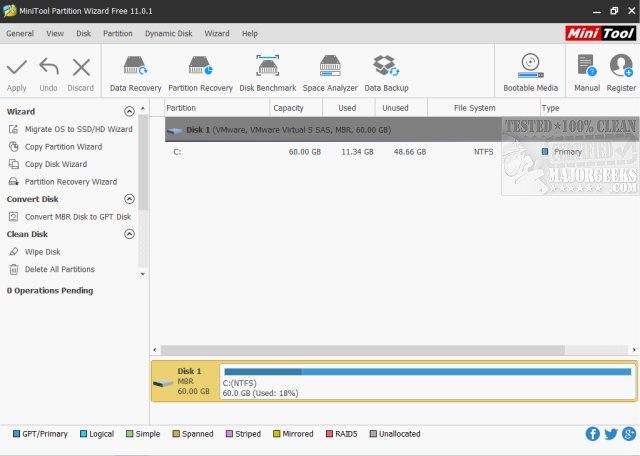
MiniTool Partition Wizard Free Edition is an efficient and user-friendly partition manager that allows users to easily manage their hard drive partitions without any cost. This tool simplifies complex disk management tasks, making it accessible for both tech enthusiasts and casual users. Whether you need to resize partitions, check the health of your drive, or migrate your system to an SSD, MiniTool Partition Wizard has you covered.
Key Features of MiniTool Partition Wizard:
1. User-Friendly Interface: With its straightforward visual layout, users can easily navigate through various disk management options, eliminating the frustration often associated with partitioning tasks.
2. Comprehensive Partition Management: The tool allows users to resize, create, delete, merge, split, and format partitions effortlessly. It enables efficient space allocation for operating systems or enhances performance by optimizing drive space.
3. Data Protection: Users can recover lost partitions, clone hard drives, and create backups, providing peace of mind regarding data safety.
4. Performance Optimization: MiniTool Partition Wizard can help improve system performance by reallocating disk space, rebuilding the master boot record (MBR), and aligning SSD partitions.
5. Flexible Conversions: The tool supports converting FAT to NTFS, MBR to GPT, and changing partitions from primary to logical formats, catering to both simple and advanced needs.
6. Support for Large Drives: It efficiently manages drives exceeding 2TB, ensuring users can work without worrying about storage limitations.
7. Disk Analysis and Diagnostics: With features like disk surface testing and space analysis, users can quickly identify issues and optimize storage.
What Sets MiniTool Apart?
While many disk utilities exist, MiniTool Partition Wizard stands out for its combination of functionality and ease of use. Unique features include:
- Visual Disk Maps: Users can preview their partitions before making changes, enhancing understanding and control over modifications.
- Hot-Extend Functionality: Users can enlarge partitions without rebooting, allowing for seamless workflow.
- Effortless Copying: Transferring data from one disk to another can be done quickly, avoiding tedious reinstallation processes.
Although there is a Pro Version available for advanced users at $99, the free edition is robust enough for most needs, making it one of the best options in the market.
In Conclusion:
MiniTool Partition Wizard Free Edition is a top-tier tool for anyone looking to tackle disk management issues without spending money. Its blend of simplicity, versatility, and effectiveness has garnered a vast user base. If you need to solve storage challenges, upgrade your drives, or optimize your system, this tool is worth trying. Experience the convenience of easy disk management and join the millions of satisfied users who rely on MiniTool.
Further Considerations:
For users looking to deepen their knowledge of disk partitioning, questions may arise such as whether to choose GPT (GUID Partition Table) or MBR (Master Boot Record) when partitioning a drive, or understanding the implications of Windows 10 creating extra disk partitions. Additionally, users may wonder if formatting a hard drive is necessary when performing a fresh install of Windows. Exploring these topics can provide further insight into effective disk management strategies
Key Features of MiniTool Partition Wizard:
1. User-Friendly Interface: With its straightforward visual layout, users can easily navigate through various disk management options, eliminating the frustration often associated with partitioning tasks.
2. Comprehensive Partition Management: The tool allows users to resize, create, delete, merge, split, and format partitions effortlessly. It enables efficient space allocation for operating systems or enhances performance by optimizing drive space.
3. Data Protection: Users can recover lost partitions, clone hard drives, and create backups, providing peace of mind regarding data safety.
4. Performance Optimization: MiniTool Partition Wizard can help improve system performance by reallocating disk space, rebuilding the master boot record (MBR), and aligning SSD partitions.
5. Flexible Conversions: The tool supports converting FAT to NTFS, MBR to GPT, and changing partitions from primary to logical formats, catering to both simple and advanced needs.
6. Support for Large Drives: It efficiently manages drives exceeding 2TB, ensuring users can work without worrying about storage limitations.
7. Disk Analysis and Diagnostics: With features like disk surface testing and space analysis, users can quickly identify issues and optimize storage.
What Sets MiniTool Apart?
While many disk utilities exist, MiniTool Partition Wizard stands out for its combination of functionality and ease of use. Unique features include:
- Visual Disk Maps: Users can preview their partitions before making changes, enhancing understanding and control over modifications.
- Hot-Extend Functionality: Users can enlarge partitions without rebooting, allowing for seamless workflow.
- Effortless Copying: Transferring data from one disk to another can be done quickly, avoiding tedious reinstallation processes.
Although there is a Pro Version available for advanced users at $99, the free edition is robust enough for most needs, making it one of the best options in the market.
In Conclusion:
MiniTool Partition Wizard Free Edition is a top-tier tool for anyone looking to tackle disk management issues without spending money. Its blend of simplicity, versatility, and effectiveness has garnered a vast user base. If you need to solve storage challenges, upgrade your drives, or optimize your system, this tool is worth trying. Experience the convenience of easy disk management and join the millions of satisfied users who rely on MiniTool.
Further Considerations:
For users looking to deepen their knowledge of disk partitioning, questions may arise such as whether to choose GPT (GUID Partition Table) or MBR (Master Boot Record) when partitioning a drive, or understanding the implications of Windows 10 creating extra disk partitions. Additionally, users may wonder if formatting a hard drive is necessary when performing a fresh install of Windows. Exploring these topics can provide further insight into effective disk management strategies
MiniTool Partition Wizard Free Edition 13.5 released
MiniTool Partition Wizard Free Edition is a powerful yet free partition manager that can perform complicated partition operations to manage your hard drive partitions.
MiniTool Partition Wizard Free Edition 13.5 released @ MajorGeeks