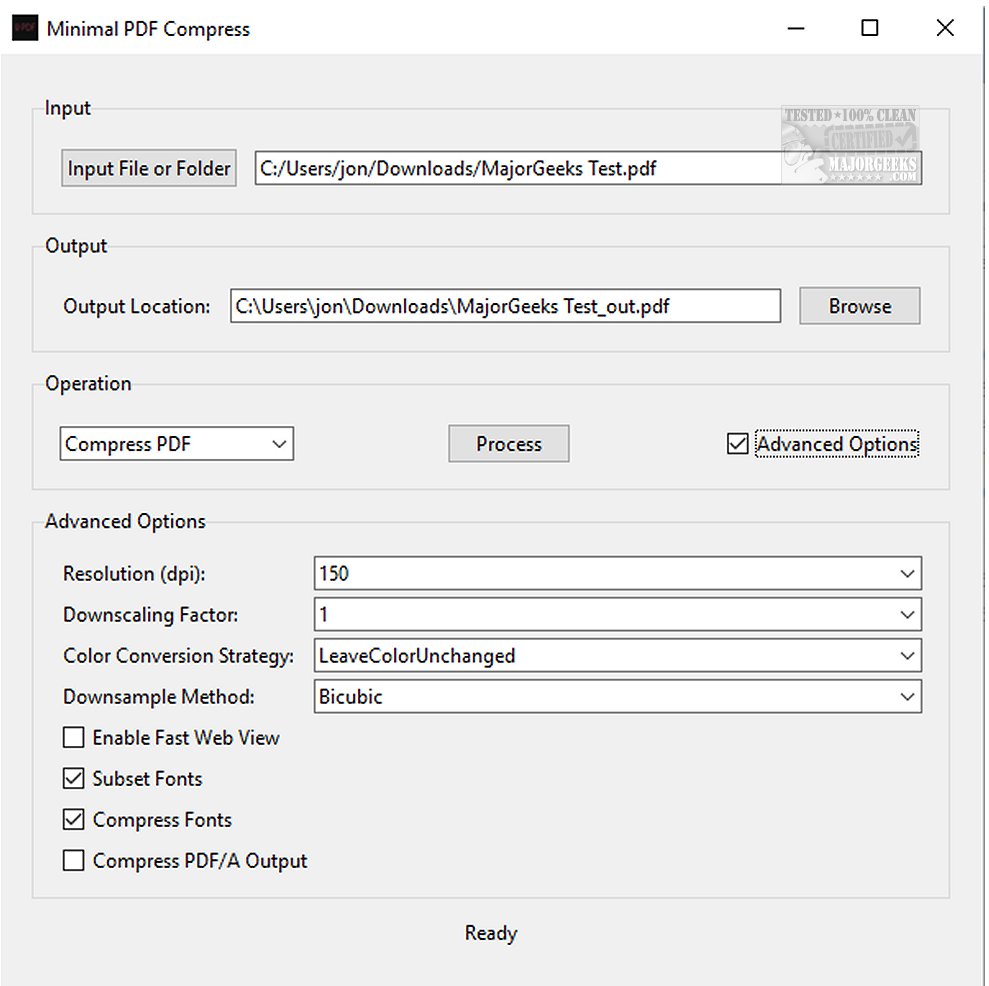
Minimal PDF Compress is a newly released desktop application designed to simplify the processes of compressing and converting PDF files. Built on the robust capabilities of GhostScript, this software allows users to efficiently reduce the size of PDF documents while maintaining quality, as well as convert standard PDFs into the PDF/A format for long-term digital preservation. The application features an intuitive graphical user interface (GUI) that caters to users of all skill levels, making it a practical choice for both casual users and professionals.
Users can customize compression settings to meet their specific requirements and can easily select individual PDF files or entire folders for processing. The default output location for compressed files is the same as the input directory, but users have the option to specify an alternative location.
For advanced users, Minimal PDF Compress offers hidden features for output resolution adjustments, downscaling factors, and various color conversion strategies. Additionally, the software supports batch processing, allowing multiple PDFs to be compressed simultaneously with minimal quality loss.
Extension of the Text
In an age where digital document management is crucial, the release of Minimal PDF Compress 1.9.7 addresses a significant need for efficient PDF processing solutions. With the increasing reliance on digital formats for document storage and sharing, users require tools that not only compress files effectively but also ensure long-term accessibility and compatibility.
The application’s reliance on GhostScript enhances its performance, allowing it to handle complex PDF structures while preserving the integrity of the content. This is particularly beneficial for professionals who often work with large files that need to be shared via email or uploaded to cloud services, where file size limitations can be an issue.
Moreover, the user-friendly design of Minimal PDF Compress promotes inclusivity in technology use. By eliminating the need for command-line proficiency, it opens doors for users who may not have a technical background, thus democratizing access to effective PDF tools.
The batch mode feature stands out as a significant advantage for users managing multiple documents, such as businesses that process invoices or reports in bulk. This capability not only saves time but also enhances productivity, allowing users to focus on other important tasks.
As digital documentation continues to evolve, tools like Minimal PDF Compress are essential for maintaining efficient workflows and ensuring that documents remain accessible and manageable. Future updates could potentially introduce additional features such as cloud integration, enhanced security measures, and collaboration tools, further positioning Minimal PDF Compress as a go-to solution for PDF management
Users can customize compression settings to meet their specific requirements and can easily select individual PDF files or entire folders for processing. The default output location for compressed files is the same as the input directory, but users have the option to specify an alternative location.
For advanced users, Minimal PDF Compress offers hidden features for output resolution adjustments, downscaling factors, and various color conversion strategies. Additionally, the software supports batch processing, allowing multiple PDFs to be compressed simultaneously with minimal quality loss.
Extension of the Text
In an age where digital document management is crucial, the release of Minimal PDF Compress 1.9.7 addresses a significant need for efficient PDF processing solutions. With the increasing reliance on digital formats for document storage and sharing, users require tools that not only compress files effectively but also ensure long-term accessibility and compatibility.
The application’s reliance on GhostScript enhances its performance, allowing it to handle complex PDF structures while preserving the integrity of the content. This is particularly beneficial for professionals who often work with large files that need to be shared via email or uploaded to cloud services, where file size limitations can be an issue.
Moreover, the user-friendly design of Minimal PDF Compress promotes inclusivity in technology use. By eliminating the need for command-line proficiency, it opens doors for users who may not have a technical background, thus democratizing access to effective PDF tools.
The batch mode feature stands out as a significant advantage for users managing multiple documents, such as businesses that process invoices or reports in bulk. This capability not only saves time but also enhances productivity, allowing users to focus on other important tasks.
As digital documentation continues to evolve, tools like Minimal PDF Compress are essential for maintaining efficient workflows and ensuring that documents remain accessible and manageable. Future updates could potentially introduce additional features such as cloud integration, enhanced security measures, and collaboration tools, further positioning Minimal PDF Compress as a go-to solution for PDF management
Minimal PDF Compress 1.9.7 released
Minimal PDF Compress gives you a user-friendly desktop application that streamlines the tasks of compressing and converting PDFs.